
SaaS B2B Product Design (UI/UX)Rishi Shah
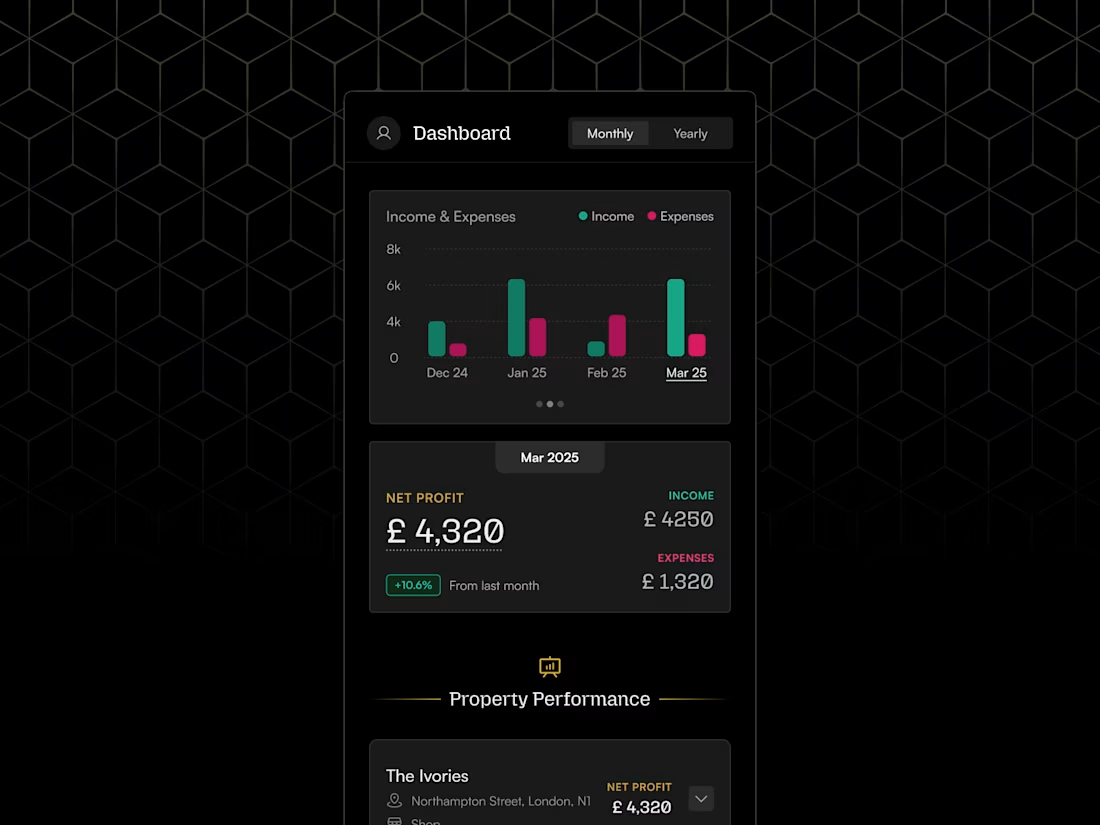
Most SaaS products ship with the right features but the wrong experience. Users drop off, support tickets pile up, and the team keeps patching symptoms instead of fixing the root.
I start every project by finding where the real friction is. Not by guessing, but by looking at how users actually move through your product. Then I design screens that fix it, with full Figma files and documentation your engineers can build from.
At SalesHandy I took a 2.5-star product to 4.5 stars without adding a single feature. At Amagi I led design from MVP to final product for a MediaTech unicorn. The work speaks for itself.
Here is the complete description, section by section. Update each part separately in Contra.
Opening paragraph (replaces current intro)
Most SaaS products ship with the right features but the wrong experience. Users drop off, support tickets pile up, and the team spends months patching symptoms instead of fixing the root.
I start every project by finding where the real friction is. Not by guessing, but by looking at how users actually move through your product. Then I design screens that fix it, with full Figma files your engineers can build from without asking questions.
At SalesHandy I took a 2.5-star product to 4.5 stars without adding a single new feature. At Amagi I led design from MVP to final product for a MediaTech unicorn. At VenueVista, booking-related support calls dropped 60% after launch.
If your product works but does not perform, that is exactly the problem I solve.
What's included sections
🔍 Design Discovery
Before I open Figma, I need to understand your users, your business goals, and where the current experience is breaking down. This happens through a briefing call, a short questionnaire, or a review of any existing documents you have. You will walk away from this phase with a shared understanding of what we are solving and why.
📋 Project Requirements Document
I turn everything from discovery into a clear written document. It covers the must-have features, user roles, key workflows, and the success metrics we are designing toward. This becomes the single source of truth for the project so no one has to guess what we agreed on.
📅 Timeline and Task Plan
You will get a realistic project timeline with milestones and review checkpoints before any design work starts. No surprises. You will always know what is being worked on and when to expect it.
🎨 Figma Design
This is the main deliverable. High-fidelity screens built in Figma, including interactive prototypes, annotated components, and all assets ready for development handoff. Every screen covers the key states: empty, loading, error, and filled. Your engineers will not have to guess what anything is supposed to do.
📑 Design System Documentation
A full guide covering every component, color, typography style, spacing rule, and interaction pattern used in the product. This means your team can build new screens later without starting from scratch or breaking what already exists.
FAQs

Starting at$25 /hr
Tags
ChatGPT

Claude

FigJam

Figma
Replit

UI Designer
UX Designer
UX Researcher
Service provided by
Rishi Shah proAhmedabad, India
- 5.00
- Rating
- 39
- Followers
SaaS B2B Product Design (UI/UX)Rishi Shah
Starting at$25 /hr
Tags
ChatGPT
Claude
FigJam
Figma
Replit
UI Designer
UX Designer
UX Researcher
Most SaaS products ship with the right features but the wrong experience. Users drop off, support tickets pile up, and the team keeps patching symptoms instead of fixing the root.
I start every project by finding where the real friction is. Not by guessing, but by looking at how users actually move through your product. Then I design screens that fix it, with full Figma files and documentation your engineers can build from.
At SalesHandy I took a 2.5-star product to 4.5 stars without adding a single feature. At Amagi I led design from MVP to final product for a MediaTech unicorn. The work speaks for itself.
Here is the complete description, section by section. Update each part separately in Contra.
Opening paragraph (replaces current intro)
Most SaaS products ship with the right features but the wrong experience. Users drop off, support tickets pile up, and the team spends months patching symptoms instead of fixing the root.
I start every project by finding where the real friction is. Not by guessing, but by looking at how users actually move through your product. Then I design screens that fix it, with full Figma files your engineers can build from without asking questions.
At SalesHandy I took a 2.5-star product to 4.5 stars without adding a single new feature. At Amagi I led design from MVP to final product for a MediaTech unicorn. At VenueVista, booking-related support calls dropped 60% after launch.
If your product works but does not perform, that is exactly the problem I solve.
What's included sections
🔍 Design Discovery
Before I open Figma, I need to understand your users, your business goals, and where the current experience is breaking down. This happens through a briefing call, a short questionnaire, or a review of any existing documents you have. You will walk away from this phase with a shared understanding of what we are solving and why.
📋 Project Requirements Document
I turn everything from discovery into a clear written document. It covers the must-have features, user roles, key workflows, and the success metrics we are designing toward. This becomes the single source of truth for the project so no one has to guess what we agreed on.
📅 Timeline and Task Plan
You will get a realistic project timeline with milestones and review checkpoints before any design work starts. No surprises. You will always know what is being worked on and when to expect it.
🎨 Figma Design
This is the main deliverable. High-fidelity screens built in Figma, including interactive prototypes, annotated components, and all assets ready for development handoff. Every screen covers the key states: empty, loading, error, and filled. Your engineers will not have to guess what anything is supposed to do.
📑 Design System Documentation
A full guide covering every component, color, typography style, spacing rule, and interaction pattern used in the product. This means your team can build new screens later without starting from scratch or breaking what already exists.
FAQs
$25 /hr