
WordPress Speed Optimization & Technical FixesKuda Zafevere
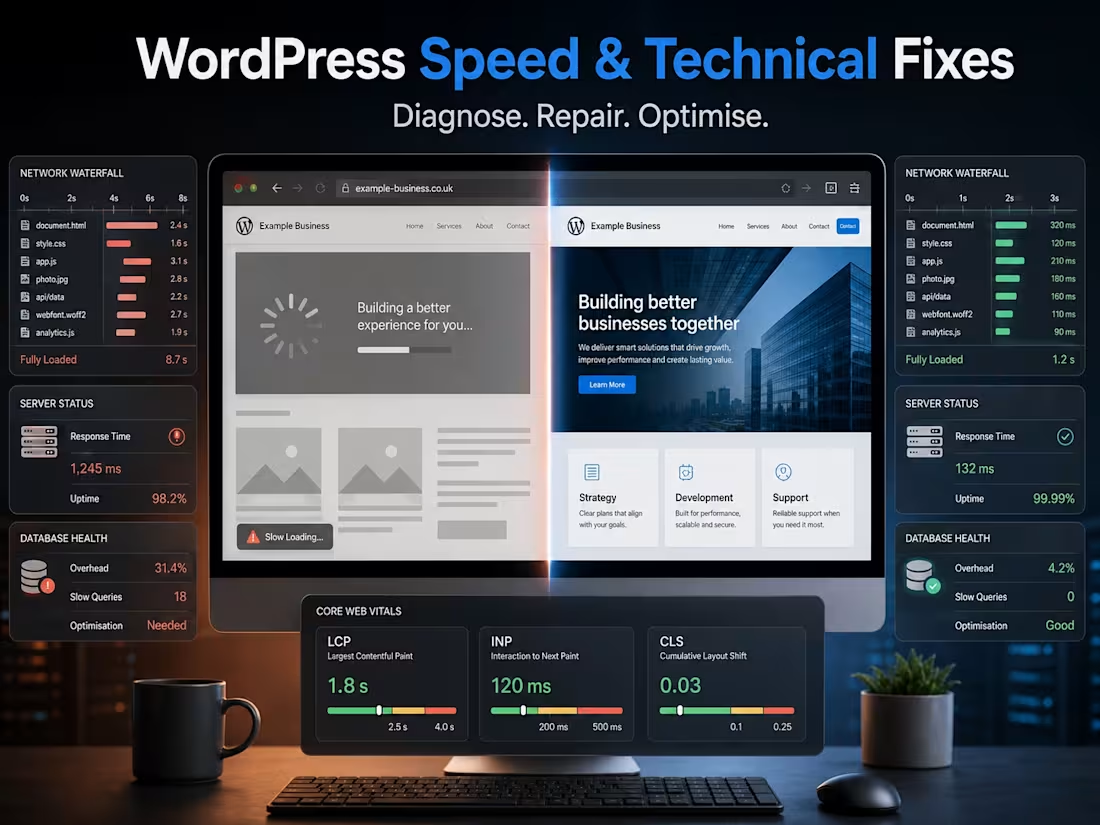
Fix WordPress problems at the source—not with another unnecessary plugin
Is your WordPress website slow, displaying errors, breaking after updates or behaving unpredictably?
I diagnose and resolve WordPress performance problems, technical errors, plugin conflicts and hosting-related issues for business websites, WooCommerce stores, membership sites and directories.
Rather than making random changes or installing multiple optimisation plugins, I investigate the website, hosting environment and affected user journey to identify the most likely root cause.
What I can help with
WordPress performance
Slow page-loading and poor user experience
Core Web Vitals issues involving LCP, INP and CLS
Slow WordPress admin dashboards
Excessive plugins, scripts and database queries
Unoptimised images, fonts, CSS and JavaScript
Caching, compression and CDN configuration
Cloudflare configuration and cache conflicts
Database cleanup and optimisation
Bloated autoloaded options and scheduled tasks
Slow WooCommerce product, cart or checkout pages
Hosting and server-resource bottlenecks
WordPress technical fixes
Critical errors and blank or white screens
PHP errors, warnings and deprecated-code notices
HTTP 500, 403 and redirect errors
Plugin and theme conflicts
Broken layouts after WordPress or plugin updates
Elementor and page-builder problems
WooCommerce checkout and order-flow errors
Broken contact forms or email delivery problems
Login, user-role and permission issues
SSL, HTTPS and mixed-content errors
Failed migrations and incorrect URLs
DNS, CDN and caching-related website problems
Mobile layout and responsive display issues
Suspicious traffic, excessive crawling and bandwidth spikes
Backup, update and basic security-hardening configuration
Suitable projects
This service is suitable when:
Your website has become noticeably slower
WordPress or the admin area frequently times out
A plugin or theme update caused an error
Your website works for some users but not others
PageSpeed Insights identifies serious performance problems
WooCommerce cart or checkout functionality is failing
Your hosting company and developer are blaming each other
The website contains too many plugins or overlapping optimisation tools
You need an experienced developer to investigate an issue safely
You want technical improvements without rebuilding the entire website
My process
1. Initial assessment
You provide the website address, a description of the issue, relevant screenshots or error messages and details of any recent changes.
I review the visible symptoms and confirm the access required for further investigation.
2. Backup and safe testing
Where possible, I confirm that a recent backup exists before making material changes.
Higher-risk changes may be tested in a staging environment first. Live-site testing is kept controlled to minimise disruption to visitors, orders and enquiries.
3. Technical diagnosis
Depending on the issue, I may review:
WordPress Site Health information
Theme and plugin compatibility
PHP and WordPress debug logs
Browser developer tools
Network requests and loading waterfalls
Database queries and scheduled tasks
Hosting resource usage
Caching and CDN behaviour
PageSpeed Insights and Core Web Vitals data
WooCommerce logs and system status
Server, security and access logs
4. Implementation
I apply the agreed fixes, remove or replace conflicting configurations where appropriate and avoid introducing unnecessary dependencies.
If the issue is caused by hosting, a third-party service or a paid extension, I will explain the limitation and recommend the most practical next step.
5. Testing
I test the affected pages and functionality across common screen sizes and user journeys.
For ecommerce websites, this may include products, variations, cart behaviour, checkout, payment handoff and transactional emails where suitable test access is available.
6. Findings and handover
I provide a summary of:
The issue identified
Changes made
Any remaining limitations
Recommended follow-up actions
Ongoing maintenance or monitoring requirements
What I need from you
Depending on the problem, please be prepared to provide:
WordPress administrator access
Hosting, cPanel, Plesk or server access
SFTP or SSH access where required
Cloudflare or CDN access
Access to the staging environment
Relevant screenshots and error messages
The approximate date the problem began
Details of recent updates or changes
Google Search Console or analytics access where relevant
WooCommerce payment or integration test credentials
Permission before purchasing or replacing premium software
Please do not share passwords in the initial inquiry. Secure access can be arranged after the project is confirmed.
Important scope information
Technical issues cannot always be accurately priced from a screenshot or brief description.
One visible symptom may have several possible causes involving WordPress, plugins, custom code, hosting, DNS, external APIs or third-party services. Initial diagnostic work may therefore be required before the full repair scope can be confirmed.
Performance improvements are also influenced by hosting capacity, website design, content, advertising scripts, analytics tools, plugins and external services.
Specific PageSpeed scores, Core Web Vitals results, search rankings or complete resolution of unsupported third-party software cannot be guaranteed.
Why work with me?
I work across WordPress development, WooCommerce, Brilliant Directories, hosting, DNS, Cloudflare, analytics and custom PHP integrations. This allows me to investigate beyond the visible page rather than assuming every issue is caused by WordPress itself.
My focus is to:
Identify the underlying problem
Protect the existing website and data
Make the smallest reliable change
Avoid unnecessary plugins and recurring costs
Explain what was fixed and what still requires attention
Send an inquiry with your website address, the problem you are experiencing, when it began and any recent changes made to the website.
FAQs


Contact for pricing
Duration1 week
Tags
Cloudflare
PHP

Website Optimization
WooCommerce

WordPress

Technical SEO
Web Developer
WordPress Developer
Website Performance
Service provided by
Kuda Zafevere Cape Town, South Africa
- 1
- Followers
WordPress Speed Optimization & Technical FixesKuda Zafevere
Contact for pricing
Duration1 week
Tags
Cloudflare
PHP
Website Optimization
WooCommerce
WordPress
Technical SEO
Web Developer
WordPress Developer
Website Performance
Fix WordPress problems at the source—not with another unnecessary plugin
Is your WordPress website slow, displaying errors, breaking after updates or behaving unpredictably?
I diagnose and resolve WordPress performance problems, technical errors, plugin conflicts and hosting-related issues for business websites, WooCommerce stores, membership sites and directories.
Rather than making random changes or installing multiple optimisation plugins, I investigate the website, hosting environment and affected user journey to identify the most likely root cause.
What I can help with
WordPress performance
Slow page-loading and poor user experience
Core Web Vitals issues involving LCP, INP and CLS
Slow WordPress admin dashboards
Excessive plugins, scripts and database queries
Unoptimised images, fonts, CSS and JavaScript
Caching, compression and CDN configuration
Cloudflare configuration and cache conflicts
Database cleanup and optimisation
Bloated autoloaded options and scheduled tasks
Slow WooCommerce product, cart or checkout pages
Hosting and server-resource bottlenecks
WordPress technical fixes
Critical errors and blank or white screens
PHP errors, warnings and deprecated-code notices
HTTP 500, 403 and redirect errors
Plugin and theme conflicts
Broken layouts after WordPress or plugin updates
Elementor and page-builder problems
WooCommerce checkout and order-flow errors
Broken contact forms or email delivery problems
Login, user-role and permission issues
SSL, HTTPS and mixed-content errors
Failed migrations and incorrect URLs
DNS, CDN and caching-related website problems
Mobile layout and responsive display issues
Suspicious traffic, excessive crawling and bandwidth spikes
Backup, update and basic security-hardening configuration
Suitable projects
This service is suitable when:
Your website has become noticeably slower
WordPress or the admin area frequently times out
A plugin or theme update caused an error
Your website works for some users but not others
PageSpeed Insights identifies serious performance problems
WooCommerce cart or checkout functionality is failing
Your hosting company and developer are blaming each other
The website contains too many plugins or overlapping optimisation tools
You need an experienced developer to investigate an issue safely
You want technical improvements without rebuilding the entire website
My process
1. Initial assessment
You provide the website address, a description of the issue, relevant screenshots or error messages and details of any recent changes.
I review the visible symptoms and confirm the access required for further investigation.
2. Backup and safe testing
Where possible, I confirm that a recent backup exists before making material changes.
Higher-risk changes may be tested in a staging environment first. Live-site testing is kept controlled to minimise disruption to visitors, orders and enquiries.
3. Technical diagnosis
Depending on the issue, I may review:
WordPress Site Health information
Theme and plugin compatibility
PHP and WordPress debug logs
Browser developer tools
Network requests and loading waterfalls
Database queries and scheduled tasks
Hosting resource usage
Caching and CDN behaviour
PageSpeed Insights and Core Web Vitals data
WooCommerce logs and system status
Server, security and access logs
4. Implementation
I apply the agreed fixes, remove or replace conflicting configurations where appropriate and avoid introducing unnecessary dependencies.
If the issue is caused by hosting, a third-party service or a paid extension, I will explain the limitation and recommend the most practical next step.
5. Testing
I test the affected pages and functionality across common screen sizes and user journeys.
For ecommerce websites, this may include products, variations, cart behaviour, checkout, payment handoff and transactional emails where suitable test access is available.
6. Findings and handover
I provide a summary of:
The issue identified
Changes made
Any remaining limitations
Recommended follow-up actions
Ongoing maintenance or monitoring requirements
What I need from you
Depending on the problem, please be prepared to provide:
WordPress administrator access
Hosting, cPanel, Plesk or server access
SFTP or SSH access where required
Cloudflare or CDN access
Access to the staging environment
Relevant screenshots and error messages
The approximate date the problem began
Details of recent updates or changes
Google Search Console or analytics access where relevant
WooCommerce payment or integration test credentials
Permission before purchasing or replacing premium software
Please do not share passwords in the initial inquiry. Secure access can be arranged after the project is confirmed.
Important scope information
Technical issues cannot always be accurately priced from a screenshot or brief description.
One visible symptom may have several possible causes involving WordPress, plugins, custom code, hosting, DNS, external APIs or third-party services. Initial diagnostic work may therefore be required before the full repair scope can be confirmed.
Performance improvements are also influenced by hosting capacity, website design, content, advertising scripts, analytics tools, plugins and external services.
Specific PageSpeed scores, Core Web Vitals results, search rankings or complete resolution of unsupported third-party software cannot be guaranteed.
Why work with me?
I work across WordPress development, WooCommerce, Brilliant Directories, hosting, DNS, Cloudflare, analytics and custom PHP integrations. This allows me to investigate beyond the visible page rather than assuming every issue is caused by WordPress itself.
My focus is to:
Identify the underlying problem
Protect the existing website and data
Make the smallest reliable change
Avoid unnecessary plugins and recurring costs
Explain what was fixed and what still requires attention
Send an inquiry with your website address, the problem you are experiencing, when it began and any recent changes made to the website.
FAQs
Contact for pricing