
Excel Data Cleaning & Formatting — Transforming Messy Data into deepraj abbad
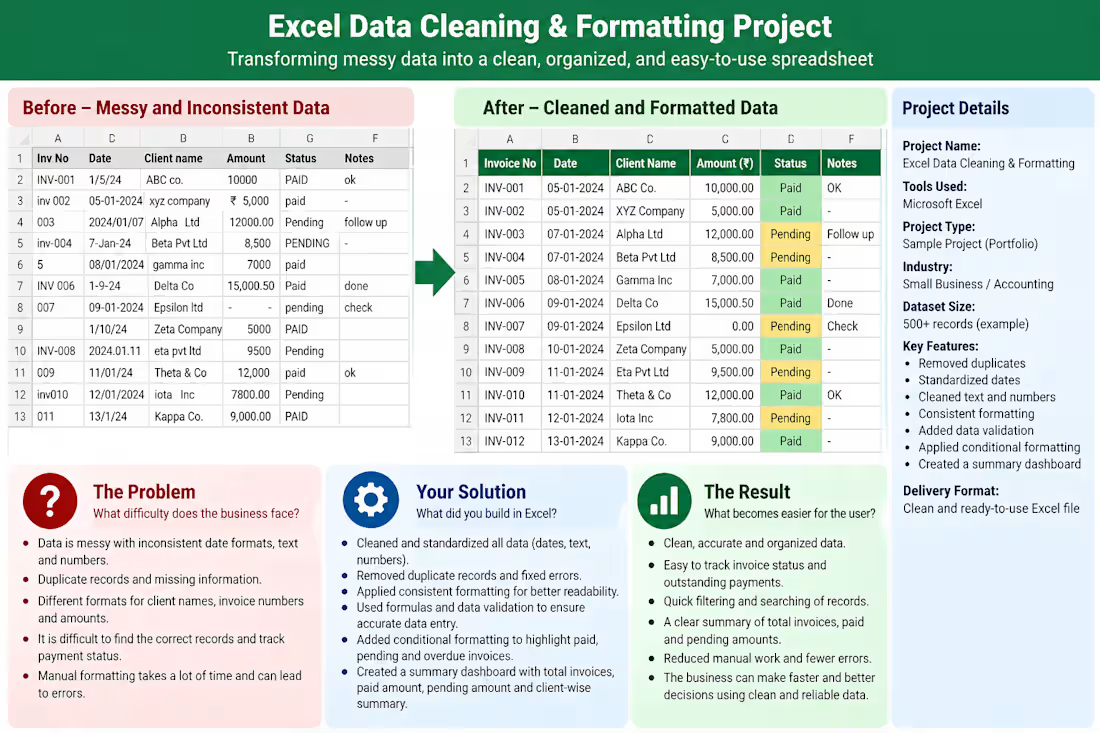
This project demonstrates how Microsoft Excel can transform messy business invoice data into a clean, organized, and easy-to-use spreadsheet.
The Problem: The business had disorganized invoice records with inconsistent date formats, duplicate entries, inconsistent client names, missing values, and incorrectly formatted amounts. This made it difficult to search records, track payments, and prepare accurate reports.
My Solution
I designed a data-cleaning workflow in Excel to:
• Standardize date, text, and number formats.
Identify and remove duplicate records after checking them.
Correct inconsistent client names and invoice numbers.
The Result
The cleaned spreadsheet is easier to read, search, filter, and maintain. Users can review invoice information more efficiently, identify payment statuses quickly, and prepare business summaries with less manual effort.
Tools Used: Microsoft Excel
Project Type: Sample portfolio project
Skills Demonstrated: Data cleaning, data formatting, Excel formulas, data validation, conditional formatting, and reporting.
deepraj's other services
Contact for pricing
Duration1 week
Tags
Microsoft Excel

Data Analyst
Data cleaning
Data formating
Data organization
Data validation
Duplicate Removal
Spreadsheet Management
Service provided by
deepraj abbad Majalgaon, India
Excel Data Cleaning & Formatting — Transforming Messy Data into deepraj abbad
Contact for pricing
Duration1 week
Tags
Microsoft Excel
Data Analyst
Data cleaning
Data formating
Data organization
Data validation
Duplicate Removal
Spreadsheet Management
This project demonstrates how Microsoft Excel can transform messy business invoice data into a clean, organized, and easy-to-use spreadsheet.
The Problem: The business had disorganized invoice records with inconsistent date formats, duplicate entries, inconsistent client names, missing values, and incorrectly formatted amounts. This made it difficult to search records, track payments, and prepare accurate reports.
My Solution
I designed a data-cleaning workflow in Excel to:
• Standardize date, text, and number formats.
Identify and remove duplicate records after checking them.
Correct inconsistent client names and invoice numbers.
The Result
The cleaned spreadsheet is easier to read, search, filter, and maintain. Users can review invoice information more efficiently, identify payment statuses quickly, and prepare business summaries with less manual effort.
Tools Used: Microsoft Excel
Project Type: Sample portfolio project
Skills Demonstrated: Data cleaning, data formatting, Excel formulas, data validation, conditional formatting, and reporting.
deepraj's other services
Contact for pricing