
Product Design for SaaS, Apps & DashboardsArtis Lutkovskis

Product Design for SaaS, Apps & Dashboards
Users don't talk about good interfaces. They talk about the bad ones, in support tickets, app store reviews and to their friends. Product design is the work that prevents those conversations.
I design digital products people actually want to use: SaaS platforms, dashboards, CRMs, mobile apps, e-commerce and internal tools. Whatever the surface, the goal is the same. The user gets their job done without friction, and your product feels obvious from the first click.
Designed around tasks, not screens
A marketing site has 60 seconds to convince. A product has to work for the same person across hundreds of sessions. So I start with the task: what the user is trying to do, what can go wrong, and what success looks like. Then I build the screens around it.
Every screen has one clear primary action.
Every flow covers success, failure and everything in between: loading, empty, error, edge cases.
Components are designed once and reused, so the product stays consistent as it grows.
Engineers get a spec they can build from, not a Figma file full of open questions.
Who this is for
Founders building a new product who want the UX right the first time
Teams whose product has outgrown its original interface
Startups with product-market fit on a rough UI that now needs to feel professional
What you get
Discovery: users, goals, current friction and success metrics
User flows and information architecture covering every screen and state
Wireframes to agree on structure before visuals
High-fidelity UI for all screens and states
Design system: components, type, color, spacing, documented for developers
Interactive Figma prototype of the key flows
Responsive web or native layouts following iOS and Material guidelines
Dev-ready Figma file with auto-layout and named components
Loom handoff walkthrough
2 weeks of post-handoff support for your developers
Process & timeline
A focused app or dashboard takes 5–7 weeks. A complex CRM, multi-role platform or full e-commerce experience takes 8–12 weeks. We scope by real screens and flows, not a template.
Week 1 - Discovery, user flows, information architecture
Week 2 - Wireframes and flow validation
Weeks 3–6+ - High-fidelity design across all flows and states
Final week - Design system docs, prototype, handoff
What I need from you
Access to people who know your users (founder, support, sales), any existing research or analytics, brand basics, and 1–2 hours a week for reviews and decisions.
FAQs
Example work
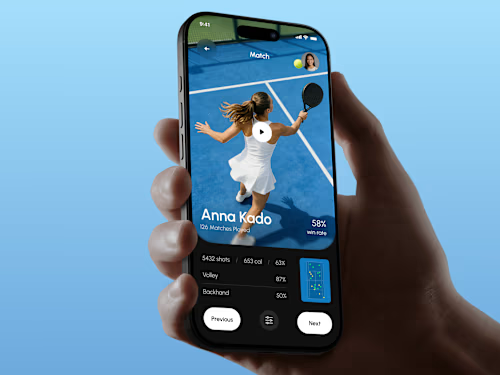

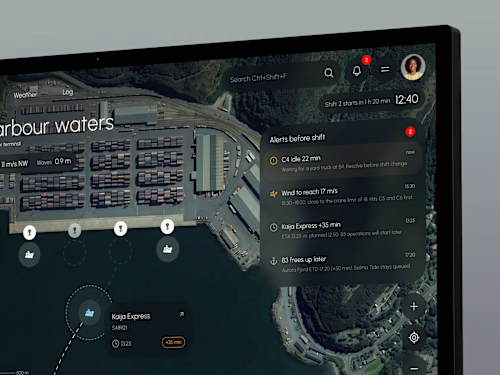
Artis's other services


Contact for pricing
Duration6 weeks
Tags
Figma

FLORA

Jitter

Framer Designer
Mobile Designer
Product Designer
UI Designer
UX Designer
Web Designer
Service provided by
Artis Lutkovskis proRiga, Latvia
- 5.00
- Rating
- 44
- Followers
Product Design for SaaS, Apps & DashboardsArtis Lutkovskis
Contact for pricing
Duration6 weeks
Tags
Figma
FLORA
Jitter
Framer Designer
Mobile Designer
Product Designer
UI Designer
UX Designer
Web Designer
Product Design for SaaS, Apps & Dashboards
Users don't talk about good interfaces. They talk about the bad ones, in support tickets, app store reviews and to their friends. Product design is the work that prevents those conversations.
I design digital products people actually want to use: SaaS platforms, dashboards, CRMs, mobile apps, e-commerce and internal tools. Whatever the surface, the goal is the same. The user gets their job done without friction, and your product feels obvious from the first click.
Designed around tasks, not screens
A marketing site has 60 seconds to convince. A product has to work for the same person across hundreds of sessions. So I start with the task: what the user is trying to do, what can go wrong, and what success looks like. Then I build the screens around it.
Every screen has one clear primary action.
Every flow covers success, failure and everything in between: loading, empty, error, edge cases.
Components are designed once and reused, so the product stays consistent as it grows.
Engineers get a spec they can build from, not a Figma file full of open questions.
Who this is for
Founders building a new product who want the UX right the first time
Teams whose product has outgrown its original interface
Startups with product-market fit on a rough UI that now needs to feel professional
What you get
Discovery: users, goals, current friction and success metrics
User flows and information architecture covering every screen and state
Wireframes to agree on structure before visuals
High-fidelity UI for all screens and states
Design system: components, type, color, spacing, documented for developers
Interactive Figma prototype of the key flows
Responsive web or native layouts following iOS and Material guidelines
Dev-ready Figma file with auto-layout and named components
Loom handoff walkthrough
2 weeks of post-handoff support for your developers
Process & timeline
A focused app or dashboard takes 5–7 weeks. A complex CRM, multi-role platform or full e-commerce experience takes 8–12 weeks. We scope by real screens and flows, not a template.
Week 1 - Discovery, user flows, information architecture
Week 2 - Wireframes and flow validation
Weeks 3–6+ - High-fidelity design across all flows and states
Final week - Design system docs, prototype, handoff
What I need from you
Access to people who know your users (founder, support, sales), any existing research or analytics, brand basics, and 1–2 hours a week for reviews and decisions.
FAQs
Example work
Artis's other services
Contact for pricing