
Product Designkarim abid
The Product Design process aims to create user-friendly digital interfaces while considering both functionality and visual appeal.
Research and Analysis:
User Research: Understand the target audience's needs and behaviors.
Market Research: Analyze industry, competitors, and trends.
Requirements Gathering: Define project requirements.
Concept and Planning:
Concept Development: Brainstorm design ideas.
Information Architecture: Organize the layout.
User Flow Design: Map user navigation.
Design and Prototyping:
Wireframing: Create low-fidelity layout sketches.
Prototyping: Develop interactive models.
High-Fidelity Mockups: Design detailed visuals.
User Testing and Feedback:
Usability Testing: Collect user feedback on functionality.
Client and Stakeholder Feedback: Incorporate feedback.
Revisions and Refinement: Make improvements.
Finalization and Handoff:
Final Design: Prepare for implementation.
Development Assets: Provide implementation resources.
Style Guides: Document design guidelines.
User Training Materials: Create guides for user understanding.
Documentation and Evaluation:
Design Documentation: Summarize decisions and rationale.
Project Summary: Report project highlights and recommendations.
What's included
Wireframes:
These are low-fidelity sketches or digital representations of the interface's layout, showing the placement of elements without detailed visuals.
Prototypes:
nteractive prototypes that allow the client to experience the flow and functionality of the design before development.
User Flows:
Visual representations of how users will navigate through the interface, helping clients understand the user journey.
High-Fidelity Mockups:
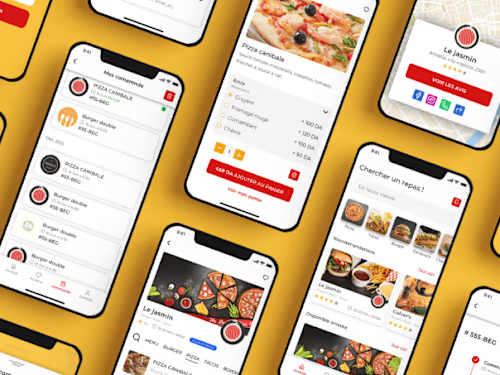
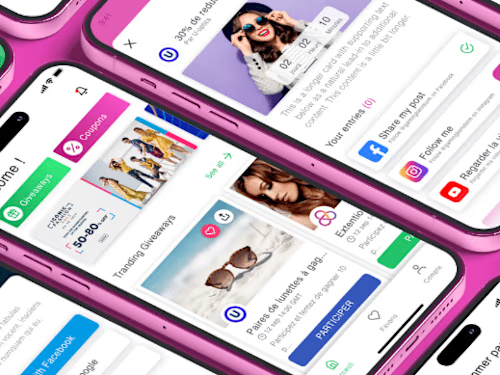
Detailed, pixel-perfect designs that provide a realistic look at the final interface, including visual elements, typography, and color schemes.
Interactive Mockups:
Prototypes that closely mimic the final product's functionality and interactions, often created using tools like Figma, Adobe XD, or InVision.
Style Guides:
A comprehensive document outlining the design system, including typography, color palettes, iconography, and UI elements.
Design Handoff Files:
Detailed design files in formats suitable for development, such as PSD, Sketch, or Figma files.
Final Design Documentation:
A comprehensive document summarizing the design decisions, rationale, and specifications for the project.
karim's other services

Starting at$35 /hr
Tags
Adobe Illustrator

Adobe XD

Figma

Miro

Zoom

Design Systems Specialist
UI Designer
UX Designer
Service provided by
karim abid France
Product Designkarim abid
Starting at$35 /hr
Tags
Adobe Illustrator
Adobe XD
Figma
Miro
Zoom
Design Systems Specialist
UI Designer
UX Designer
The Product Design process aims to create user-friendly digital interfaces while considering both functionality and visual appeal.
Research and Analysis:
User Research: Understand the target audience's needs and behaviors.
Market Research: Analyze industry, competitors, and trends.
Requirements Gathering: Define project requirements.
Concept and Planning:
Concept Development: Brainstorm design ideas.
Information Architecture: Organize the layout.
User Flow Design: Map user navigation.
Design and Prototyping:
Wireframing: Create low-fidelity layout sketches.
Prototyping: Develop interactive models.
High-Fidelity Mockups: Design detailed visuals.
User Testing and Feedback:
Usability Testing: Collect user feedback on functionality.
Client and Stakeholder Feedback: Incorporate feedback.
Revisions and Refinement: Make improvements.
Finalization and Handoff:
Final Design: Prepare for implementation.
Development Assets: Provide implementation resources.
Style Guides: Document design guidelines.
User Training Materials: Create guides for user understanding.
Documentation and Evaluation:
Design Documentation: Summarize decisions and rationale.
Project Summary: Report project highlights and recommendations.
What's included
Wireframes:
These are low-fidelity sketches or digital representations of the interface's layout, showing the placement of elements without detailed visuals.
Prototypes:
nteractive prototypes that allow the client to experience the flow and functionality of the design before development.
User Flows:
Visual representations of how users will navigate through the interface, helping clients understand the user journey.
High-Fidelity Mockups:
Detailed, pixel-perfect designs that provide a realistic look at the final interface, including visual elements, typography, and color schemes.
Interactive Mockups:
Prototypes that closely mimic the final product's functionality and interactions, often created using tools like Figma, Adobe XD, or InVision.
Style Guides:
A comprehensive document outlining the design system, including typography, color palettes, iconography, and UI elements.
Design Handoff Files:
Detailed design files in formats suitable for development, such as PSD, Sketch, or Figma files.
Final Design Documentation:
A comprehensive document summarizing the design decisions, rationale, and specifications for the project.
karim's other services
$35 /hr