
Cutting edge landing page in figma with prototypeMatthew Dix
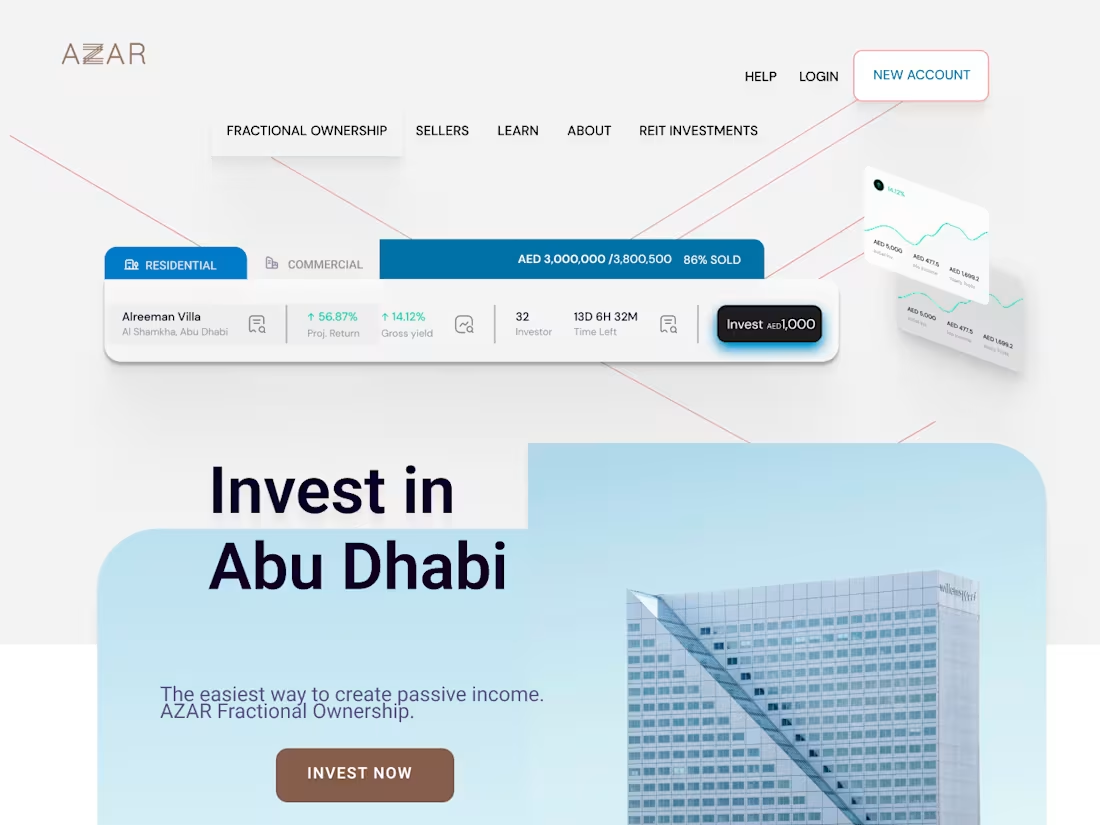
I design cutting-edge landing pages in Figma that merge aesthetic precision with strategic flow. Each build includes desktop and mobile layouts, type systems, colour swatches, grids, and reusable components with working prototypes. The result is a launch-ready design system crafted for clarity, conversion, and creative longevity.
What's included
1. Full Figma Design File (Desktop + Mobile)
A complete, production-ready landing page design built in Figma, including all sections, grid systems, and spacing tokens. Both desktop and mobile breakpoints are included.
Format: .fig file, fully editable
Includes: Auto-layout, grid system, organised layers
Revisions: 1 round of refinements post-review
2. Style Guide & Component Library
A mini design system covering typography, colour swatches, button states, cards, and UI elements — all built using reusable components and instances.
Format: Figma page or exported .pdf style sheet upon request
Includes: 4–6 heading styles, text hierarchy, colour palette, grid templates, and UI components
3. Interactive Prototype
Clickable Figma prototype demonstrating real navigation, hover effects, and scroll flow — perfect for client or stakeholder presentation.
Format: Figma prototype link + Loom walkthrough (optional)
Includes: Smooth transitions and smart interactions
Purpose: Communicate flow and feel before development
4. Final Handoff Package
All assets are prepped and organised for your developer or in-house designer.
Format: Shared Figma file + optional .zip export of assets
Includes: Notes on spacing, interaction specs, and export settings
Delivery: Via Figma share link and secure download folder
5. Post-Launch Support (Optional Add-On)
One follow-up session after delivery to polish micro-interactions or assist with early dev QA.
Duration: 30 minutes
Availability: Within 7 days post-handoff
FAQs
Example work
Matthew's other services


Starting at$1,500
Duration2 weeks
Tags
Figma

UI Designer
UX Designer
Web Designer
Service provided by
Matthew Dix proJohannesburg, South Africa
- $1k+
- Earned
- 1
- Paid projects
- 5.00
- Rating
- 163
- Followers
Cutting edge landing page in figma with prototypeMatthew Dix
I design cutting-edge landing pages in Figma that merge aesthetic precision with strategic flow. Each build includes desktop and mobile layouts, type systems, colour swatches, grids, and reusable components with working prototypes. The result is a launch-ready design system crafted for clarity, conversion, and creative longevity.
What's included
1. Full Figma Design File (Desktop + Mobile)
A complete, production-ready landing page design built in Figma, including all sections, grid systems, and spacing tokens. Both desktop and mobile breakpoints are included.
Format: .fig file, fully editable
Includes: Auto-layout, grid system, organised layers
Revisions: 1 round of refinements post-review
2. Style Guide & Component Library
A mini design system covering typography, colour swatches, button states, cards, and UI elements — all built using reusable components and instances.
Format: Figma page or exported .pdf style sheet upon request
Includes: 4–6 heading styles, text hierarchy, colour palette, grid templates, and UI components
3. Interactive Prototype
Clickable Figma prototype demonstrating real navigation, hover effects, and scroll flow — perfect for client or stakeholder presentation.
Format: Figma prototype link + Loom walkthrough (optional)
Includes: Smooth transitions and smart interactions
Purpose: Communicate flow and feel before development
4. Final Handoff Package
All assets are prepped and organised for your developer or in-house designer.
Format: Shared Figma file + optional .zip export of assets
Includes: Notes on spacing, interaction specs, and export settings
Delivery: Via Figma share link and secure download folder
5. Post-Launch Support (Optional Add-On)
One follow-up session after delivery to polish micro-interactions or assist with early dev QA.
Duration: 30 minutes
Availability: Within 7 days post-handoff
FAQs
Example work
Matthew's other services
$1,500