
Excel Automation — Python Desktop ToolDiego Ruiz
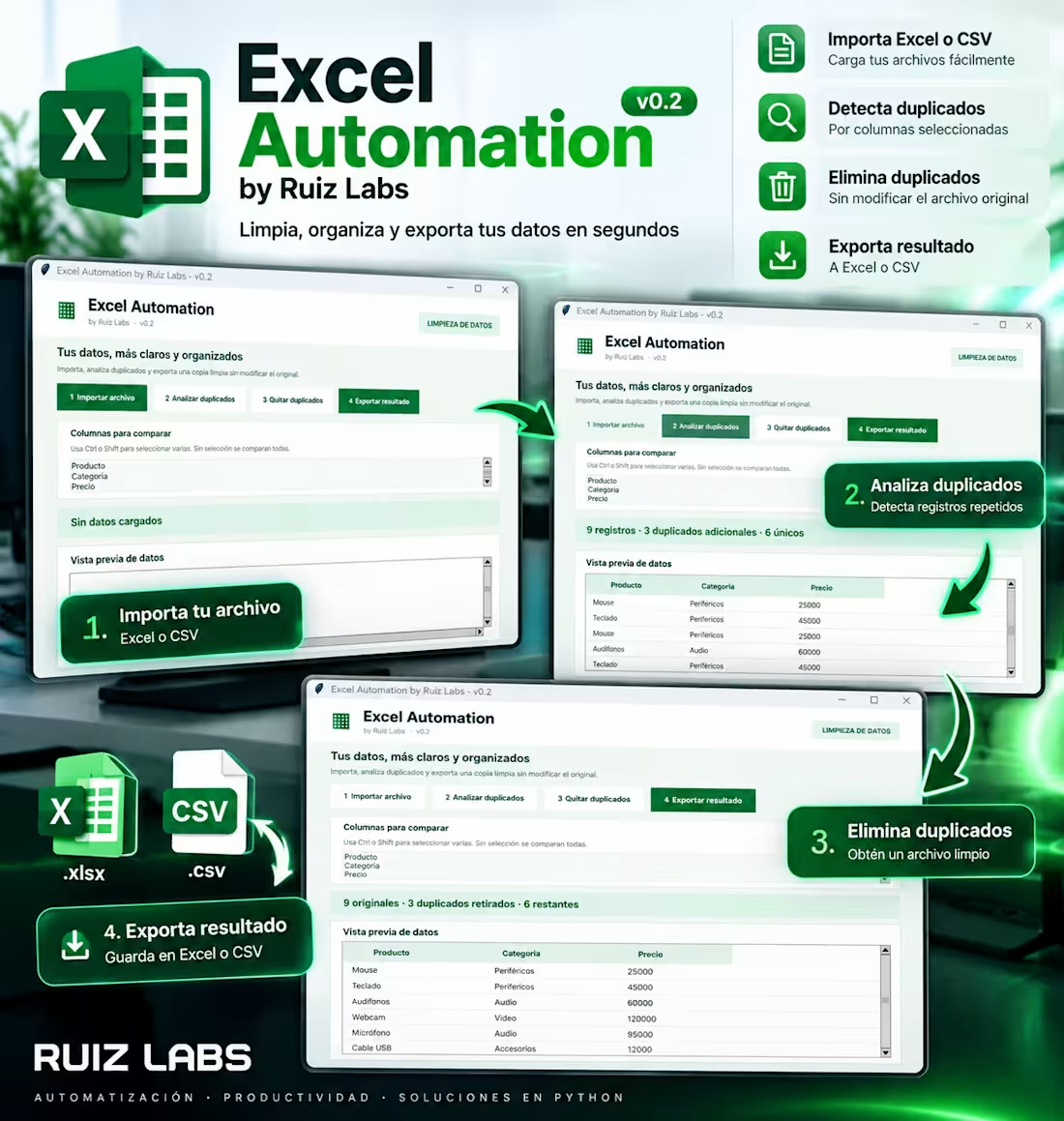
Excel Automation — Python Desktop Tool
Data Cleaning & Duplicate Removal | by Ruiz Labs
Project Overview
I developed a Windows desktop application using Python to simplify repetitive spreadsheet cleaning tasks.
The tool allows users to import Excel and CSV files, identify duplicate records, select columns for comparison, remove duplicates, and export cleaned datasets without modifying the original files.
Key Features
Import Excel (.xlsx) and CSV files.
Preview spreadsheet data.
Detect duplicate records based on selected columns.
Remove duplicate entries.
Export cleaned data to Excel or CSV.
Run as a standalone Windows executable.
Technologies Used
Python, Tkinter, pandas, openpyxl, and PyInstaller.
Demonstration
In a sample dataset containing nine records, the application identified three duplicate entries, leaving six unique records.
My Role
I designed, developed, tested, and packaged the application as a Windows desktop tool.
Potential Applications
Useful for small businesses, administrative teams, inventory management, and professionals who regularly work with spreadsheet data.
Project type: Personal portfolio demonstration.
FAQs




Excel Automation — Python Desktop ToolDiego Ruiz
Starting at$25
Duration1 week
Tags
Python
Excel Automation — Python Desktop Tool
Data Cleaning & Duplicate Removal | by Ruiz Labs
Project Overview
I developed a Windows desktop application using Python to simplify repetitive spreadsheet cleaning tasks.
The tool allows users to import Excel and CSV files, identify duplicate records, select columns for comparison, remove duplicates, and export cleaned datasets without modifying the original files.
Key Features
Import Excel (.xlsx) and CSV files.
Preview spreadsheet data.
Detect duplicate records based on selected columns.
Remove duplicate entries.
Export cleaned data to Excel or CSV.
Run as a standalone Windows executable.
Technologies Used
Python, Tkinter, pandas, openpyxl, and PyInstaller.
Demonstration
In a sample dataset containing nine records, the application identified three duplicate entries, leaving six unique records.
My Role
I designed, developed, tested, and packaged the application as a Windows desktop tool.
Potential Applications
Useful for small businesses, administrative teams, inventory management, and professionals who regularly work with spreadsheet data.
Project type: Personal portfolio demonstration.
FAQs
$25