
I will Design your Mobile app or website Using Figma Vinod Kalathiya

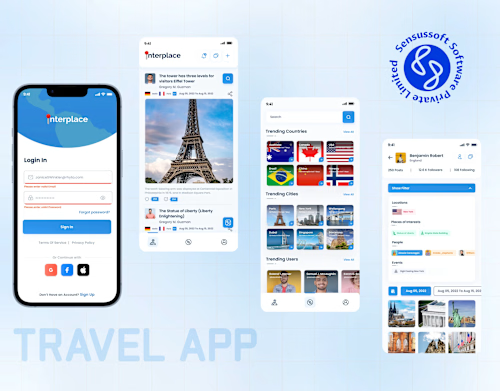
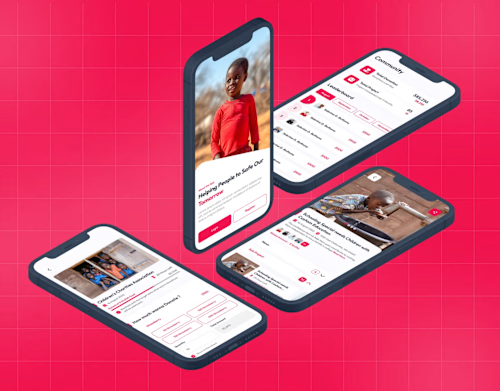
I design modern, intuitive, and visually polished UI/UX for mobile apps and websites that deliver a seamless, user-centered experience. My work blends strong UX strategy with clean, pixel-perfect UI to ensure your product feels easy, engaging, and premium. What makes me unique is my ability to translate complex ideas into simple, beautiful, and highly usable designs ready for development.
What's included
✅ Deliverables — UI/UX Design for Mobile App & Website
1. Complete UX Audit & Requirement Understanding
A detailed review of your existing product (or idea) to understand goals, user flows, and pain points. Includes competitive analysis and UX improvement recommendations.
2. User Flow & Information Architecture
Structured user journeys, navigation logic, and screens mapping to ensure the product is intuitive and easy to use.
3. Wireframes (Low or Mid Fidelity)
Clean wireframes for all key screens showing layout, structure, and interaction logic before moving to UI design.
4. High-Fidelity UI Designs (Pixel-Perfect)
Beautiful, modern, and responsive UI designs for both mobile app and/or website tailored to your brand identity. Includes typography, color palette, components, spacing, and visual style.
5. Interactive Prototypes
Clickable prototypes for testing flows, sharing with stakeholders, and validating the user experience before development begins.
6. Design System & Component Library
A scalable design system with reusable components, UI guidelines, spacing rules, and state variations (hover, active, disabled, etc.) to ensure consistency across screens.
7. Developer-Ready Export Files
Delivery of organized design files (Figma or your preferred tool) with clear annotations, assets, and specifications so the development team can implement without confusion.
8. Revisions & Feedback Implementation
Refinement of designs based on your feedback to ensure the final output matches your expectations and business goals.
9. Handoff Meeting (Optional)
A walkthrough session with your development team to explain design decisions, interactions, and implementation details.
10. Ongoing Support (Optional)
Support for additional screens, new features, or iterative design improvements as your product grows.



Contact for pricing
Duration1 week
Tags
Adobe XD

Figma

Sketch

Product Designer
UX Designer
UX Engineer
Service provided by
Vinod Kalathiya proSurat, India
- 1
- Paid projects
- 5.00
- Rating
- 13
- Followers
I will Design your Mobile app or website Using Figma Vinod Kalathiya
Contact for pricing
Duration1 week
Tags
Adobe XD
Figma
Sketch
Product Designer
UX Designer
UX Engineer
I design modern, intuitive, and visually polished UI/UX for mobile apps and websites that deliver a seamless, user-centered experience. My work blends strong UX strategy with clean, pixel-perfect UI to ensure your product feels easy, engaging, and premium. What makes me unique is my ability to translate complex ideas into simple, beautiful, and highly usable designs ready for development.
What's included
✅ Deliverables — UI/UX Design for Mobile App & Website
1. Complete UX Audit & Requirement Understanding
A detailed review of your existing product (or idea) to understand goals, user flows, and pain points. Includes competitive analysis and UX improvement recommendations.
2. User Flow & Information Architecture
Structured user journeys, navigation logic, and screens mapping to ensure the product is intuitive and easy to use.
3. Wireframes (Low or Mid Fidelity)
Clean wireframes for all key screens showing layout, structure, and interaction logic before moving to UI design.
4. High-Fidelity UI Designs (Pixel-Perfect)
Beautiful, modern, and responsive UI designs for both mobile app and/or website tailored to your brand identity. Includes typography, color palette, components, spacing, and visual style.
5. Interactive Prototypes
Clickable prototypes for testing flows, sharing with stakeholders, and validating the user experience before development begins.
6. Design System & Component Library
A scalable design system with reusable components, UI guidelines, spacing rules, and state variations (hover, active, disabled, etc.) to ensure consistency across screens.
7. Developer-Ready Export Files
Delivery of organized design files (Figma or your preferred tool) with clear annotations, assets, and specifications so the development team can implement without confusion.
8. Revisions & Feedback Implementation
Refinement of designs based on your feedback to ensure the final output matches your expectations and business goals.
9. Handoff Meeting (Optional)
A walkthrough session with your development team to explain design decisions, interactions, and implementation details.
10. Ongoing Support (Optional)
Support for additional screens, new features, or iterative design improvements as your product grows.
Contact for pricing