
User-Centered UX/UI Design for Websites, Apps & Digital ProductsNicholas Ansu
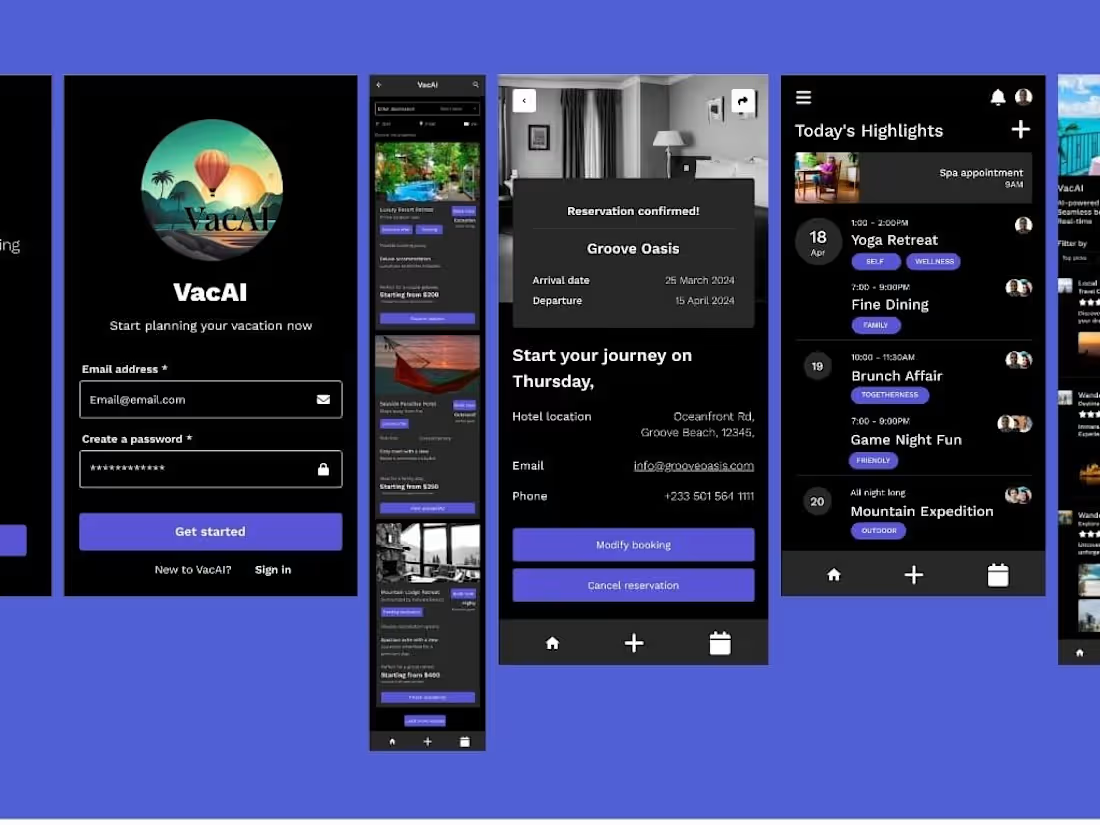
I design clean, user-friendly interfaces that not only look great but also feel intuitive and solve real user problems. Whether you're launching a new digital product or need a redesign of an existing site or app, I combine design thinking and modern UI aesthetics to create seamless user experiences using Figma and other industry tools.
What's included
User Interface (UI) Design – Web or Mobile
A clean, intuitive, and brand-aligned interface design for websites or mobile apps. Includes layouts for key pages/screens (e.g., Home, About, Dashboard, Login, etc.).
Quantity: 3–6 custom-designed screens
Format: Figma (share link) + PNG/JPEG exports
Revisions: 2 rounds of revisions
UX Wireframes & User Flow
Low-to-mid fidelity wireframes mapping out user journeys and screen structures. Helps define content hierarchy and app/site structure.
Quantity: Up to 6 wireframes + user flow chart
Format: Figma or PDF
Revisions: 1 round of revision
Style Guide & UI Components
Mini design system or style guide including color palette, typography, buttons, input fields, icons, etc. for consistency across the interface.
Format: Figma component library + PDF export
Revisions: 1 round of revision
Clickable Prototype
An interactive prototype simulating user interaction to demonstrate flow and behavior. Useful for testing and stakeholder feedback.
Format: Figma prototype link
Revisions: 1 revision after initial feedback
Developer Handoff Assets
Organized files and notes for smooth developer collaboration. Includes spacing, sizing, colors, and font specs with annotations.
Format: Figma inspect mode or downloadable assets
Revisions: Final QA pass
Optional Add-On
UX Audit or Redesign of Existing App/Page
Review or revamp of your current design based on usability and UI/UX best practices. Includes annotated feedback or a new version.

Contact for pricing
Tags
Adobe Photoshop

Adobe XD

Figma

Framer

Sketch

UX Designer
UX Engineer
Service provided by
Nicholas Ansu Kumasi, Ghana
User-Centered UX/UI Design for Websites, Apps & Digital ProductsNicholas Ansu
Contact for pricing
Tags
Adobe Photoshop
Adobe XD
Figma
Framer
Sketch
UX Designer
UX Engineer
I design clean, user-friendly interfaces that not only look great but also feel intuitive and solve real user problems. Whether you're launching a new digital product or need a redesign of an existing site or app, I combine design thinking and modern UI aesthetics to create seamless user experiences using Figma and other industry tools.
What's included
User Interface (UI) Design – Web or Mobile
A clean, intuitive, and brand-aligned interface design for websites or mobile apps. Includes layouts for key pages/screens (e.g., Home, About, Dashboard, Login, etc.).
Quantity: 3–6 custom-designed screens
Format: Figma (share link) + PNG/JPEG exports
Revisions: 2 rounds of revisions
UX Wireframes & User Flow
Low-to-mid fidelity wireframes mapping out user journeys and screen structures. Helps define content hierarchy and app/site structure.
Quantity: Up to 6 wireframes + user flow chart
Format: Figma or PDF
Revisions: 1 round of revision
Style Guide & UI Components
Mini design system or style guide including color palette, typography, buttons, input fields, icons, etc. for consistency across the interface.
Format: Figma component library + PDF export
Revisions: 1 round of revision
Clickable Prototype
An interactive prototype simulating user interaction to demonstrate flow and behavior. Useful for testing and stakeholder feedback.
Format: Figma prototype link
Revisions: 1 revision after initial feedback
Developer Handoff Assets
Organized files and notes for smooth developer collaboration. Includes spacing, sizing, colors, and font specs with annotations.
Format: Figma inspect mode or downloadable assets
Revisions: Final QA pass
Optional Add-On
UX Audit or Redesign of Existing App/Page
Review or revamp of your current design based on usability and UI/UX best practices. Includes annotated feedback or a new version.
Contact for pricing