
I Will Do Data Formatting, Data Entry and Data Cleaning In ExcelVaibhav Vishwakarma
I will offer expertly designed Excel solutions— from clean data entry templates to dynamic dashboards and automated tools— according to your specific needs. What makes me unique is my ability to combine professional-grade formatting, smart formulas, and interactive features to create Excel deliverables that are not just functional, but also intuitive and visually clear. Whether you're tracking, analyzing, or presenting data, I ensure your Excel files do the heavy lifting for you.
What's included
Structured & Validated Excel Workbook
Purpose: Data Entry, Data Cleaning
Features:
Clear sheet organization (Raw Data, Processed Data, etc.)
Data validation (drop-downs, no duplicates).
Freeze panes, filters, and protected cells.
Consistent formatting and error-proofing.
Benefit: Clean, easy-to-use, and prevents data entry mistakes.
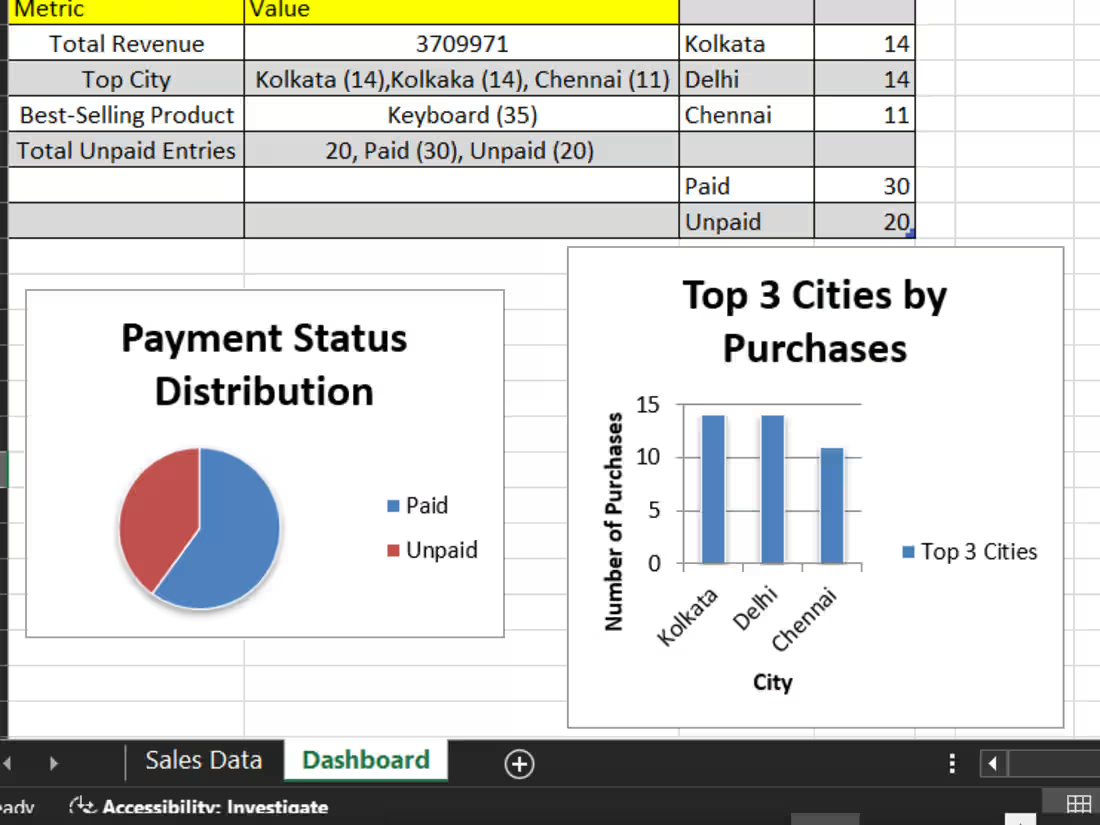
Interactive Dashboard
Purpose: Visual Reporting & Data Monitoring
Features:
PivotTables, Pivot Charts, Slicers.
Dynamic charts auto-updated with data.
Clean layout with color-coded metrics.
Benefit: Makes decision-making faster and more visual.
Analytical Report or Summary Sheet
Purpose: Insights & Findings from Raw Data
Features:
Summary tables (using SUMIFS, COUNTIFS, AVERAGEIF)
Key observations or metrics
Trend analysis (month-wise, product-wise, etc.)
Visual highlights (e.g., red-yellow-green indicators)
Benefit: Extracts meaningful insights from large datasets.
Custom Excel Template
Purpose: Repeatable & Scalable Workflows
Examples:
Invoice Generator
Attendance Sheet
Project Tracker
Timesheet/Leave Tracker
Benefit: Easy for teams/clients to reuse with zero setup.
Starting at$25
Duration1 day
Tags
Google Sheets


Microsoft Excel

Microsoft Office 365

Data Analyst
Data Entry Specialist
Service provided by
Vaibhav Vishwakarma Bhopal, India
I Will Do Data Formatting, Data Entry and Data Cleaning In ExcelVaibhav Vishwakarma
Starting at$25
Duration1 day
Tags
Google Sheets
Microsoft Excel
Microsoft Office 365
Data Analyst
Data Entry Specialist
I will offer expertly designed Excel solutions— from clean data entry templates to dynamic dashboards and automated tools— according to your specific needs. What makes me unique is my ability to combine professional-grade formatting, smart formulas, and interactive features to create Excel deliverables that are not just functional, but also intuitive and visually clear. Whether you're tracking, analyzing, or presenting data, I ensure your Excel files do the heavy lifting for you.
What's included
Structured & Validated Excel Workbook
Purpose: Data Entry, Data Cleaning
Features:
Clear sheet organization (Raw Data, Processed Data, etc.)
Data validation (drop-downs, no duplicates).
Freeze panes, filters, and protected cells.
Consistent formatting and error-proofing.
Benefit: Clean, easy-to-use, and prevents data entry mistakes.
Interactive Dashboard
Purpose: Visual Reporting & Data Monitoring
Features:
PivotTables, Pivot Charts, Slicers.
Dynamic charts auto-updated with data.
Clean layout with color-coded metrics.
Benefit: Makes decision-making faster and more visual.
Analytical Report or Summary Sheet
Purpose: Insights & Findings from Raw Data
Features:
Summary tables (using SUMIFS, COUNTIFS, AVERAGEIF)
Key observations or metrics
Trend analysis (month-wise, product-wise, etc.)
Visual highlights (e.g., red-yellow-green indicators)
Benefit: Extracts meaningful insights from large datasets.
Custom Excel Template
Purpose: Repeatable & Scalable Workflows
Examples:
Invoice Generator
Attendance Sheet
Project Tracker
Timesheet/Leave Tracker
Benefit: Easy for teams/clients to reuse with zero setup.
$25