
Mobile app designSeyanu Ademuwa
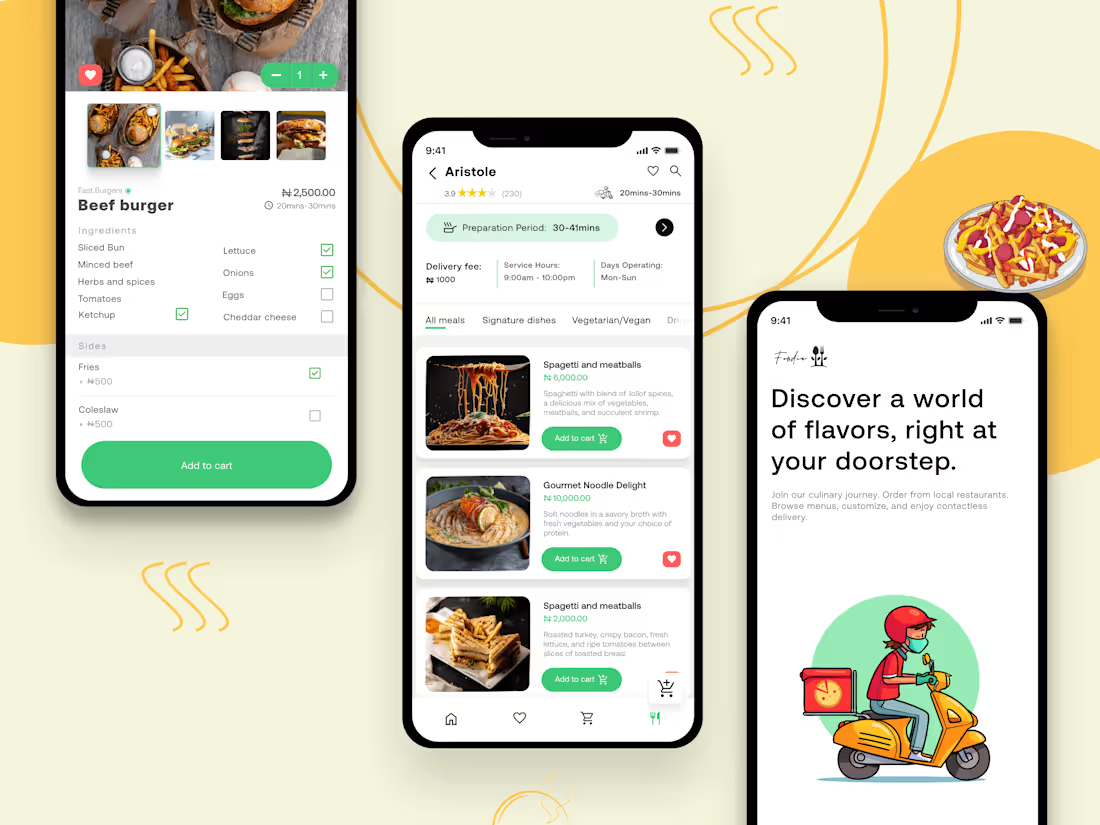
I offer comprehensive mobile app design services, focusing on creating user-friendly experiences. From detailed user flows to high-fidelity prototypes, I make sure every step is clear and well-designed to ensure a seamless and engaging interface.
What makes my service different is the extra attention I give to details, amazing UI skills and commitment to ensuring your app is not only visually appealing but also highly functional and scalable.
What's included
User Flows and Task Flows
Visual diagrams that map out the steps users take to accomplish specific tasks within the app, from start to finish.
These flows help identify pain points and opportunities for improving the user journey and overall experience.
Format: PNG, Figma File (sent through a link).
Wireframes
Low-fidelity sketches or digital wireframes outlining the app's structure and layout without detailed visuals.
Wireframes focus on the placement of elements like buttons, menus, and content without the distraction of detailed design elements.
Format: Figma File (sent through a link).
High-Fidelity designs
Detailed, polished designs that visually represent the final version of the app. They include colours, typography, and images.
Format: Figma File (sent through a link).
Interactive Prototype
A clickable, interactive version of the mobile app that simulates the user experience, showing transitions, interactions, and animations.
This prototype allows for early user testing and feedback before development, helping refine the design and identify usability issues.
Format: Figma File (sent through a link).
User Personas
Fictional, but data-driven representations of the app’s target users, based on UX research. These personas include demographic information, behaviours, goals, and pain points to help guide design decisions that are centred around user needs.
Format: PNG, Figma File (sent through a link).
Design System
A set of UI components (buttons, forms), design principles, and visual elements (colour palette, typography) ensuring consistency.
Format: Figma File (sent through a link).
Seyanu's other services
Starting at$50 /hr
Tags
Adobe XD

Figma

Mobile Designer
UI Designer
UX Designer
Service provided by
Seyanu Ademuwa France
Mobile app designSeyanu Ademuwa
Starting at$50 /hr
Tags
Adobe XD
Figma
Mobile Designer
UI Designer
UX Designer
I offer comprehensive mobile app design services, focusing on creating user-friendly experiences. From detailed user flows to high-fidelity prototypes, I make sure every step is clear and well-designed to ensure a seamless and engaging interface.
What makes my service different is the extra attention I give to details, amazing UI skills and commitment to ensuring your app is not only visually appealing but also highly functional and scalable.
What's included
User Flows and Task Flows
Visual diagrams that map out the steps users take to accomplish specific tasks within the app, from start to finish.
These flows help identify pain points and opportunities for improving the user journey and overall experience.
Format: PNG, Figma File (sent through a link).
Wireframes
Low-fidelity sketches or digital wireframes outlining the app's structure and layout without detailed visuals.
Wireframes focus on the placement of elements like buttons, menus, and content without the distraction of detailed design elements.
Format: Figma File (sent through a link).
High-Fidelity designs
Detailed, polished designs that visually represent the final version of the app. They include colours, typography, and images.
Format: Figma File (sent through a link).
Interactive Prototype
A clickable, interactive version of the mobile app that simulates the user experience, showing transitions, interactions, and animations.
This prototype allows for early user testing and feedback before development, helping refine the design and identify usability issues.
Format: Figma File (sent through a link).
User Personas
Fictional, but data-driven representations of the app’s target users, based on UX research. These personas include demographic information, behaviours, goals, and pain points to help guide design decisions that are centred around user needs.
Format: PNG, Figma File (sent through a link).
Design System
A set of UI components (buttons, forms), design principles, and visual elements (colour palette, typography) ensuring consistency.
Format: Figma File (sent through a link).
Seyanu's other services
$50 /hr