
Designing sleek, user-friendly mobile apps that engage & performIsrael Ijegbai
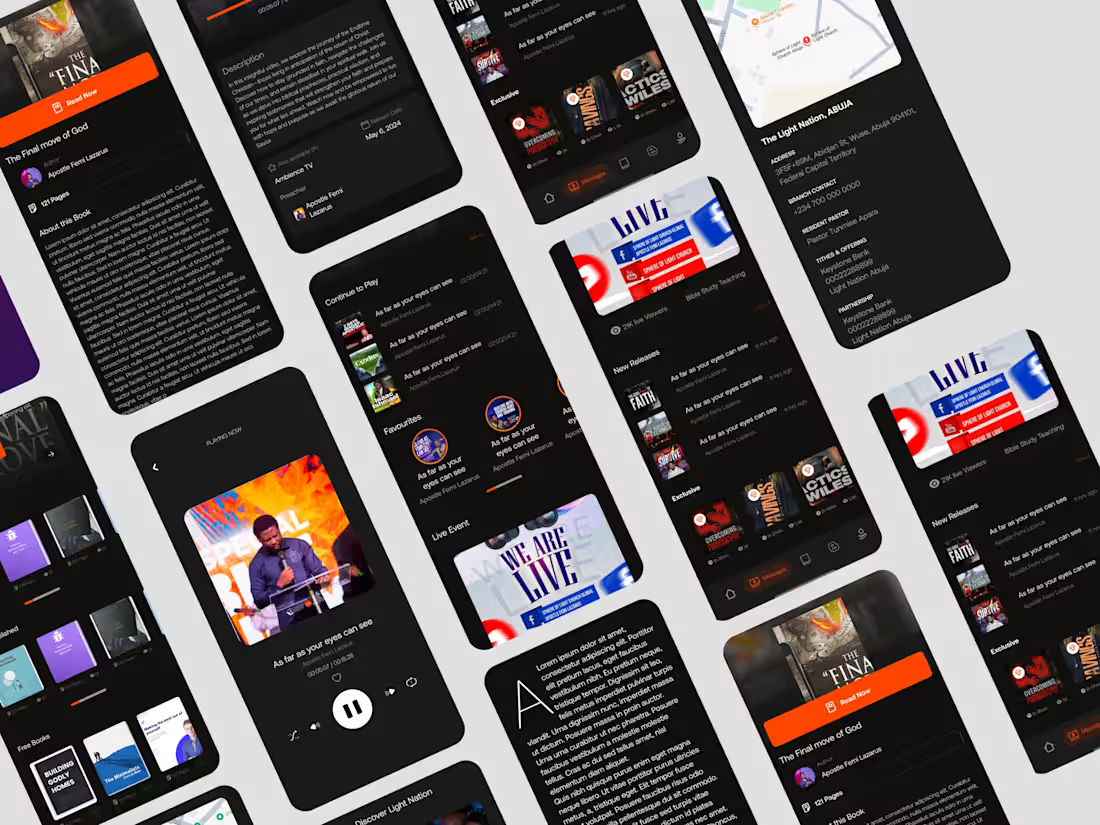
I design intuitive and visually engaging mobile apps that solve real user problems and elevate digital experiences. My approach combines thorough UX research, user-centered design principles, and interactive prototyping to ensure the app is both functional and delightful.
What sets me apart is my ability to seamlessly blend usability with aesthetic appeal, creating mobile solutions that not only look great but drive meaningful engagement and results.
What's included
UX Research & Insights
Conduct thorough research to understand user needs, goals, and behaviors. This includes creating detailed user personas, mapping user journeys, conducting competitor analysis, and collecting survey or interview data. The insights derived guide design decisions and ensure that the app solves real problems while providing a seamless and meaningful experience for the target audience.
High-Fidelity UI Designs
Develop visually polished and interactive designs for every screen of the mobile app. This involves applying consistent branding, color schemes, typography, and layout principles. The designs are responsive, intuitive, and optimized for user experience, ensuring that users can navigate the app effortlessly across different devices and screen sizes.
Interactive Prototype
Create a fully clickable prototype using tools like Figma or Framer that demonstrates the app’s flow, interactions, and transitions. This allows stakeholders to experience the product before development, identify usability issues early, and provide feedback, ensuring alignment with both business goals and user expectations.
Design System & Assets
Build a comprehensive design system containing reusable UI components, buttons, icons, typography, and color palettes. Include export-ready assets for development to maintain consistency and efficiency. The system ensures that the app can scale easily and that future updates or new features remain cohesive with the existing design.
Developer handoff
Provide well-organized handoff materials including specifications, redlines, and assets for developers. This ensures accurate implementation of the designs and smooth collaboration between designers and development teams. Clear documentation reduces ambiguity, prevents errors, and accelerates the development process, resulting in a high-quality final product.
FAQs
Example work


Contact for pricing
Tags
Adobe XD

FigJam

Figma
Framer

Interaction Designer
Mobile Designer
Service provided by
Israel Ijegbai proLagos, Nigeria
- 5.00
- Rating
- 167
- Followers
Designing sleek, user-friendly mobile apps that engage & performIsrael Ijegbai
I design intuitive and visually engaging mobile apps that solve real user problems and elevate digital experiences. My approach combines thorough UX research, user-centered design principles, and interactive prototyping to ensure the app is both functional and delightful.
What sets me apart is my ability to seamlessly blend usability with aesthetic appeal, creating mobile solutions that not only look great but drive meaningful engagement and results.
What's included
UX Research & Insights
Conduct thorough research to understand user needs, goals, and behaviors. This includes creating detailed user personas, mapping user journeys, conducting competitor analysis, and collecting survey or interview data. The insights derived guide design decisions and ensure that the app solves real problems while providing a seamless and meaningful experience for the target audience.
High-Fidelity UI Designs
Develop visually polished and interactive designs for every screen of the mobile app. This involves applying consistent branding, color schemes, typography, and layout principles. The designs are responsive, intuitive, and optimized for user experience, ensuring that users can navigate the app effortlessly across different devices and screen sizes.
Interactive Prototype
Create a fully clickable prototype using tools like Figma or Framer that demonstrates the app’s flow, interactions, and transitions. This allows stakeholders to experience the product before development, identify usability issues early, and provide feedback, ensuring alignment with both business goals and user expectations.
Design System & Assets
Build a comprehensive design system containing reusable UI components, buttons, icons, typography, and color palettes. Include export-ready assets for development to maintain consistency and efficiency. The system ensures that the app can scale easily and that future updates or new features remain cohesive with the existing design.
Developer handoff
Provide well-organized handoff materials including specifications, redlines, and assets for developers. This ensures accurate implementation of the designs and smooth collaboration between designers and development teams. Clear documentation reduces ambiguity, prevents errors, and accelerates the development process, resulting in a high-quality final product.
FAQs
Example work
Contact for pricing