
Shopify Sales Momentum Audit — Momentum SnapshotDavid Brian Berlin
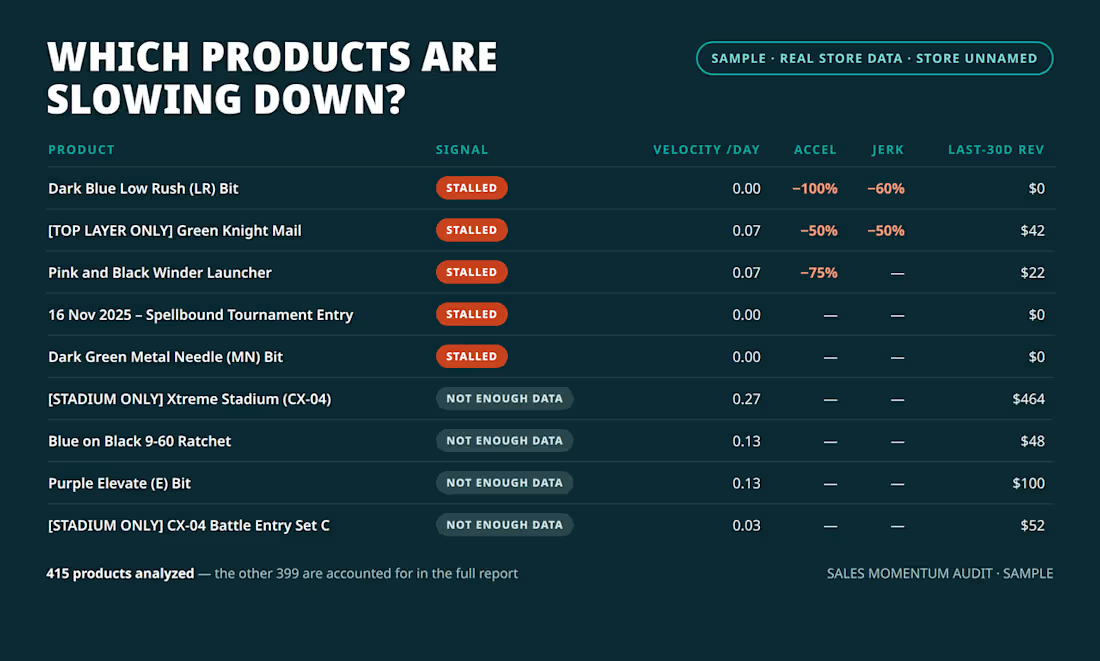
THIS SERVICE — Momentum Snapshot, $100 one-time. Trailing 90 days of your Shopify orders, up to 25 products: per-product momentum table, your top 5 prioritized opportunities, and a 30-day action plan, as a PDF report. Delivery: 2 days from receiving your export. Revisions: 1 round included (a re-run with a corrected or more complete export).
Your Shopify order history contains signals about which products are gaining or losing sales momentum. I turn that export into a prioritized decision report showing what to promote, price-test, monitor, or cut.
WHAT YOU GET
Product-level momentum analysis across your selected date range
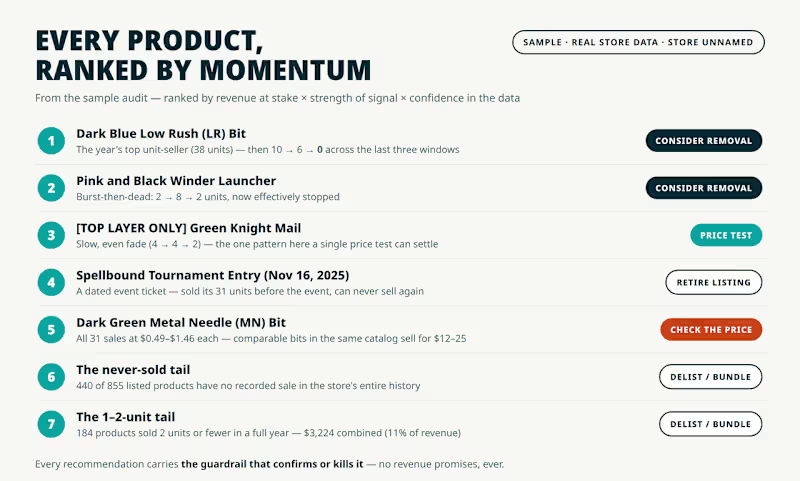
A ranked list of products by sales pace and direction
A prioritized 30-day action plan
Price-test recommendations with clear guardrails and review points
A PDF report tied to your own order export
HOW IT WORKS
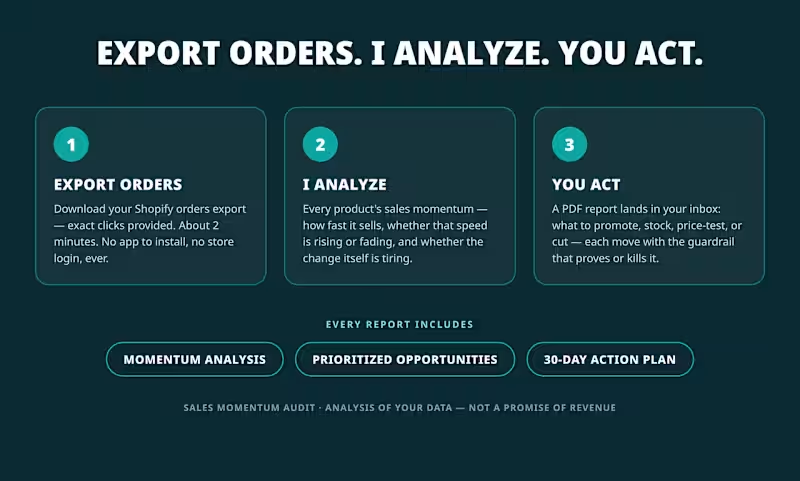
Export your Shopify orders using my instructions. No app or store login required.
Upload the file.
Receive your report in 2 to 4 days.
WHO IT'S FOR
Best for Shopify stores with roughly 300+ monthly orders. Below that, product-level signals may be too thin. Message me first and I'll tell you whether your data can support a useful analysis.
THE HONEST PART
This is analysis, not a revenue promise. If the data is too thin or noisy to support a conclusion, I'll say so instead of guessing. If your report is missing the product analysis, prioritized opportunity list, or 30-day action plan, I'll revise it free.
WHAT I NEED FROM YOU (please include these when you start your order)
Your orders export (CSV): in Shopify admin go to Orders → click Export (top right) → choose Orders by date and select the range for your package (last 90 / 180 / 365 days) → choose CSV for Excel → download and send me that file. Please don't edit or re-save it in a spreadsheet first — the original file reads best. You may delete the customer name and email columns before uploading if you prefer; I only need the date, product name, quantity and price columns. Never send a password — this audit never needs your login.
Roughly how many orders your store gets in a month (under 100 / 100–300 / 300–1,000 / over 1,000).
Your store's web address, for context only. I never log in to your store.
Optional but helpful: the decision you're making (stocking, cutting, price tests), and anything unusual in this window (a big sale, a migration, a viral moment, a long stockout).
By ordering you understand this is an analysis of your sales data with recommendations and price tests — not a guarantee of revenue.
FAQs
David Brian's other services
Starting at$100
Duration2 days
Tags
Google Sheets

Microsoft Excel

Shopify

Data Analyst
E-commerce
Marketing Strategist
Retail
DTC
E-commerce Consultant
Service provided by
David Brian Berlin Los Angeles, USA
Shopify Sales Momentum Audit — Momentum SnapshotDavid Brian Berlin
Starting at$100
Duration2 days
Tags
Google Sheets
Microsoft Excel
Shopify
Data Analyst
E-commerce
Marketing Strategist
Retail
DTC
E-commerce Consultant
THIS SERVICE — Momentum Snapshot, $100 one-time. Trailing 90 days of your Shopify orders, up to 25 products: per-product momentum table, your top 5 prioritized opportunities, and a 30-day action plan, as a PDF report. Delivery: 2 days from receiving your export. Revisions: 1 round included (a re-run with a corrected or more complete export).
Your Shopify order history contains signals about which products are gaining or losing sales momentum. I turn that export into a prioritized decision report showing what to promote, price-test, monitor, or cut.
WHAT YOU GET
Product-level momentum analysis across your selected date range
A ranked list of products by sales pace and direction
A prioritized 30-day action plan
Price-test recommendations with clear guardrails and review points
A PDF report tied to your own order export
HOW IT WORKS
Export your Shopify orders using my instructions. No app or store login required.
Upload the file.
Receive your report in 2 to 4 days.
WHO IT'S FOR
Best for Shopify stores with roughly 300+ monthly orders. Below that, product-level signals may be too thin. Message me first and I'll tell you whether your data can support a useful analysis.
THE HONEST PART
This is analysis, not a revenue promise. If the data is too thin or noisy to support a conclusion, I'll say so instead of guessing. If your report is missing the product analysis, prioritized opportunity list, or 30-day action plan, I'll revise it free.
WHAT I NEED FROM YOU (please include these when you start your order)
Your orders export (CSV): in Shopify admin go to Orders → click Export (top right) → choose Orders by date and select the range for your package (last 90 / 180 / 365 days) → choose CSV for Excel → download and send me that file. Please don't edit or re-save it in a spreadsheet first — the original file reads best. You may delete the customer name and email columns before uploading if you prefer; I only need the date, product name, quantity and price columns. Never send a password — this audit never needs your login.
Roughly how many orders your store gets in a month (under 100 / 100–300 / 300–1,000 / over 1,000).
Your store's web address, for context only. I never log in to your store.
Optional but helpful: the decision you're making (stocking, cutting, price tests), and anything unusual in this window (a big sale, a migration, a viral moment, a long stockout).
By ordering you understand this is an analysis of your sales data with recommendations and price tests — not a guarantee of revenue.
FAQs
David Brian's other services
$100