
📱Responsive Mobile Design That ConvertsArron Watson
A bad app experience is a business problem. Users bounce, reviews suffer, and the product you worked hard to build never gets the chance it deserves.
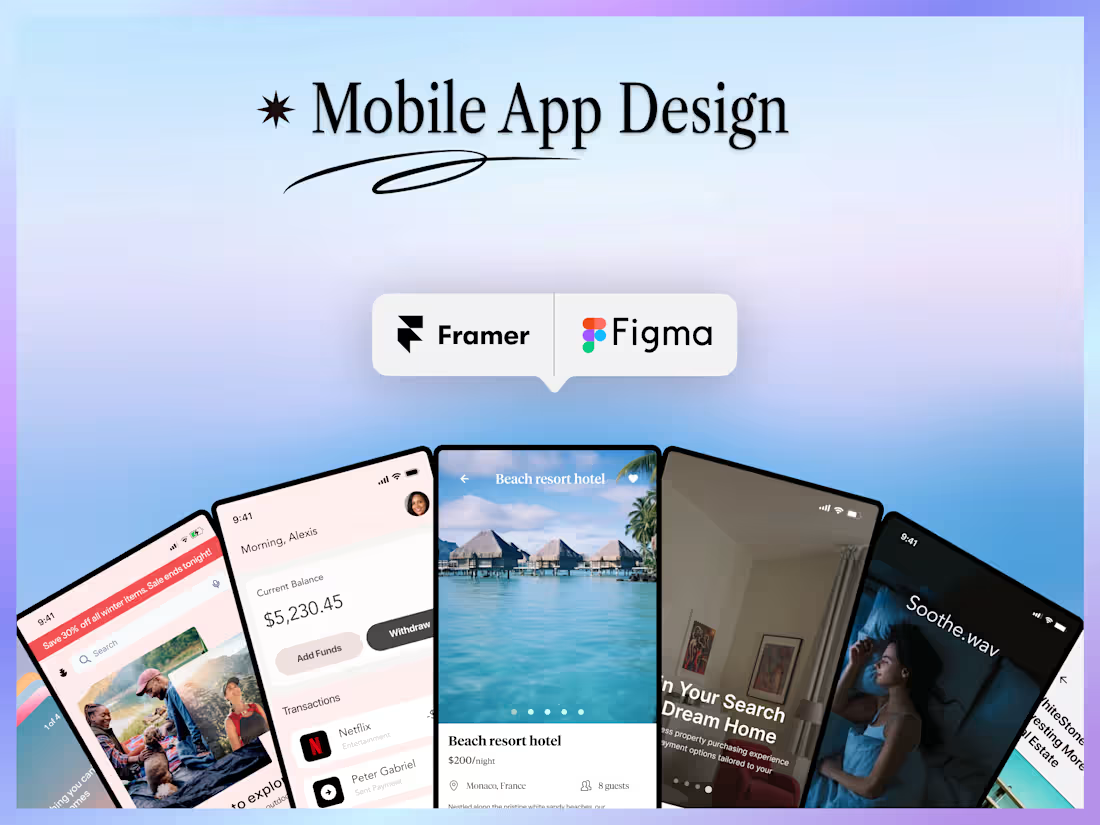
I design mobile apps for iOS and Android that feel intuitive, look sharp, and work for the people using them. Every project starts with understanding your users and your goals before a single screen gets designed. From user flow mapping to high-fidelity UI, every decision is intentional and every interaction is considered.
Whether you're building something new from the ground up or bringing structure to an existing product that needs a design overhaul, you'll walk away with a polished, developer-ready app design that your team is proud to ship and your users are glad they downloaded.
What's included
🗺️ User Flow Mapping
Before any screens get designed, we map out how users move through your app. Every path, every decision point, every action. This is the foundation that keeps the design coherent and the experience intuitive from the first tap to the last.
📐 UX Wireframes
Low-fidelity wireframes that establish structure, layout, and logic before any visual design begins. This is where we pressure test the experience and make sure everything makes sense before we invest in the details.
📱 8 to 12 High-Fidelity UI Screens
Fully designed, pixel-perfect screens for both iOS and Android. Every screen reflects your brand, your user needs, and the platform conventions that make apps feel native and familiar to the people using them.
🔗 Clickable Prototype
An interactive prototype you can tap through like a real app. Use it to test with users, present to stakeholders, or hand to developers with a clear picture of how every interaction is supposed to feel.
♿ Accessibility Compliance
Every design meets WCAG 2.1 AA standards. Your app works for everyone, including users with visual, motor, or cognitive differences. Accessibility is not an afterthought. It's built in from the start.
🔄 2 Rounds of Revisions
Two rounds of revisions are included. The first round typically covers overall layout and flow feedback. The second refines the visual details and prepares the design for final handoff. We align on direction early so neither round feels wasted.
📦 Developer-Ready Handoff
Final deliverables are tailored to what your team actually needs. Whether that's a clean Figma file, annotated developer specs, a walkthrough video, or all three, we confirm the right format during the project so your developer has exactly what they need to build accurately and efficiently.
🛡️ 2 Weeks of Post-Handoff Support
After handoff I stay available for two weeks to answer developer questions, clarify design decisions, and make minor adjustments as the build gets underway. The goal is a smooth transition from design to development with no gaps.
FAQs
Arron's other services
Starting at$4,500
Duration4 weeks
Tags
Figma

Framer

Lovable

MagicPath

Wix Studio

Mobile Designer
UI Designer
UX Designer
Service provided by
Arron Watson proWashington, USA
- $1k+
- Earned
- 5
- Paid projects
- 5.00
- Rating
- 226
- Followers
📱Responsive Mobile Design That ConvertsArron Watson
Starting at$4,500
Duration4 weeks
Tags
Figma
Framer
Lovable
MagicPath
Wix Studio
Mobile Designer
UI Designer
UX Designer
A bad app experience is a business problem. Users bounce, reviews suffer, and the product you worked hard to build never gets the chance it deserves.
I design mobile apps for iOS and Android that feel intuitive, look sharp, and work for the people using them. Every project starts with understanding your users and your goals before a single screen gets designed. From user flow mapping to high-fidelity UI, every decision is intentional and every interaction is considered.
Whether you're building something new from the ground up or bringing structure to an existing product that needs a design overhaul, you'll walk away with a polished, developer-ready app design that your team is proud to ship and your users are glad they downloaded.
What's included
🗺️ User Flow Mapping
Before any screens get designed, we map out how users move through your app. Every path, every decision point, every action. This is the foundation that keeps the design coherent and the experience intuitive from the first tap to the last.
📐 UX Wireframes
Low-fidelity wireframes that establish structure, layout, and logic before any visual design begins. This is where we pressure test the experience and make sure everything makes sense before we invest in the details.
📱 8 to 12 High-Fidelity UI Screens
Fully designed, pixel-perfect screens for both iOS and Android. Every screen reflects your brand, your user needs, and the platform conventions that make apps feel native and familiar to the people using them.
🔗 Clickable Prototype
An interactive prototype you can tap through like a real app. Use it to test with users, present to stakeholders, or hand to developers with a clear picture of how every interaction is supposed to feel.
♿ Accessibility Compliance
Every design meets WCAG 2.1 AA standards. Your app works for everyone, including users with visual, motor, or cognitive differences. Accessibility is not an afterthought. It's built in from the start.
🔄 2 Rounds of Revisions
Two rounds of revisions are included. The first round typically covers overall layout and flow feedback. The second refines the visual details and prepares the design for final handoff. We align on direction early so neither round feels wasted.
📦 Developer-Ready Handoff
Final deliverables are tailored to what your team actually needs. Whether that's a clean Figma file, annotated developer specs, a walkthrough video, or all three, we confirm the right format during the project so your developer has exactly what they need to build accurately and efficiently.
🛡️ 2 Weeks of Post-Handoff Support
After handoff I stay available for two weeks to answer developer questions, clarify design decisions, and make minor adjustments as the build gets underway. The goal is a smooth transition from design to development with no gaps.
FAQs
Arron's other services
$4,500