
UI/UX Design Regina Go
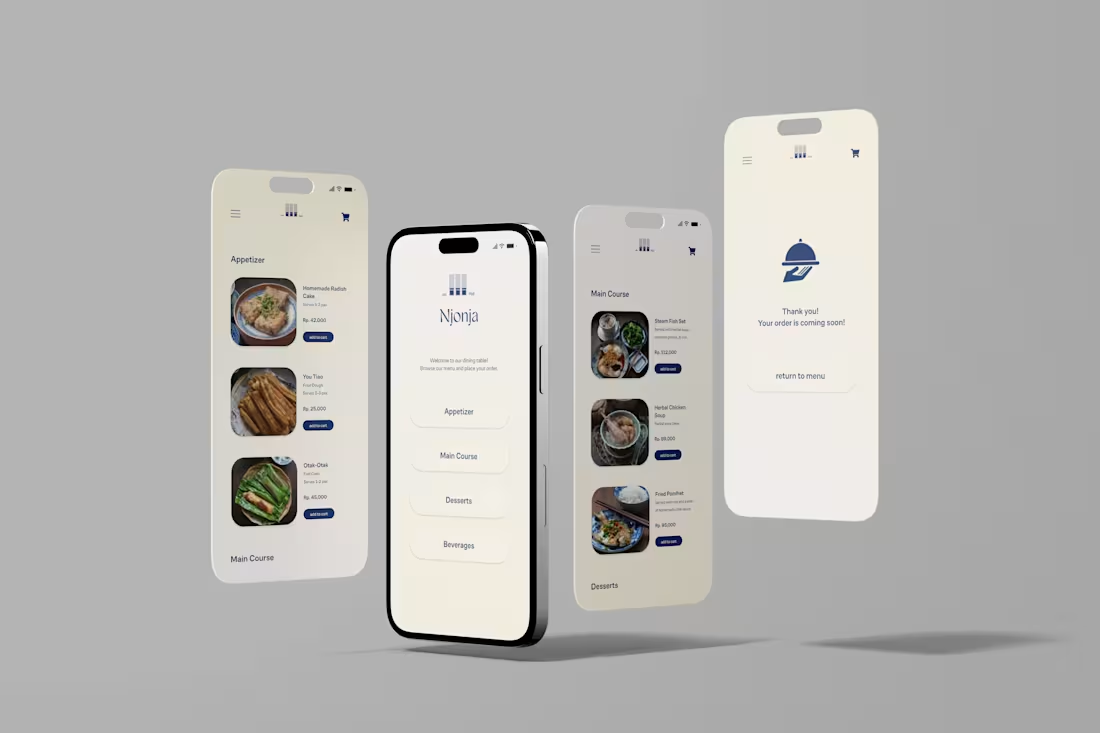
As a UX designer, I emphasize usability testing to uncover real user issues, ensuring an objective problem definition that is grounded in actual user experiences rather than just design perspectives. My diverse industry experience enhances my ability to empathize with a broad range of users, while my visual design background ensures that the prototypes I create are both aesthetically pleasing and highly intuitive. This combination of rigorous research, broad perspective, and refined design skills sets my approach apart.
What's included
UX Research Analysis
Key Insights: A summary of critical findings derived from user research, highlighting patterns, behaviors, and user needs that inform design decisions.
Personas: Detailed profiles representing different user types, based on research data. These personas help in understanding the diverse needs and motivations of your target audience, ensuring the design meets their specific requirements.
User Journey Maps: Diagrams that illustrate the steps users take to achieve their goals within the product. These maps highlight user interactions, touchpoints, and emotions throughout their journey, identifying pain points and opportunities for improvement.
Interaction Diagrams: Visual representations that map out user interactions and workflows, showing how users navigate through the product and interact with various elements. These diagrams help in understanding user behavior and refining the overall user experience.
Prototype
Low-Fidelity Sketches: Basic, preliminary sketches or digital wireframes that outline the layout and structure of the design. These sketches provide an initial view of how interactive elements are incorporated and how users will navigate through the interface.
Interactive Prototypes: Advanced, clickable models that simulate real user interactions. These prototypes allow you to test and experience the design’s functionality and usability, providing valuable insights into how the interface responds to user input and enabling iterative feedback and improvements.
High-Fidelity Mockups: Detailed, static representations of the final design, including visual elements such as colors, typography, and imagery. These mockups give a realistic preview of the final product’s look and feel.
Interactive Strategy
Defines what interactions are critical for achieving user goals and business objectives. The strategy also establishes guidelines for how interactions should function and outlines how users will interact with the product at different stages of their journey.
UI Design System
Comprehensive collection of reusable components, patterns, and guidelines used to create and maintain consistent user interfaces across the digital product.
Regina 's other services
Contact for pricing
Tags
Adobe Creative Cloud

Adobe XD

Figma

NotionAI

Typeform

Prototyper
UI Designer
UX Designer
Service provided by
Regina Go Vancouver, Canada
UI/UX Design Regina Go
Contact for pricing
Tags
Adobe Creative Cloud
Adobe XD
Figma
NotionAI
Typeform
Prototyper
UI Designer
UX Designer
As a UX designer, I emphasize usability testing to uncover real user issues, ensuring an objective problem definition that is grounded in actual user experiences rather than just design perspectives. My diverse industry experience enhances my ability to empathize with a broad range of users, while my visual design background ensures that the prototypes I create are both aesthetically pleasing and highly intuitive. This combination of rigorous research, broad perspective, and refined design skills sets my approach apart.
What's included
UX Research Analysis
Key Insights: A summary of critical findings derived from user research, highlighting patterns, behaviors, and user needs that inform design decisions.
Personas: Detailed profiles representing different user types, based on research data. These personas help in understanding the diverse needs and motivations of your target audience, ensuring the design meets their specific requirements.
User Journey Maps: Diagrams that illustrate the steps users take to achieve their goals within the product. These maps highlight user interactions, touchpoints, and emotions throughout their journey, identifying pain points and opportunities for improvement.
Interaction Diagrams: Visual representations that map out user interactions and workflows, showing how users navigate through the product and interact with various elements. These diagrams help in understanding user behavior and refining the overall user experience.
Prototype
Low-Fidelity Sketches: Basic, preliminary sketches or digital wireframes that outline the layout and structure of the design. These sketches provide an initial view of how interactive elements are incorporated and how users will navigate through the interface.
Interactive Prototypes: Advanced, clickable models that simulate real user interactions. These prototypes allow you to test and experience the design’s functionality and usability, providing valuable insights into how the interface responds to user input and enabling iterative feedback and improvements.
High-Fidelity Mockups: Detailed, static representations of the final design, including visual elements such as colors, typography, and imagery. These mockups give a realistic preview of the final product’s look and feel.
Interactive Strategy
Defines what interactions are critical for achieving user goals and business objectives. The strategy also establishes guidelines for how interactions should function and outlines how users will interact with the product at different stages of their journey.
UI Design System
Comprehensive collection of reusable components, patterns, and guidelines used to create and maintain consistent user interfaces across the digital product.
Regina 's other services
Contact for pricing