
Make.com Workflow Automation | AI & Business TasksSyeda saba

Make.com Lead Management & Workflow Automation
Do you spend too much time managing inquiries, updating spreadsheets, sending emails, and tracking customer follow-ups manually? I can help you organize these repetitive tasks with Make.com workflow automation, Google Sheets, and Gmail integrations.
I build practical automation workflows that help small businesses keep their incoming leads organized, maintain clear records, and simplify routine communication.
What I Can Help You Automate
1. Lead Management Automation
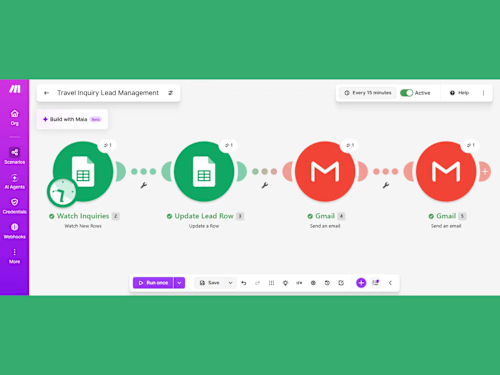
Keep incoming inquiries organized instead of manually copying information between different tools. I can help set up a workflow that captures inquiry details, updates lead records, and keeps your information structured.
Depending on your requirements and the apps you use, a workflow can help with:
Organizing incoming customer inquiries.
Recording lead information in Google Sheets.
Updating existing lead records.
Maintaining lead status and follow-up information.
Reducing repetitive manual data entry.
Creating a more organized lead management process.
2. Make.com Workflow Automation
Make.com helps connect compatible apps and automate repetitive business processes. I can help you create workflows using triggers and actions that move information between connected applications.
My workflow automation services can include:
Make.com scenario setup.
Form-to-Google-Sheets automation.
Lead data processing and record updates.
Gmail notification workflows.
Automated email replies for suitable use cases.
Basic app integrations and workflow testing.
Troubleshooting and improving existing simple workflows.
The exact workflow depends on your business process, connected applications, and project requirements.
3. Google Sheets Lead Tracking
Google Sheets can be used to maintain a simple, organized lead tracking system. I can help structure your spreadsheet and connect it to a Make.com workflow so that lead information can be recorded or updated automatically.
Your lead tracker can include fields such as customer name, email address, inquiry details, date received, and follow-up status, depending on the information collected by your form.
Where appropriate, status options such as Connected, Completed, and Need Follow-up can help you identify which inquiries need attention.
4. Gmail Email Automation
Responding to every inquiry manually can take time. I can help configure Gmail actions within a workflow to support routine email communication.
Possible tasks include:
Sending an email notification when a new inquiry arrives.
Sending a configured response to a customer.
Keeping communication connected to your inquiry process.
Helping you organize routine lead-related emails.
Email content, triggers, and conditions will be agreed upon before the workflow is built. Automated messages should always be tested to ensure they go to the correct recipients and contain the correct information.
5. CRM and Business Process Automation
If your business uses a CRM or another compatible application, we can discuss whether it can be connected to your existing process through Make.com.
Potential use cases include lead record updates, contact organization, follow-up reminders, and moving information between supported tools. CRM integrations and advanced lead-routing features depend on the platform, access permissions, and agreed project scope.
I will review your requirements before confirming whether a particular integration is possible.
Tools I Work With
Make.com — workflow automation and app connections.
Google Sheets — lead records and tracking.
Gmail — email notifications and configured replies.
Online forms — collecting inquiry information.
AI tools — where appropriate for an agreed, supported workflow.
I focus on practical solutions that match the tools and requirements of your project rather than adding unnecessary complexity.
My Workflow Setup Process
Step 1: Understand your task
Tell me which process you want to automate, which apps you use, and what currently takes too much manual effort.
Step 2: Plan the workflow
We will identify the trigger, the actions required, the information to be transferred, and the expected result.
Step 3: Configure the automation
I will work on the agreed Make.com scenario and its supported integrations within the confirmed project scope.
Step 4: Test the workflow
I will test the configured process using suitable sample data or authorized test records to check whether the expected actions occur.
Step 5: Handover
You will receive an explanation of the completed workflow and any agreed setup notes. Additional documentation or revisions should be discussed as part of the project scope.
Who Is This Service For?
This service may be useful for:
Small businesses receiving customer inquiries.
Freelancers who need a more organized lead tracker.
Consultants and service providers managing prospective clients.
Businesses that use Google Sheets to record leads.
Teams that want to simplify routine email notifications.
People looking for entry-level, practical no-code workflow automation.
What You Can Expect
My goal is to help you reduce avoidable manual work, keep inquiry information organized, and create a clearer process for managing leads and follow-ups.
Every project is different. I will confirm the scope, required tools, access, and expected deliverables before starting. Complex CRM integrations, AI agents, paid third-party services, and advanced automation features may require a separate assessment.
Before You Order
Please message me with:
The task you want to automate.
The apps you currently use.
The information you want to collect or transfer.
The result you expect from the workflow.
If you are unsure where to start, describe your current manual process and I can help you identify a suitable first step.
Ready to simplify your lead management? Let's discuss your Make.com automation, Google Sheets lead tracking, Gmail notifications, and business workflow requirements.
FAQs
Example work
Syeda's other services

Starting at$50
Duration1 week
Tags
Google Sheets
Make.com
AI Automation
AI Integration
Business Workflow Automation
Email Automation
Lead Management
No-Code Automation
Service provided by
Syeda saba Bahawalpur, Pakistan
- 2
- Followers
Make.com Workflow Automation | AI & Business TasksSyeda saba
Starting at$50
Duration1 week
Tags
Google Sheets
Make.com
AI Automation
AI Integration
Business Workflow Automation
Email Automation
Lead Management
No-Code Automation
Make.com Lead Management & Workflow Automation
Do you spend too much time managing inquiries, updating spreadsheets, sending emails, and tracking customer follow-ups manually? I can help you organize these repetitive tasks with Make.com workflow automation, Google Sheets, and Gmail integrations.
I build practical automation workflows that help small businesses keep their incoming leads organized, maintain clear records, and simplify routine communication.
What I Can Help You Automate
1. Lead Management Automation
Keep incoming inquiries organized instead of manually copying information between different tools. I can help set up a workflow that captures inquiry details, updates lead records, and keeps your information structured.
Depending on your requirements and the apps you use, a workflow can help with:
Organizing incoming customer inquiries.
Recording lead information in Google Sheets.
Updating existing lead records.
Maintaining lead status and follow-up information.
Reducing repetitive manual data entry.
Creating a more organized lead management process.
2. Make.com Workflow Automation
Make.com helps connect compatible apps and automate repetitive business processes. I can help you create workflows using triggers and actions that move information between connected applications.
My workflow automation services can include:
Make.com scenario setup.
Form-to-Google-Sheets automation.
Lead data processing and record updates.
Gmail notification workflows.
Automated email replies for suitable use cases.
Basic app integrations and workflow testing.
Troubleshooting and improving existing simple workflows.
The exact workflow depends on your business process, connected applications, and project requirements.
3. Google Sheets Lead Tracking
Google Sheets can be used to maintain a simple, organized lead tracking system. I can help structure your spreadsheet and connect it to a Make.com workflow so that lead information can be recorded or updated automatically.
Your lead tracker can include fields such as customer name, email address, inquiry details, date received, and follow-up status, depending on the information collected by your form.
Where appropriate, status options such as Connected, Completed, and Need Follow-up can help you identify which inquiries need attention.
4. Gmail Email Automation
Responding to every inquiry manually can take time. I can help configure Gmail actions within a workflow to support routine email communication.
Possible tasks include:
Sending an email notification when a new inquiry arrives.
Sending a configured response to a customer.
Keeping communication connected to your inquiry process.
Helping you organize routine lead-related emails.
Email content, triggers, and conditions will be agreed upon before the workflow is built. Automated messages should always be tested to ensure they go to the correct recipients and contain the correct information.
5. CRM and Business Process Automation
If your business uses a CRM or another compatible application, we can discuss whether it can be connected to your existing process through Make.com.
Potential use cases include lead record updates, contact organization, follow-up reminders, and moving information between supported tools. CRM integrations and advanced lead-routing features depend on the platform, access permissions, and agreed project scope.
I will review your requirements before confirming whether a particular integration is possible.
Tools I Work With
Make.com — workflow automation and app connections.
Google Sheets — lead records and tracking.
Gmail — email notifications and configured replies.
Online forms — collecting inquiry information.
AI tools — where appropriate for an agreed, supported workflow.
I focus on practical solutions that match the tools and requirements of your project rather than adding unnecessary complexity.
My Workflow Setup Process
Step 1: Understand your task
Tell me which process you want to automate, which apps you use, and what currently takes too much manual effort.
Step 2: Plan the workflow
We will identify the trigger, the actions required, the information to be transferred, and the expected result.
Step 3: Configure the automation
I will work on the agreed Make.com scenario and its supported integrations within the confirmed project scope.
Step 4: Test the workflow
I will test the configured process using suitable sample data or authorized test records to check whether the expected actions occur.
Step 5: Handover
You will receive an explanation of the completed workflow and any agreed setup notes. Additional documentation or revisions should be discussed as part of the project scope.
Who Is This Service For?
This service may be useful for:
Small businesses receiving customer inquiries.
Freelancers who need a more organized lead tracker.
Consultants and service providers managing prospective clients.
Businesses that use Google Sheets to record leads.
Teams that want to simplify routine email notifications.
People looking for entry-level, practical no-code workflow automation.
What You Can Expect
My goal is to help you reduce avoidable manual work, keep inquiry information organized, and create a clearer process for managing leads and follow-ups.
Every project is different. I will confirm the scope, required tools, access, and expected deliverables before starting. Complex CRM integrations, AI agents, paid third-party services, and advanced automation features may require a separate assessment.
Before You Order
Please message me with:
The task you want to automate.
The apps you currently use.
The information you want to collect or transfer.
The result you expect from the workflow.
If you are unsure where to start, describe your current manual process and I can help you identify a suitable first step.
Ready to simplify your lead management? Let's discuss your Make.com automation, Google Sheets lead tracking, Gmail notifications, and business workflow requirements.
FAQs
Example work
Syeda's other services
$50