
Professional Website UI/UX DevelopmentVictoria Anariba
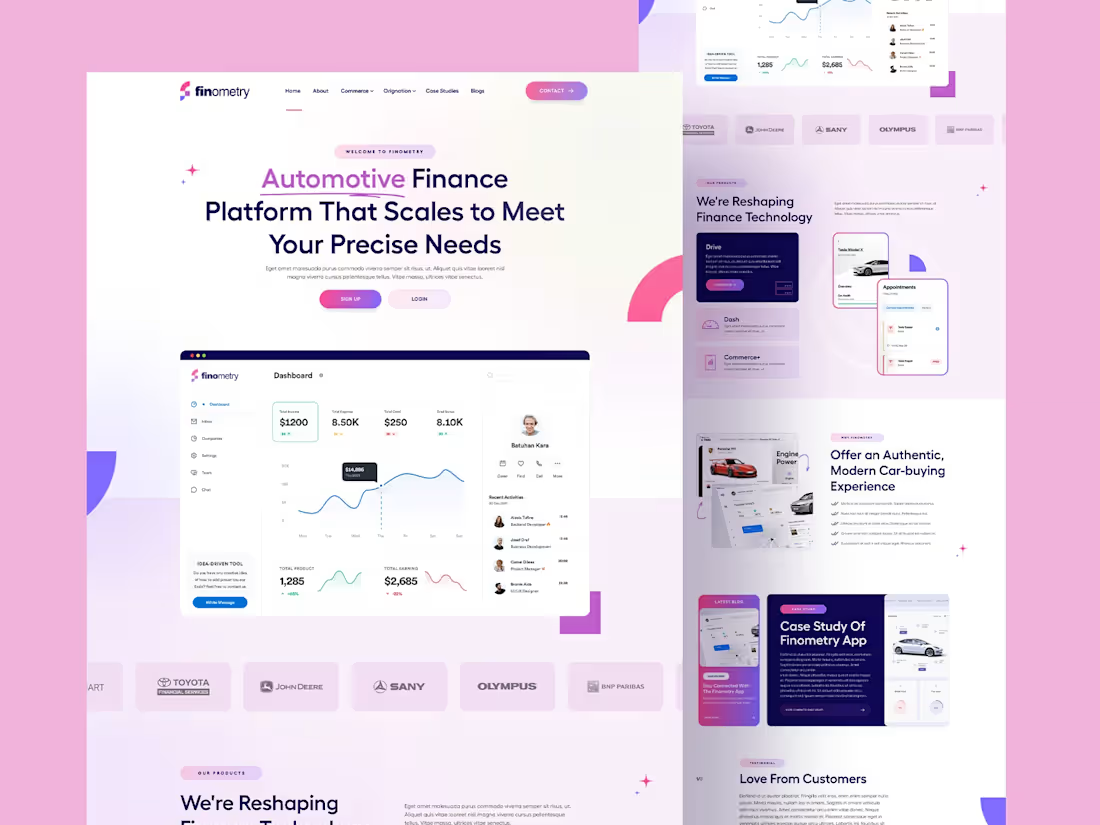
Offering end-to-end UI/UX design solutions that turn complex ideas into seamless, user-friendly digital experiences. Each project begins with a deep dive into user behavior, business goals, and industry context—ensuring the final product is intuitive, engaging, and aligned with real-world needs.
The process includes structured user research, journey mapping, and wireframing, followed by high-fidelity UI design and interactive prototyping. Designs are crafted with attention to detail, accessibility, and responsive behavior across all devices. Every component is prepared for smooth developer handoff, with organized files, design systems, and clear documentation.
The result is a polished, user-focused interface that not only looks great but works effortlessly—built to support your product’s success from day one.
What's included
User Research & Discovery
- User personas
- Stakeholder interview summaries
- Competitive analysis
- UX audit (if redesign)
- User journey maps
- Empathy maps
- Key pain points & opportunities
Information Architecture
- Site map or app flow diagram
- Navigation structure
- Content strategy outline
- Feature prioritization (MoSCoW or similar framework)
Wireframes
- Low-fidelity wireframes (sketches or grayscale layouts)
- Medium/high-fidelity wireframes (more detailed)
- Mobile, tablet, and desktop variations
- Interactive wireframe prototype (optional, using Figma, Adobe XD, etc.)
UI Design
- Mood boards and style exploration
- UI style guide (typography, colors, iconography)
- High-fidelity UI mockups (all key screens)
- Responsive design for multiple breakpoints
- Component-based design system (buttons, forms, cards, etc.)
Interactive Prototypes
- Clickable Figma/Adobe XD prototype
- Usability-tested interactions and animations
- Developer-ready design specs (spacing, dimensions, hex codes, etc.)
Usability Testing (Optional but Recommended)
- Test plan
- Session recordings or notes
- Feedback summary
- Iteration recommendations
Handoff to Developers
- Organized Figma/XD files with naming conventions
- Design tokens and variables (for DevOps or front-end handoff)
- Exported assets (SVGs, PNGs, icons, fonts, etc.)
- Zeplin or Figma Inspect access for dev collaboration
- Interaction & animation notes (if complex transitions involved)
Documentation
- Final design documentation (PDF or Notion format)
- Design rationale (why certain decisions were made)
- Accessibility guidelines (WCAG alignment if applicable)
- Component documentation (for design systems)
Optional Add-ons
- Dark mode variants
- Branding or logo refresh
- HTML/CSS front-end implementation
- Micro-interactions or animation prototypes (e.g., Lottie files)
Victoria's other services
Starting at$30 /hr
Tags
Figma

Framer

Shopify

Webflow

WordPress

UI Designer
Web Designer
Web Developer
Service provided by
Victoria Anariba proHouston, USA
- $5k+
- Earned
- 5
- Paid projects
- 5.00
- Rating
- 23
- Followers
Professional Website UI/UX DevelopmentVictoria Anariba
Starting at$30 /hr
Tags
Figma
Framer
Shopify
Webflow
WordPress
UI Designer
Web Designer
Web Developer
Offering end-to-end UI/UX design solutions that turn complex ideas into seamless, user-friendly digital experiences. Each project begins with a deep dive into user behavior, business goals, and industry context—ensuring the final product is intuitive, engaging, and aligned with real-world needs.
The process includes structured user research, journey mapping, and wireframing, followed by high-fidelity UI design and interactive prototyping. Designs are crafted with attention to detail, accessibility, and responsive behavior across all devices. Every component is prepared for smooth developer handoff, with organized files, design systems, and clear documentation.
The result is a polished, user-focused interface that not only looks great but works effortlessly—built to support your product’s success from day one.
What's included
User Research & Discovery
- User personas
- Stakeholder interview summaries
- Competitive analysis
- UX audit (if redesign)
- User journey maps
- Empathy maps
- Key pain points & opportunities
Information Architecture
- Site map or app flow diagram
- Navigation structure
- Content strategy outline
- Feature prioritization (MoSCoW or similar framework)
Wireframes
- Low-fidelity wireframes (sketches or grayscale layouts)
- Medium/high-fidelity wireframes (more detailed)
- Mobile, tablet, and desktop variations
- Interactive wireframe prototype (optional, using Figma, Adobe XD, etc.)
UI Design
- Mood boards and style exploration
- UI style guide (typography, colors, iconography)
- High-fidelity UI mockups (all key screens)
- Responsive design for multiple breakpoints
- Component-based design system (buttons, forms, cards, etc.)
Interactive Prototypes
- Clickable Figma/Adobe XD prototype
- Usability-tested interactions and animations
- Developer-ready design specs (spacing, dimensions, hex codes, etc.)
Usability Testing (Optional but Recommended)
- Test plan
- Session recordings or notes
- Feedback summary
- Iteration recommendations
Handoff to Developers
- Organized Figma/XD files with naming conventions
- Design tokens and variables (for DevOps or front-end handoff)
- Exported assets (SVGs, PNGs, icons, fonts, etc.)
- Zeplin or Figma Inspect access for dev collaboration
- Interaction & animation notes (if complex transitions involved)
Documentation
- Final design documentation (PDF or Notion format)
- Design rationale (why certain decisions were made)
- Accessibility guidelines (WCAG alignment if applicable)
- Component documentation (for design systems)
Optional Add-ons
- Dark mode variants
- Branding or logo refresh
- HTML/CSS front-end implementation
- Micro-interactions or animation prototypes (e.g., Lottie files)
Victoria's other services
$30 /hr