
Crafting intuitive, stunning mobile designs: MVPs to full UX/UITia-Marie Vo
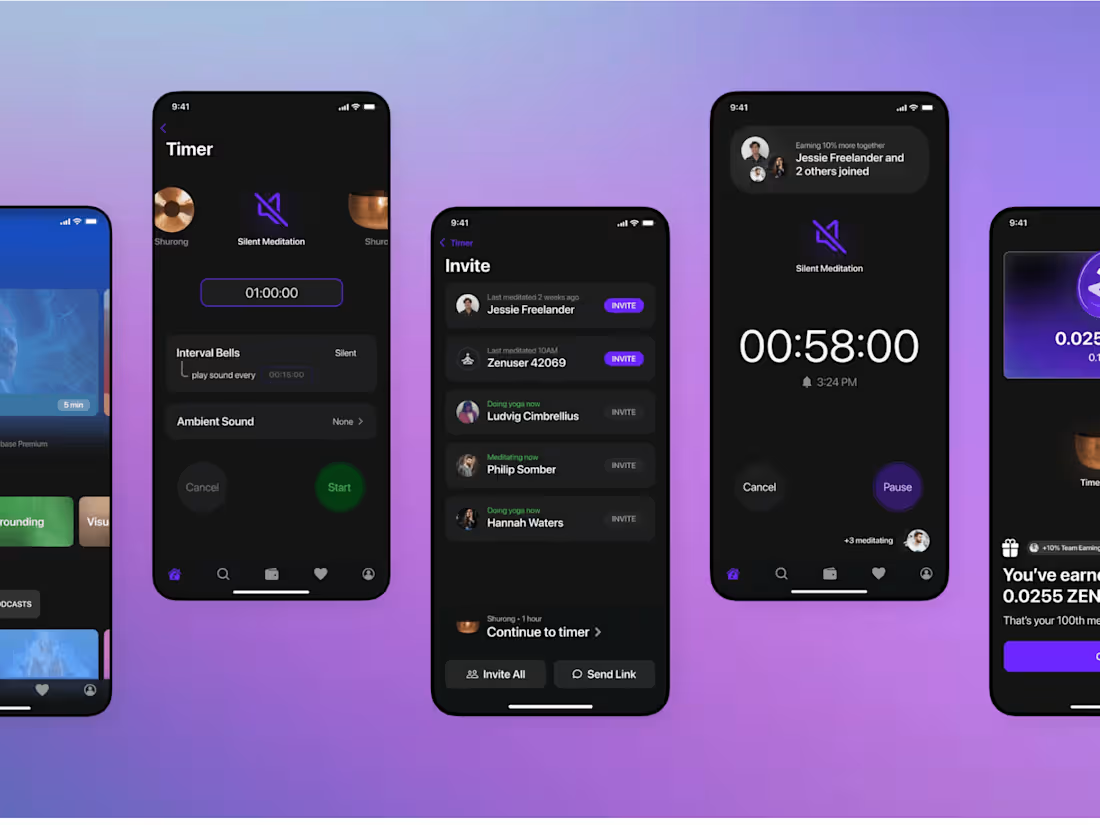
I deliver comprehensive mobile app design solutions, guiding projects from initial concept to developer handoff with a focus on intuitive, visually stunning interfaces. My process combines user-centered research with trending design techniques, including interactive prototyping and micro-interaction design, to create engaging experiences that resonate with users and drive success. What sets me apart is my expertise in optimizing for accessibility and performance, coupled with my ability to craft localization-ready designs, ensuring your app resonates with a global audience while maintaining its core aesthetic and functionality.
What's included
Project Brief
Initial document outlining project goals, target audience, and key requirements.
Research Summary (if applicable)
1. User interviews insights
2. Market analysis
3. Competitive landscape overview
User Personas (if applicable)
Detailed profiles of target users, including goals, pain points, and behaviors.
User Journey Maps (if applicable)
Visual representation of user's path through the app, highlighting key touch points.
Information Architecture
App structure and content organization, often in the form of a sitemap.
Low-fidelity Wireframes:
Simple sketches or digital outlines of key app screens and user flows.
User Story Map (if applicable)
Visual aid organizing user stories and prioritizing features for development.
Mid-fidelity Prototype
Clickable prototype demonstrating core app functionality and navigation.
Visual Design Concepts
2-3 visual direction options for the app's look and feel.
High-fidelity UI Mockups
Detailed visual designs of all app screens.
UI Style Guide
Documentation of colors, typography, icons, and other design elements.
Interaction Design Specifications
Detailed descriptions of how users interact with the app, including gestures and animations.
High-fidelity Interactive Prototype
Fully clickable model closely resembling the final app.
Usability Test Results
Findings from user testing sessions with the prototype.
Design Iteration Documentation
Changes made based on usability testing and stakeholder feedback.
Final UI Kit
Complete set of reusable design components for consistent implementation.
Responsive Design Layouts
Designs adapted for various device sizes and orientations.
Design-to-Development Handoff Package
1. Final design files
2. Asset library (icons, images, etc.)
3. Detailed annotations for developers
Design QA Checklist
List of design elements to verify during development.
Future Recommendations
Suggestions for potential features or improvements for future iterations.
Tia-Marie's other services

Contact for pricing
Tags
Figma

Sketch

Mobile Designer
Product Designer
UX Designer
Service provided by
Tia-Marie Vo San Francisco, USA
Crafting intuitive, stunning mobile designs: MVPs to full UX/UITia-Marie Vo
I deliver comprehensive mobile app design solutions, guiding projects from initial concept to developer handoff with a focus on intuitive, visually stunning interfaces. My process combines user-centered research with trending design techniques, including interactive prototyping and micro-interaction design, to create engaging experiences that resonate with users and drive success. What sets me apart is my expertise in optimizing for accessibility and performance, coupled with my ability to craft localization-ready designs, ensuring your app resonates with a global audience while maintaining its core aesthetic and functionality.
What's included
Project Brief
Initial document outlining project goals, target audience, and key requirements.
Research Summary (if applicable)
1. User interviews insights
2. Market analysis
3. Competitive landscape overview
User Personas (if applicable)
Detailed profiles of target users, including goals, pain points, and behaviors.
User Journey Maps (if applicable)
Visual representation of user's path through the app, highlighting key touch points.
Information Architecture
App structure and content organization, often in the form of a sitemap.
Low-fidelity Wireframes:
Simple sketches or digital outlines of key app screens and user flows.
User Story Map (if applicable)
Visual aid organizing user stories and prioritizing features for development.
Mid-fidelity Prototype
Clickable prototype demonstrating core app functionality and navigation.
Visual Design Concepts
2-3 visual direction options for the app's look and feel.
High-fidelity UI Mockups
Detailed visual designs of all app screens.
UI Style Guide
Documentation of colors, typography, icons, and other design elements.
Interaction Design Specifications
Detailed descriptions of how users interact with the app, including gestures and animations.
High-fidelity Interactive Prototype
Fully clickable model closely resembling the final app.
Usability Test Results
Findings from user testing sessions with the prototype.
Design Iteration Documentation
Changes made based on usability testing and stakeholder feedback.
Final UI Kit
Complete set of reusable design components for consistent implementation.
Responsive Design Layouts
Designs adapted for various device sizes and orientations.
Design-to-Development Handoff Package
1. Final design files
2. Asset library (icons, images, etc.)
3. Detailed annotations for developers
Design QA Checklist
List of design elements to verify during development.
Future Recommendations
Suggestions for potential features or improvements for future iterations.
Tia-Marie's other services
Contact for pricing