
WordPress/PHP Lead Engineers and DevelopmentGreg Jacoby
1. Discovery & Planning:
Needs Assessment: A detailed questionnaire or interview to understand the client's requirements, objectives, and target audience.
Project Plan: An outline of the project's phases, expected timelines, and milestones.
Website Sitemap: A visual representation or list detailing the planned pages/sections of the website.
2. Design:
Mockups: Graphic designs of key website pages, usually provided in a tool like Adobe XD or Figma.
Responsive Design: Adaptations of the main design for various screen sizes (desktop, tablet, mobile).
Revision Rounds: A set number of feedback and modification cycles based on the mockups.
3. Development:
Custom WordPress Theme: Development of a bespoke theme if the client does not want a pre-existing one.
Custom Plugins: Creation or modification of WordPress plugins tailored to the client's needs.
Database Design: For websites that require advanced database functions beyond WordPress's default capabilities.
Integration with Third-Party Systems: Like CRM systems, payment gateways, mailing services, etc.
Performance Optimization: Techniques to speed up the website, including caching, minification of CSS/JS files, image optimization, etc.
4. Content Implementation:
Content Upload: Populating the website with the client-provided content for each page.
SEO Configuration: Implementing on-page SEO elements like meta tags, header tags, alt tags, XML sitemaps, etc.
Multimedia Integration: Adding images, videos, sliders, etc., as per design requirements.
5. Testing & Quality Assurance:
Cross-Browser and Cross-Device Testing: Ensuring the website functions correctly across various browsers (like Chrome, Firefox, Safari) and devices.
Functionality Testing: Checking all features, forms, plugins, and integrations to make sure they work as intended.
Performance Testing: Using tools like Google PageSpeed Insights to ensure the website loads quickly and efficiently.
6. Training & Documentation:
CMS Training: Guiding the client on how to use the WordPress backend for content updates, backups, etc.
Documentation: Providing a manual or guide detailing website maintenance, content updates, and basic troubleshooting.
7. Launch:
Migration: If the site was developed on a staging server, it would be migrated to the client's live hosting environment.
Backup Setup: Implementing backup solutions to ensure the client's website data is safe and recoverable.
8. Post-Launch Support:
Bug Fixes: Addressing any issues that arise post-launch within a stipulated period.
Updates & Maintenance: Offering periodic updates to WordPress, themes, and plugins to maintain site security and performance.
Ongoing Support Packages: Optional monthly or yearly support packages for continued site maintenance and updates.
While the specifics may vary depending on the project's complexity and the client's needs, this comprehensive list serves as a robust starting point for those looking to offer WordPress & PHP design & development services.
What's included
Well-built products
We create apps and websites intelligently. Built to last, modular, and aligned with your business goals.
Custom WordPress Plugin
Creation or modification of WordPress plugins tailored to the client's needs.
Custom WordPress Theme
Development of a bespoke theme if the client does not want a pre-existing one.
Templated WP Site
A gorgeous, templated WordPress site at a great price.
WordPress Multisite Development
Development and support of complex WP multisite installations
WordPress Hosting
High speed hosting configured specifically for WP sites.
Laravel Backend Development
Laravel gurus creating backend infrastructure
Example work
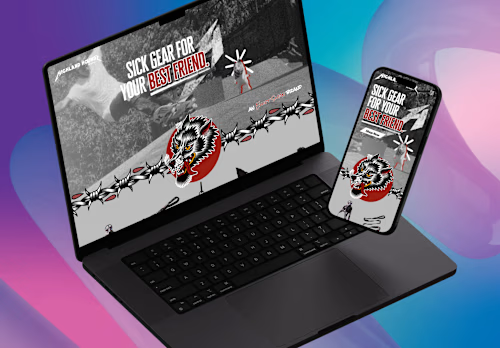
Greg's other services


Contact for pricing
Tags
Figma

GitHub Enterprise

Laravel

PHP

WordPress

Backend Engineer
Web Designer
Web Developer
Service provided by
Greg Jacoby New York, USA
- $10k+
- Earned
- 2
- Paid projects
- 5.00
- Rating
- 20
- Followers
WordPress/PHP Lead Engineers and DevelopmentGreg Jacoby
Contact for pricing
Tags
Figma
GitHub Enterprise
Laravel
PHP
WordPress
Backend Engineer
Web Designer
Web Developer
1. Discovery & Planning:
Needs Assessment: A detailed questionnaire or interview to understand the client's requirements, objectives, and target audience.
Project Plan: An outline of the project's phases, expected timelines, and milestones.
Website Sitemap: A visual representation or list detailing the planned pages/sections of the website.
2. Design:
Mockups: Graphic designs of key website pages, usually provided in a tool like Adobe XD or Figma.
Responsive Design: Adaptations of the main design for various screen sizes (desktop, tablet, mobile).
Revision Rounds: A set number of feedback and modification cycles based on the mockups.
3. Development:
Custom WordPress Theme: Development of a bespoke theme if the client does not want a pre-existing one.
Custom Plugins: Creation or modification of WordPress plugins tailored to the client's needs.
Database Design: For websites that require advanced database functions beyond WordPress's default capabilities.
Integration with Third-Party Systems: Like CRM systems, payment gateways, mailing services, etc.
Performance Optimization: Techniques to speed up the website, including caching, minification of CSS/JS files, image optimization, etc.
4. Content Implementation:
Content Upload: Populating the website with the client-provided content for each page.
SEO Configuration: Implementing on-page SEO elements like meta tags, header tags, alt tags, XML sitemaps, etc.
Multimedia Integration: Adding images, videos, sliders, etc., as per design requirements.
5. Testing & Quality Assurance:
Cross-Browser and Cross-Device Testing: Ensuring the website functions correctly across various browsers (like Chrome, Firefox, Safari) and devices.
Functionality Testing: Checking all features, forms, plugins, and integrations to make sure they work as intended.
Performance Testing: Using tools like Google PageSpeed Insights to ensure the website loads quickly and efficiently.
6. Training & Documentation:
CMS Training: Guiding the client on how to use the WordPress backend for content updates, backups, etc.
Documentation: Providing a manual or guide detailing website maintenance, content updates, and basic troubleshooting.
7. Launch:
Migration: If the site was developed on a staging server, it would be migrated to the client's live hosting environment.
Backup Setup: Implementing backup solutions to ensure the client's website data is safe and recoverable.
8. Post-Launch Support:
Bug Fixes: Addressing any issues that arise post-launch within a stipulated period.
Updates & Maintenance: Offering periodic updates to WordPress, themes, and plugins to maintain site security and performance.
Ongoing Support Packages: Optional monthly or yearly support packages for continued site maintenance and updates.
While the specifics may vary depending on the project's complexity and the client's needs, this comprehensive list serves as a robust starting point for those looking to offer WordPress & PHP design & development services.
What's included
Well-built products
We create apps and websites intelligently. Built to last, modular, and aligned with your business goals.
Custom WordPress Plugin
Creation or modification of WordPress plugins tailored to the client's needs.
Custom WordPress Theme
Development of a bespoke theme if the client does not want a pre-existing one.
Templated WP Site
A gorgeous, templated WordPress site at a great price.
WordPress Multisite Development
Development and support of complex WP multisite installations
WordPress Hosting
High speed hosting configured specifically for WP sites.
Laravel Backend Development
Laravel gurus creating backend infrastructure
Example work
Greg's other services
Contact for pricing