
UI designerEmanuell Aigbomobe
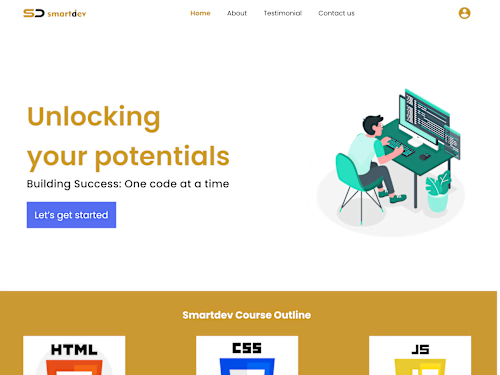
+I made sure I designed a clean and seamless user intuitive interface for this Edutech company. I collaborated with other designers, content writers, developers(both front-end and backend) and my project manager to make sure the website design fits what the company wants.
What's included
This are the deliverables for my UI design jobs
Wireframes: These are low-fidelity visual representations of your interface layout. They show the basic structure of the user interface without getting into specific visual details.
Interactive Prototypes: Interactive prototypes allow stakeholders and developers to experience the flow of the user interface. Tools like Figma, Adobe XD, or InVision can help you create clickable prototypes that simulate user interactions.
High-Fidelity Mockups: These are detailed visual representations of the user interface, showing the final design elements, typography, colors, and more. High-fidelity mockups provide a clear vision of what the final product will look like.
Design Components: Create a library of design components, including buttons, forms, icons, and other UI elements. These can be shared with developers to ensure consistency throughout the development process.
Style Guides and Design Systems: These documents outline the design principles, typography choices, color schemes, spacing, and other design guidelines. They help maintain a consistent look and feel across different parts of the application.
User Flows: Diagrams illustrating how users will navigate through the app or website. These help ensure that the user experience is intuitive and logical.
Responsive Design: Demonstrate how the interface will adapt to different screen sizes and orientations, ensuring a consistent and user-friendly experience across various devices.
Usability Testing Reports: If you've conducted usability testing, provide a summary of the findings along with any design refinements you've made based on the feedback.
Collaboration and Feedback Documents: Use tools like Figma, Sketch, or Adobe XD to share your designs with stakeholders and gather feedback. Document feedback and changes to ensure everyone is on the same page.
Icon and Image Assets: Provide the necessary icon and image assets in appropriate formats and sizes for implementation.
Design Presentations: Create presentations to communicate your design rationale, user research insights, and how your design solutions align with the project's goals.
File Organization: Keep your design files organized and use version control to manage changes effectively.
Example work
Emanuell's other services

Starting at$25 /hr
Tags
Figma

Google Drive

Brand Designer
UI Designer
Web Designer
Service provided by
Emanuell Aigbomobe Akure, Nigeria
UI designerEmanuell Aigbomobe
Starting at$25 /hr
Tags
Figma
Google Drive
Brand Designer
UI Designer
Web Designer
+I made sure I designed a clean and seamless user intuitive interface for this Edutech company. I collaborated with other designers, content writers, developers(both front-end and backend) and my project manager to make sure the website design fits what the company wants.
What's included
This are the deliverables for my UI design jobs
Wireframes: These are low-fidelity visual representations of your interface layout. They show the basic structure of the user interface without getting into specific visual details.
Interactive Prototypes: Interactive prototypes allow stakeholders and developers to experience the flow of the user interface. Tools like Figma, Adobe XD, or InVision can help you create clickable prototypes that simulate user interactions.
High-Fidelity Mockups: These are detailed visual representations of the user interface, showing the final design elements, typography, colors, and more. High-fidelity mockups provide a clear vision of what the final product will look like.
Design Components: Create a library of design components, including buttons, forms, icons, and other UI elements. These can be shared with developers to ensure consistency throughout the development process.
Style Guides and Design Systems: These documents outline the design principles, typography choices, color schemes, spacing, and other design guidelines. They help maintain a consistent look and feel across different parts of the application.
User Flows: Diagrams illustrating how users will navigate through the app or website. These help ensure that the user experience is intuitive and logical.
Responsive Design: Demonstrate how the interface will adapt to different screen sizes and orientations, ensuring a consistent and user-friendly experience across various devices.
Usability Testing Reports: If you've conducted usability testing, provide a summary of the findings along with any design refinements you've made based on the feedback.
Collaboration and Feedback Documents: Use tools like Figma, Sketch, or Adobe XD to share your designs with stakeholders and gather feedback. Document feedback and changes to ensure everyone is on the same page.
Icon and Image Assets: Provide the necessary icon and image assets in appropriate formats and sizes for implementation.
Design Presentations: Create presentations to communicate your design rationale, user research insights, and how your design solutions align with the project's goals.
File Organization: Keep your design files organized and use version control to manage changes effectively.
Example work
Emanuell's other services
$25 /hr