
Data cleanup or automation for CSV, Excel and Google SheetsJustin Pulford
From $150.
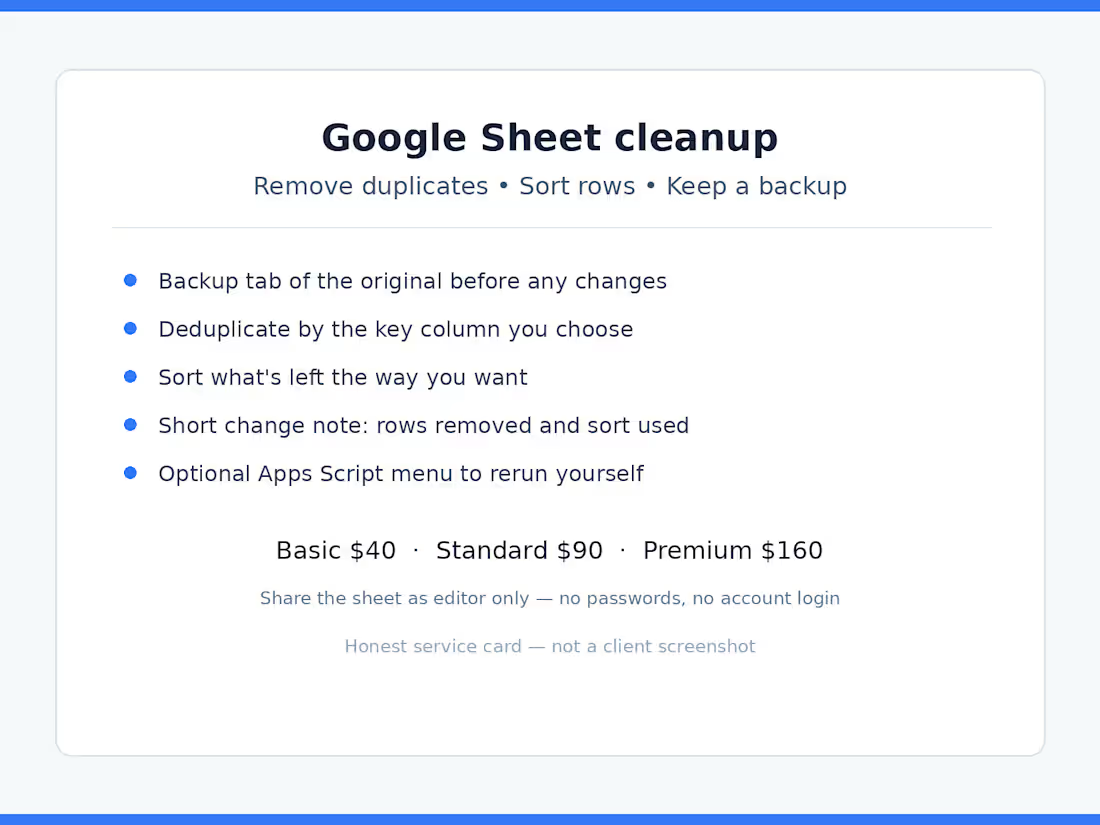
Messy exports and shared sheets are hard to trust. I'll clean up your CSV, Excel or Google Sheets data: duplicates removed, extra spaces trimmed, dates put in one format, columns split or merged, and rows sorted the way you need. You get a clean copy and a short list of exactly what changed. Your original file is never changed. On higher tiers I also give you a small script so you can repeat the cleanup on a schedule yourself.
Examples of my approach (both are samples, not client work):
- A Python CSV cleaner with 32 unit tests, built on made-up data.
- An Apps Script sample that removes duplicates and sorts rows, tested against a stand-in for Google Sheets, not a live Sheet.
Starter, $150, 3 days, 1 revision:
- Included: a one-time cleanup of up to 3 files or sheet tabs with the same layout, up to 50,000 rows each: duplicates removed by the columns you choose, spaces trimmed, blank rows removed, up to 5 date columns put in one format, columns split or merged as needed, a sort order you choose, and a change summary. Dates that could be read two ways are listed for you to check rather than guessed.
- Not included: the script, lookups or merging data across different files, pulling in outside data, building reports or charts, and database or CRM work.
- You provide: the files (or one Google Sheet shared with me as an editor), which columns decide a duplicate and which copy to keep, which columns hold dates, and how you want the result sorted.
Standard, $225, 5 days, 1 revision:
- Included: everything in Starter, plus a reusable script so you can rerun the cleanup yourself. For CSV or Excel this is a Python script with written run steps for Windows and Mac. For Google Sheets it is an Apps Script added to your sheet with a "Cleanup" menu and a preview step.
- Not included: a timed or scheduled run, and lookups or merging data across different files.
- You provide: everything listed in Starter. For Google Sheets, you approve the script's permissions in your own Google account the first time it runs, and my written steps walk you through it.
Advanced, $350, 7 days, 2 revisions:
- Included: everything in Standard, plus one simple scheduled automation that runs in your own account or on your own computer (for example, a Google Sheets timer you switch on yourself, or Windows Task Scheduler or Mac cron steps for the Python script), one custom rule on your existing columns (for example, putting phone numbers in one format), a backup made before each run, and 7 days of support over Contra messages.
- Not included: running the automation on my side, connecting to outside services or APIs, and ongoing changes after the 7 days.
- You provide: everything listed in Standard, plus how often it should run.
How we work: everything is in writing through Contra messages, with no calls, video meetings or screen sharing. You keep ownership of your data, and the files I deliver are yours to use and change. I never ask for your passwords or log in to your accounts. When the project is complete, I delete your files and any working copies of your data.


Data cleanup or automation for CSV, Excel and Google SheetsJustin Pulford
Starting at$150
Duration3 days
Tags
Python
From $150.
Messy exports and shared sheets are hard to trust. I'll clean up your CSV, Excel or Google Sheets data: duplicates removed, extra spaces trimmed, dates put in one format, columns split or merged, and rows sorted the way you need. You get a clean copy and a short list of exactly what changed. Your original file is never changed. On higher tiers I also give you a small script so you can repeat the cleanup on a schedule yourself.
Examples of my approach (both are samples, not client work):
- A Python CSV cleaner with 32 unit tests, built on made-up data.
- An Apps Script sample that removes duplicates and sorts rows, tested against a stand-in for Google Sheets, not a live Sheet.
Starter, $150, 3 days, 1 revision:
- Included: a one-time cleanup of up to 3 files or sheet tabs with the same layout, up to 50,000 rows each: duplicates removed by the columns you choose, spaces trimmed, blank rows removed, up to 5 date columns put in one format, columns split or merged as needed, a sort order you choose, and a change summary. Dates that could be read two ways are listed for you to check rather than guessed.
- Not included: the script, lookups or merging data across different files, pulling in outside data, building reports or charts, and database or CRM work.
- You provide: the files (or one Google Sheet shared with me as an editor), which columns decide a duplicate and which copy to keep, which columns hold dates, and how you want the result sorted.
Standard, $225, 5 days, 1 revision:
- Included: everything in Starter, plus a reusable script so you can rerun the cleanup yourself. For CSV or Excel this is a Python script with written run steps for Windows and Mac. For Google Sheets it is an Apps Script added to your sheet with a "Cleanup" menu and a preview step.
- Not included: a timed or scheduled run, and lookups or merging data across different files.
- You provide: everything listed in Starter. For Google Sheets, you approve the script's permissions in your own Google account the first time it runs, and my written steps walk you through it.
Advanced, $350, 7 days, 2 revisions:
- Included: everything in Standard, plus one simple scheduled automation that runs in your own account or on your own computer (for example, a Google Sheets timer you switch on yourself, or Windows Task Scheduler or Mac cron steps for the Python script), one custom rule on your existing columns (for example, putting phone numbers in one format), a backup made before each run, and 7 days of support over Contra messages.
- Not included: running the automation on my side, connecting to outside services or APIs, and ongoing changes after the 7 days.
- You provide: everything listed in Standard, plus how often it should run.
How we work: everything is in writing through Contra messages, with no calls, video meetings or screen sharing. You keep ownership of your data, and the files I deliver are yours to use and change. I never ask for your passwords or log in to your accounts. When the project is complete, I delete your files and any working copies of your data.
$150