
Website designAkshat Sharma
TIMELINE
Week 1: Project Initiation and Planning
Day 1: Project Kickoff Meeting with the client to discuss goals, objectives, and project scope.
Days 2-3: Research, competitor analysis, and defining project requirements.
Days 4-5: Develop user personas, create a sitemap, and begin wireframing.
Week 2: Design Development and Conceptualization
Days 1-2: Continue wireframing and initial design concept development.
Days 3-5: Refine design concepts based on client feedback.
Day 6: Develop a comprehensive style guide.
Week 3: Design Finalization and Prototype
Days 1-2: Present the final design to the client and make necessary revisions.
Days 3-4: Create high-fidelity design mockups for various pages.
Day 5: Develop an interactive prototype.
Day 6: Conduct usability testing with real users.
Day 7: Revise the design based on usability test results.
Week 4: Handoff and Launch
Day 1: Handoff meeting with the client to deliver all design assets, documentation, and any necessary training.
Days 2-4: Allow the client to review the final design and make any last-minute revisions.
Day 5: Final approval and sign-off from the client.
Days 6-7: Web development, quality assurance testing, and official website launch.
What's included
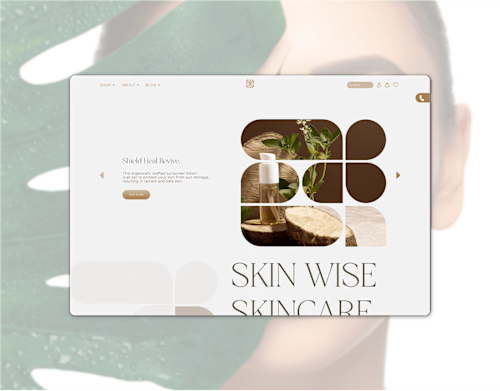
Website Design Mockups
These are visual representations of the website's design, often in the form of static images or wireframes, to help the client visualize the design concept.
Responsive Design
Ensure the design is adaptable to various devices and screen sizes, and provide responsive layouts or breakpoints for mobile, tablet, and desktop.
Interactive Prototypes
Create interactive prototypes or mockups that allow clients to experience the website's functionality and user flow before development.
High-Fidelity Designs
Present final, detailed design files that include graphics, images, typography, and color choices.
Design Assets
Provide all design assets, including images, icons, fonts, and other graphical elements used in the design.
Style Guides
Deliver a comprehensive style guide or brand guidelines document that outlines design principles, typography, color schemes, and usage guidelines for the client or developers.
Development Files
Share design files in a format suitable for development, such as PSDs, Sketch files, or Adobe XD files, along with any necessary specifications for web developers.
User Flows and Wireframes
Detailed user flows, sitemaps, and wireframes to help plan the structure and layout of the website.
Example work

Akshat's other services

Starting at$25 /hr
Tags
Adobe Illustrator

Adobe Photoshop

Adobe XD

Figma

UI Designer
UX Designer
Web Designer
Service provided by
Akshat Sharma Delhi, India
Website designAkshat Sharma
Starting at$25 /hr
Tags
Adobe Illustrator
Adobe Photoshop
Adobe XD
Figma
UI Designer
UX Designer
Web Designer
TIMELINE
Week 1: Project Initiation and Planning
Day 1: Project Kickoff Meeting with the client to discuss goals, objectives, and project scope.
Days 2-3: Research, competitor analysis, and defining project requirements.
Days 4-5: Develop user personas, create a sitemap, and begin wireframing.
Week 2: Design Development and Conceptualization
Days 1-2: Continue wireframing and initial design concept development.
Days 3-5: Refine design concepts based on client feedback.
Day 6: Develop a comprehensive style guide.
Week 3: Design Finalization and Prototype
Days 1-2: Present the final design to the client and make necessary revisions.
Days 3-4: Create high-fidelity design mockups for various pages.
Day 5: Develop an interactive prototype.
Day 6: Conduct usability testing with real users.
Day 7: Revise the design based on usability test results.
Week 4: Handoff and Launch
Day 1: Handoff meeting with the client to deliver all design assets, documentation, and any necessary training.
Days 2-4: Allow the client to review the final design and make any last-minute revisions.
Day 5: Final approval and sign-off from the client.
Days 6-7: Web development, quality assurance testing, and official website launch.
What's included
Website Design Mockups
These are visual representations of the website's design, often in the form of static images or wireframes, to help the client visualize the design concept.
Responsive Design
Ensure the design is adaptable to various devices and screen sizes, and provide responsive layouts or breakpoints for mobile, tablet, and desktop.
Interactive Prototypes
Create interactive prototypes or mockups that allow clients to experience the website's functionality and user flow before development.
High-Fidelity Designs
Present final, detailed design files that include graphics, images, typography, and color choices.
Design Assets
Provide all design assets, including images, icons, fonts, and other graphical elements used in the design.
Style Guides
Deliver a comprehensive style guide or brand guidelines document that outlines design principles, typography, color schemes, and usage guidelines for the client or developers.
Development Files
Share design files in a format suitable for development, such as PSDs, Sketch files, or Adobe XD files, along with any necessary specifications for web developers.
User Flows and Wireframes
Detailed user flows, sitemaps, and wireframes to help plan the structure and layout of the website.
Example work
Akshat's other services
$25 /hr