
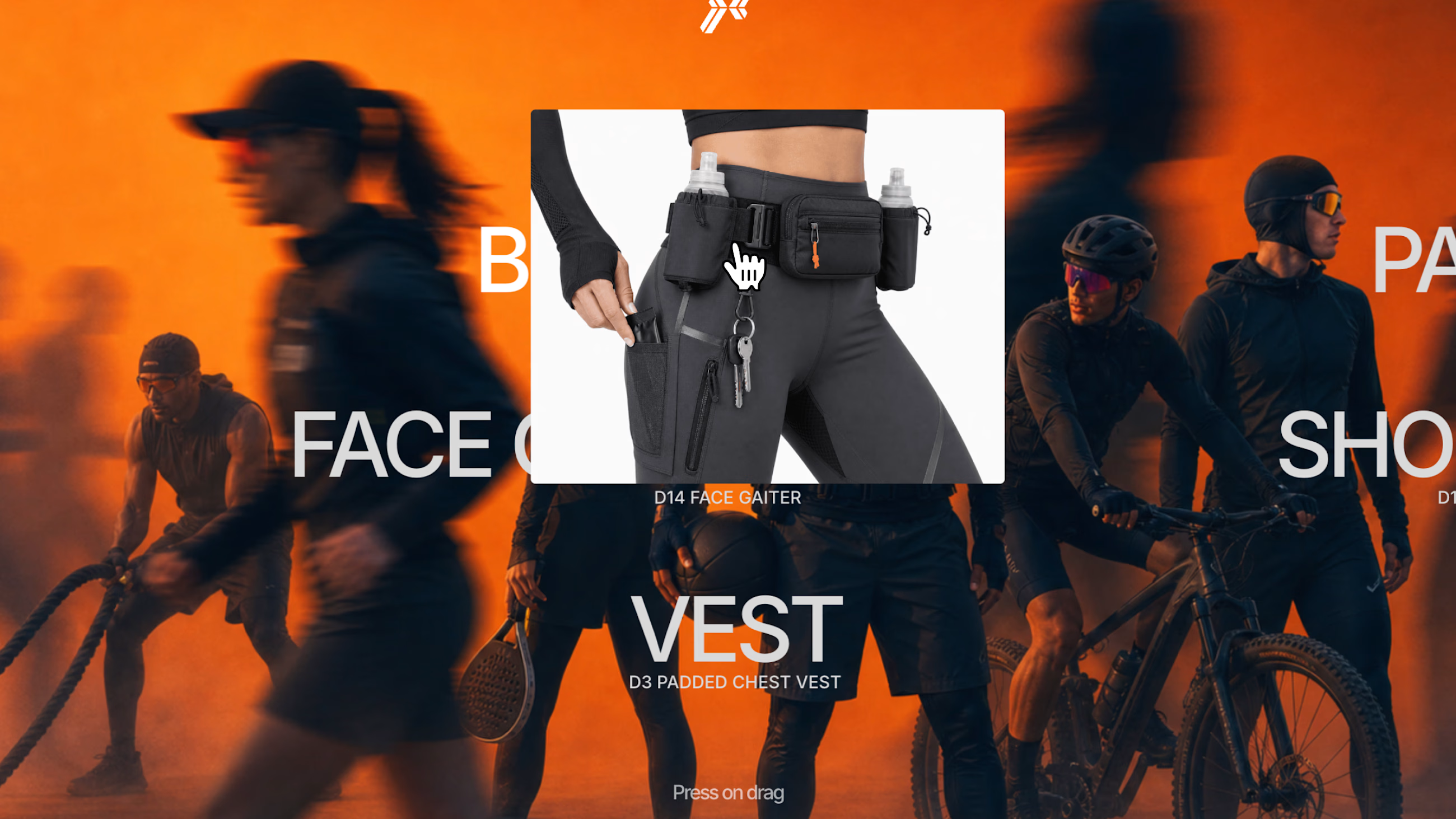
Image Marquee Rows is an interactive Framer component for building dynamic visual sections from manual content or Framer CMS collections.
Create multiple horizontal rows of text and images that move in alternating directions, respond to drag, and add subtle parallax depth as visitors interact with the section. Each item can include a title, descriptor, image, and optional link. On desktop, hovering over an item can reveal a focused image preview, while the marquee continues to move. On mobile, previews can appear inline after the active item for a cleaner touch-friendly layout.
Use it to turn portfolios, product collections, visual directories, brand archives, editorial lists, and interactive landing page sections into a richer browsing experience. Instead of a static grid, Image Marquee Rows gives your content movement, depth, and a tactile feel while staying easy to configure inside Framer.
Key features
Manual content and Framer CMS-ready structure
Multiple marquee rows with independent direction controls
Default alternating motion pattern: left, right, left
Drag interaction for exploring rows manually
Optional parallax motion for added depth
Title, descriptor, image, and optional link for each item
Desktop hover image preview
Mobile tap behavior with inline image placement
Seamless looping marquee animation
Adjustable speed, spacing, typography, colors, image size, and preview style
Pause or slow down on hover
Reduced-motion fallback
Designed for portfolios, product showcases, editorial pages, visual indexes, and landing sections
Interaction modes
Auto marquee: rows move continuously
Drag mode: visitors can pull rows left or right
Parallax mode: images and text shift with subtle depth based on cursor or scroll movement
Hover preview: focused image appears when an item is active
Mobile inline preview: image appears directly after the selected item
Suggested use cases
Portfolio project showcases
Product and collection pages
Brand archive sections
Editorial indexes
Interactive landing page blocks
Visual navigation sections
Framer CMS galleries
Featured work rows
Feature tagline options
Turn your CMS content into a draggable image marquee.
Moving image rows with drag, parallax, and hover previews.
A visual marquee system for portfolios, products, and editorial pages.
Add motion, depth, and interaction to your Framer CMS lists.
Buyer-facing value
Image Marquee Rows helps designers replace static grids with a more memorable browsing pattern. Visitors can scan content quickly, drag through rows, feel subtle parallax movement, and reveal images at the moment they interact. It is expressive enough for hero sections and practical enough for CMS-powered directories.
Refund Policy
Due to the nature of digital products, all sales are final and refunds are not provided once a purchase is completed. Please make sure the product fits your needs and review all details carefully before making a purchase.
Get it for$15.00
Tags
CMS
Framer

Gallery
styled-components

Framer Designer
framer-component
Interactive
Product created by
Place Peak Helsinki, Finland
Get it for$15.00
Tags
CMS
Framer
Gallery
styled-components
Framer Designer
framer-component
Interactive
Image Marquee Rows is an interactive Framer component for building dynamic visual sections from manual content or Framer CMS collections.
Create multiple horizontal rows of text and images that move in alternating directions, respond to drag, and add subtle parallax depth as visitors interact with the section. Each item can include a title, descriptor, image, and optional link. On desktop, hovering over an item can reveal a focused image preview, while the marquee continues to move. On mobile, previews can appear inline after the active item for a cleaner touch-friendly layout.
Use it to turn portfolios, product collections, visual directories, brand archives, editorial lists, and interactive landing page sections into a richer browsing experience. Instead of a static grid, Image Marquee Rows gives your content movement, depth, and a tactile feel while staying easy to configure inside Framer.
Key features
Manual content and Framer CMS-ready structure
Multiple marquee rows with independent direction controls
Default alternating motion pattern: left, right, left
Drag interaction for exploring rows manually
Optional parallax motion for added depth
Title, descriptor, image, and optional link for each item
Desktop hover image preview
Mobile tap behavior with inline image placement
Seamless looping marquee animation
Adjustable speed, spacing, typography, colors, image size, and preview style
Pause or slow down on hover
Reduced-motion fallback
Designed for portfolios, product showcases, editorial pages, visual indexes, and landing sections
Interaction modes
Auto marquee: rows move continuously
Drag mode: visitors can pull rows left or right
Parallax mode: images and text shift with subtle depth based on cursor or scroll movement
Hover preview: focused image appears when an item is active
Mobile inline preview: image appears directly after the selected item
Suggested use cases
Portfolio project showcases
Product and collection pages
Brand archive sections
Editorial indexes
Interactive landing page blocks
Visual navigation sections
Framer CMS galleries
Featured work rows
Feature tagline options
Turn your CMS content into a draggable image marquee.
Moving image rows with drag, parallax, and hover previews.
A visual marquee system for portfolios, products, and editorial pages.
Add motion, depth, and interaction to your Framer CMS lists.
Buyer-facing value
Image Marquee Rows helps designers replace static grids with a more memorable browsing pattern. Visitors can scan content quickly, drag through rows, feel subtle parallax movement, and reveal images at the moment they interact. It is expressive enough for hero sections and practical enough for CMS-powered directories.
Refund Policy
Due to the nature of digital products, all sales are final and refunds are not provided once a purchase is completed. Please make sure the product fits your needs and review all details carefully before making a purchase.
$15.00