
BulgeDistortion — WebGL Reveal for Framer
A GPU-accelerated WebGL thumbnail component for Framer that replicates the exact distortion interaction from the viral Codrops WebGL Bulge demo.
When an image enters the viewport, it starts fully distorted and relaxes back to its natural state — identical to the easing that happens when a mouse lifts off a hovered card. On mobile, the same effect responds to touch: press, drag, release.
Live preview here
What's included:
Component Link and Remix Link.
Key features:
WebGL bulge shader with expo.out easing (original Codrops curve)
Scroll-triggered reveal with stagger, threshold, and replay on revisit
Hover distortion with cursor tracking — and full touch support on mobile
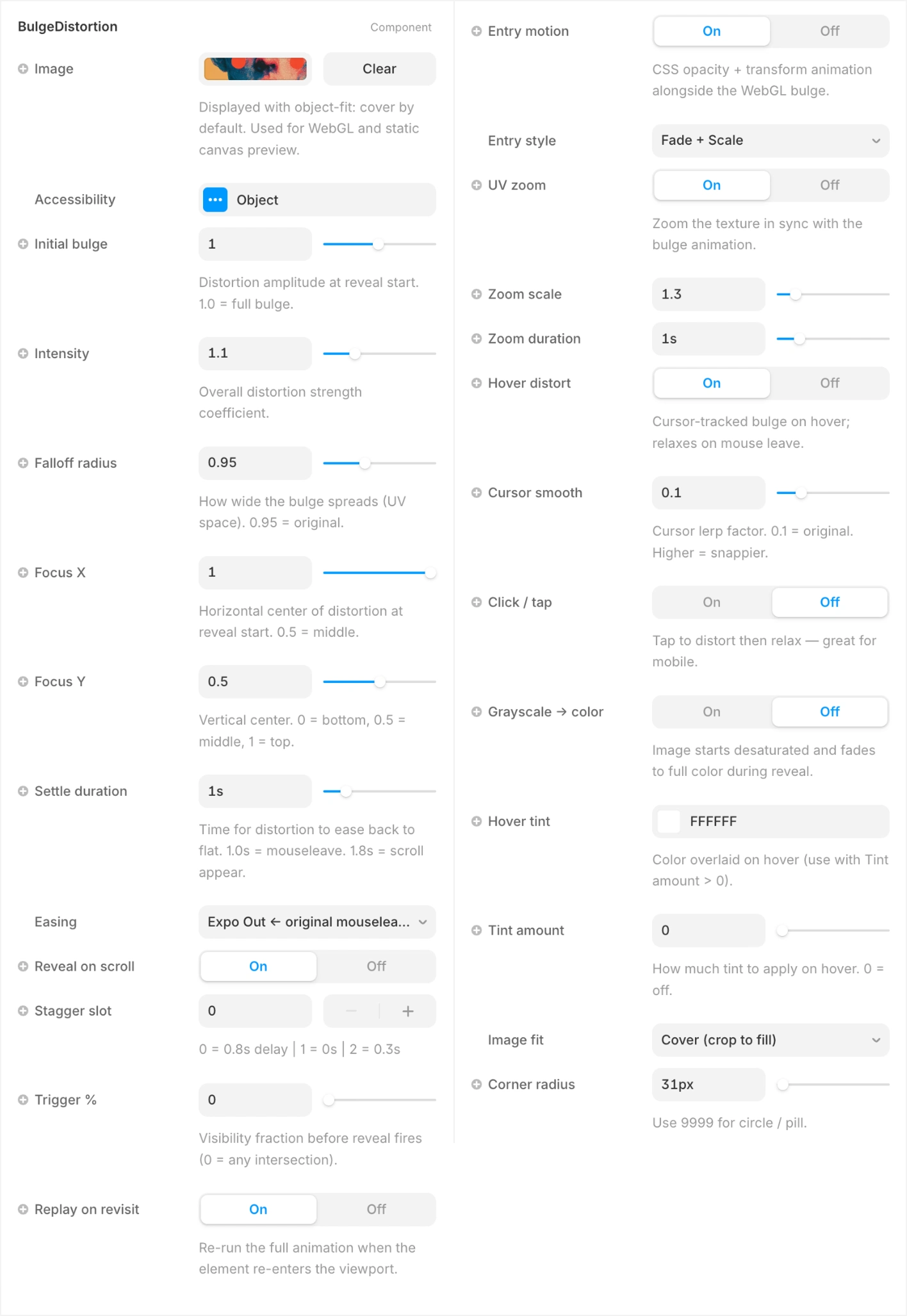
UV Zoom in sync with the bulge
Grayscale → color transition on reveal
Hover tint overlay for duotone effects
Image fit: Cover, Contain, or Fill
8 CSS entry presets (Fade, Slide Up, Zoom In, Tilt In, Float Up…)
Shared animation loop — stays fast with 6+ instances on screen
Pauses automatically when the browser tab is hidden
Respects
prefers-reduced-motionShows the real image in the Framer canvas and on export
How to install:
In Framer, go to Assets → Code → New File
Paste the component code and save
Drag BulgeDistortion onto any frame
Assign an image and configure in the right panel
No dependencies. No external libraries. Pure WebGL + React.
Get it for$10.00
Tags
Framer

WebGL

Framer Designer
Framer Developer
Product created by
Fabrizzio Zampieri proDenver, USA
- $25k+
- Earned
- 11
- Paid projects
- 4.84
- Rating
- 390
- Followers
Fabrizzio's other products
Framer Blur Text Reveal
$10.00
Framer Component Water Ripple — Interactive WebGL Distortion
$10.00
Get it for$10.00
Tags
Framer
WebGL
Framer Designer
Framer Developer
BulgeDistortion — WebGL Reveal for Framer
A GPU-accelerated WebGL thumbnail component for Framer that replicates the exact distortion interaction from the viral Codrops WebGL Bulge demo.
When an image enters the viewport, it starts fully distorted and relaxes back to its natural state — identical to the easing that happens when a mouse lifts off a hovered card. On mobile, the same effect responds to touch: press, drag, release.
Live preview here
What's included:
Component Link and Remix Link.
Key features:
WebGL bulge shader with expo.out easing (original Codrops curve)
Scroll-triggered reveal with stagger, threshold, and replay on revisit
Hover distortion with cursor tracking — and full touch support on mobile
UV Zoom in sync with the bulge
Grayscale → color transition on reveal
Hover tint overlay for duotone effects
Image fit: Cover, Contain, or Fill
8 CSS entry presets (Fade, Slide Up, Zoom In, Tilt In, Float Up…)
Shared animation loop — stays fast with 6+ instances on screen
Pauses automatically when the browser tab is hidden
Respects
prefers-reduced-motionShows the real image in the Framer canvas and on export
How to install:
In Framer, go to Assets → Code → New File
Paste the component code and save
Drag BulgeDistortion onto any frame
Assign an image and configure in the right panel
No dependencies. No external libraries. Pure WebGL + React.
Fabrizzio's other products
Framer Blur Text Reveal
$10.00
Framer Component Water Ripple — Interactive WebGL Distortion
$10.00
$10.00