
Thesaurus Tooltip - Definitions and synonyms for any word on your Framer site
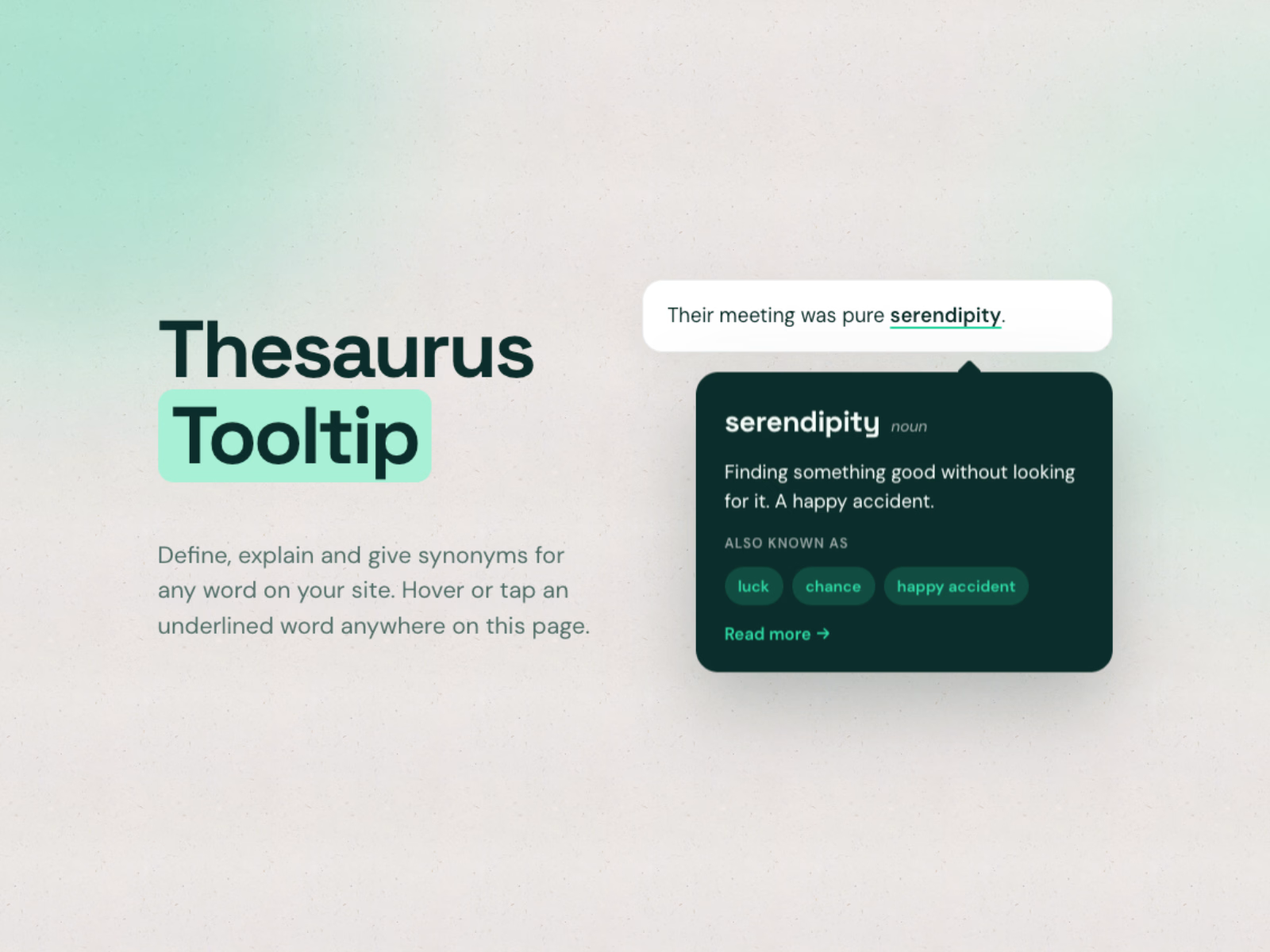
Define, explain and give synonyms for any word on your site. One component, one glossary, every page.
Thesaurus Tooltip is a Framer code component that turns words into little explainers. Add your terms once, and every matching word on the page gets a subtle underline and a tooltip with the definition, an optional word type and synonyms as chips. No plugins, no backend, no extra Framer plan needed.
Check out the live demo here: https://thesaurustooltip.framer.website
What it does
You fill a list of terms in the property panel: the word, alternative spellings, a definition, synonyms and an optional link. The component then finds those words in your text and adds the tooltip. It can work on a paragraph you type into the component, on any layer you connect to its content slot, or on the whole page, including CMS pages when you place it on the template.
What's included
ThesaurusTooltip.tsx - drop straight into Framer, no setup needed
Setup guide with step by step instructions
Features
Unlimited terms, each with word, alternative spellings, type, definition, synonyms and a learn more link
Three modes: own text, content slot or whole page
Whole page mode with include and skip selectors, so navigation, headings or footers stay untouched
Works with CMS pages: put it on the template and every article gets the glossary
Underline every occurrence or only the first one, whole word and match case options
Open on hover, tap or click, with keyboard support (Tab and Enter)
Tooltip above, below or automatic, flips when there is no room
Word style: dotted, dashed, solid, highlight or none, with color and weight
Fully styleable tooltip: font, size, colors, radius, padding, max width, shadow and arrow
Renders on top of everything, so it also works in overflow hidden sections and sticky headers
Search engines see your original text unchanged
Reduced motion support, no external dependencies, works on every Framer plan
Who it's for
Designers, writers, agencies, educators and SaaS teams who use jargon, brand names or specialist terms on their Framer site and want visitors to understand them without leaving the page.
Requirements
Framer
Works with any Framer template
License
One-time purchase. Use on unlimited personal and client projects.
Refund Policy
Due to the digital nature of this product, all sales are final. Once the file has been downloaded, refunds are not offered.
However, if you experience a technical issue that prevents the component from working as described, please reach out within 14 days of purchase and I will do my best to resolve it. If the issue cannot be fixed, a full refund will be provided. For questions, contact: info@zo-e.nl


Michelle's other products

Yoga Studio - Framer OnePage Template
$49.00
LineScroller - Framer Component
$9.00
Get it for$6.00
Tags
Framer
Web Designer
Thesaurus Tooltip - Definitions and synonyms for any word on your Framer site
Define, explain and give synonyms for any word on your site. One component, one glossary, every page.
Thesaurus Tooltip is a Framer code component that turns words into little explainers. Add your terms once, and every matching word on the page gets a subtle underline and a tooltip with the definition, an optional word type and synonyms as chips. No plugins, no backend, no extra Framer plan needed.
Check out the live demo here: https://thesaurustooltip.framer.website
What it does
You fill a list of terms in the property panel: the word, alternative spellings, a definition, synonyms and an optional link. The component then finds those words in your text and adds the tooltip. It can work on a paragraph you type into the component, on any layer you connect to its content slot, or on the whole page, including CMS pages when you place it on the template.
What's included
ThesaurusTooltip.tsx - drop straight into Framer, no setup needed
Setup guide with step by step instructions
Features
Unlimited terms, each with word, alternative spellings, type, definition, synonyms and a learn more link
Three modes: own text, content slot or whole page
Whole page mode with include and skip selectors, so navigation, headings or footers stay untouched
Works with CMS pages: put it on the template and every article gets the glossary
Underline every occurrence or only the first one, whole word and match case options
Open on hover, tap or click, with keyboard support (Tab and Enter)
Tooltip above, below or automatic, flips when there is no room
Word style: dotted, dashed, solid, highlight or none, with color and weight
Fully styleable tooltip: font, size, colors, radius, padding, max width, shadow and arrow
Renders on top of everything, so it also works in overflow hidden sections and sticky headers
Search engines see your original text unchanged
Reduced motion support, no external dependencies, works on every Framer plan
Who it's for
Designers, writers, agencies, educators and SaaS teams who use jargon, brand names or specialist terms on their Framer site and want visitors to understand them without leaving the page.
Requirements
Framer
Works with any Framer template
License
One-time purchase. Use on unlimited personal and client projects.
Refund Policy
Due to the digital nature of this product, all sales are final. Once the file has been downloaded, refunds are not offered.
However, if you experience a technical issue that prevents the component from working as described, please reach out within 14 days of purchase and I will do my best to resolve it. If the issue cannot be fixed, a full refund will be provided. For questions, contact: info@zo-e.nl
Michelle's other products
Yoga Studio - Framer OnePage Template
$49.00
LineScroller - Framer Component
$9.00
$6.00