
Outlook Email Attachments → OneDrive Auto-Save Pipeline
Important files land in your inbox every day. Most people save them manually — one by one.
Built a Make.com (http://Make.com) workflow that watches your Outlook inbox for new messages, lists any attachments, downloads them automatically, and uploads each file straight into OneDrive — organised and stored without you lifting a finger.
It's the kind of thing that only takes a few seconds per email, until it's hundreds of emails. Then it's hours. This flow gives those hours back.
Stack: Microsoft 365 Outlook · Make.com (http://Make.com) · OneDrive
4
198

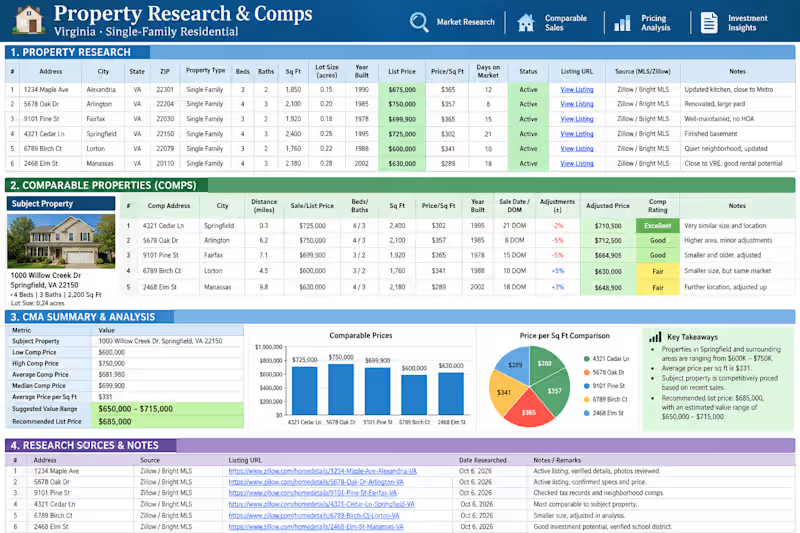
🏡 Property Comps Research Spreadsheet
A sample of my real estate research and data organization workflow using Virginia single-family properties. I research comparable properties, organize key property details, calculate price-per-square-foot, review listing status and days on market, and summarize the data into a clear CMA-style analysis.
What’s included:
Property & listing research
Comparable property analysis
Price & $/Sq Ft comparison
Property details and adjustments
CMA summary & suggested value range
Research sources and notes
Clean, organized, client-ready spreadsheet
This type of research helps real estate investors, agents, property managers, and acquisition teams quickly evaluate properties and make informed pricing decisions.
Need reliable property research and well-organized comps? I can research your target market, identify relevant comparable properties, verify the data, and turn the findings into a clean spreadsheet you can use for your next property decision. Let’s connect and build a property research system that saves you time and gives you clearer numbers.
0
30


Stop Managing Files. Start Managing Your Growth.
Do you own your data, or does your data own you?
Most businesses I work with share the same frustration: "I know I saved that file, but I have no idea where it is."
Recently, I audited a massive 180GB+ ecosystem spread across four different Google Drives—Personal, Business, Rentals, and Property Inspections. It was a digital labyrinth of duplicates, mismatched names, and fragmented folders.
The transformation?
In just 3 days, we moved from 180GB of digital noise to a streamlined, multi-tier architecture where every file is exactly two clicks away.
Why does this matter?
Organization isn't just about "cleaning up"; it’s about mental bandwidth. When your operations are structured:
You stop wasting 20% of your day searching for documents.
Your team syncs effortlessly across devices.
Your business is ready to scale without the clutter.
I specialize in turning digital chaos into high-efficiency systems—whether it’s Cloud Storage Architecture, B2B Lead Databases, or Operational Workflows.
If your Google Drive or Dropbox feels like a junk drawer, let's fix that.
Drop a "System" in the comments if you’re ready to reclaim your storage (and your time)!
#DigitalOrganization #Operations #Efficiency #CloudStorage #WorkflowOptimization #SystemsBuilding
0
133


Multi-Drive Architecture: Synchronizing & Organizing 4 Enterprise Streams
Project Overview:
The client operated with four distinct Google Drives (Personal, Giant Ventures, WMBG Rentals, and Lock & Key Property Inspection) all linked under a single account. The data was heavily fragmented, with business assets, rental documents, and personal backups mixed across all platforms. I was hired to consolidate and structure this 100GB+ ecosystem into a unified, professional workspace.
The Challenges:
Cross-Drive Clutter: Files from different businesses were intermingled, causing massive confusion and slow retrieval.
Storage Waste: High volume of redundant backups and temporary files taking up valuable cloud space.
Syncing Issues: Inconsistent folder naming prevented smooth access across mobile and desktop devices.
My Solution & Workflow:
Unified Folder Hierarchy: Designed a master structure that separated the 4 entities while maintaining a logical link between them.
Deep Data Sorting: Manually audited and moved over 100GB of files into their respective business or personal categories.
The "Zero-Duplicate" Protocol: Identified and removed redundant files to optimize storage and reduce costs.
Standardized Naming Convention: Established a consistent file-naming system for "Lock & Key" and "WMBG Rentals" to ensure future scalability.
The Results:
Turnaround Time: Completed the entire migration and organization within 3 days (ahead of schedule).
Efficiency Boost: The client can now locate any document from any of the 4 drives in seconds.
Seamless Sync: Guaranteed 100% folder accessibility across all client devices.
0
93
