
UI/UX Designer | Fintech, EdTech, SaaS, B2B & B2C Designer

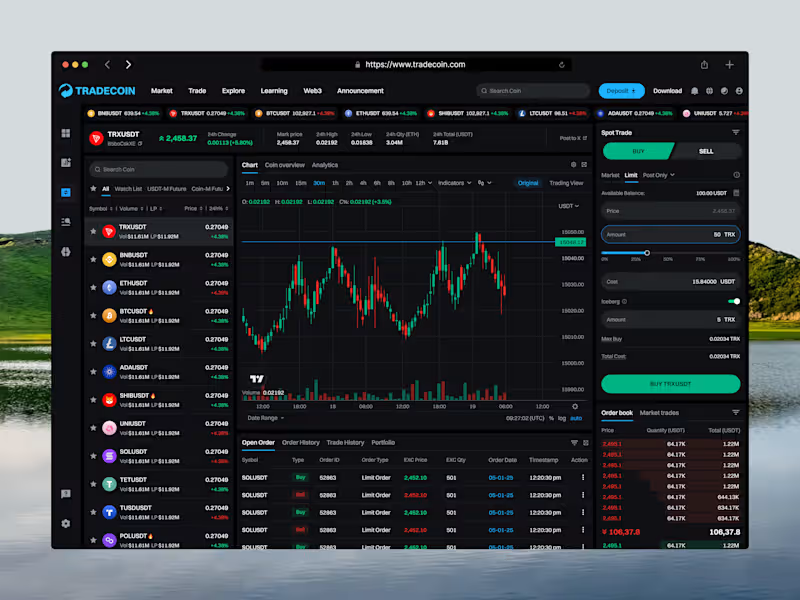
Tradecoin is a crypto trading web platform that helps users track the market and trade with confidence. This shot shows the Spot Trading screen in Buy mode, designed to let users analyze the market and place a buy order in one workspace.
The coin list on the left lets users switch pairs quickly, while the center holds a candlestick chart with timeframes, indicators, and volume. In Buy mode, the right panel turns green and shows Market, Limit, and Post Only orders, amount controls, and a live order book. Open orders, order history, trade history, and portfolio sit below the chart.
The Challenge
Trading screens can feel crowded and risky. Users switch between charts, order forms, and order books, and it’s easy to confuse a buy with a sell.
The goal was to create a focused trading experience with clear Buy and Sell states, so users always know what action they’re taking and can place orders with confidence.
Key Features
→ Green Buy mode with clear color feedback
→ Live ticker with top trading pairs
→ Coin list with search, filters & watchlist
→ Pair stats: price, 24h change, high, low & volume
→ Candlestick chart with timeframes & indicators
→ Market, Limit & Post Only order types
→ Amount slider with instant cost calculation
→ Iceberg order option
→ Max Buy & Total Cost details
→ Real-time order book & market trades
→ Open orders, history & portfolio tabs
1
67
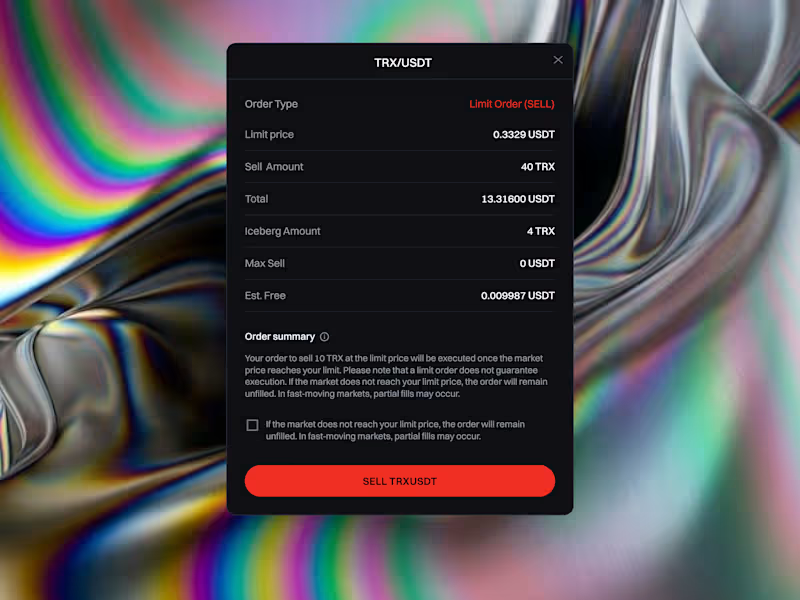
Tradecoin is a crypto trading web platform that helps users track the market and trade with confidence. This shot focuses on the Order Confirmation modal, which lets users review every detail of a limit sell order before they commit.
Placing a trade is a high-stakes moment. Users can make costly mistakes when order details are unclear or when they don’t fully understand how a limit order behaves.
The goal was to create a clear, trustworthy confirmation step that shows all order details, explains the risks, and helps users confirm with confidence.
I provide:
> UI/UX & Product Design
> Mobile App UI/UX Design
> Web & SaaS Design
> Landing Page & Website Design
> UX Research & User Flow
> Wireframing & Prototyping
> Design Systems & UI Components
> UX Audit & Usability Improvements:
> Responsive & Design QA
> MVP & Product Design
> Branding & Visual Design
> Pitch Deck Design
3
117
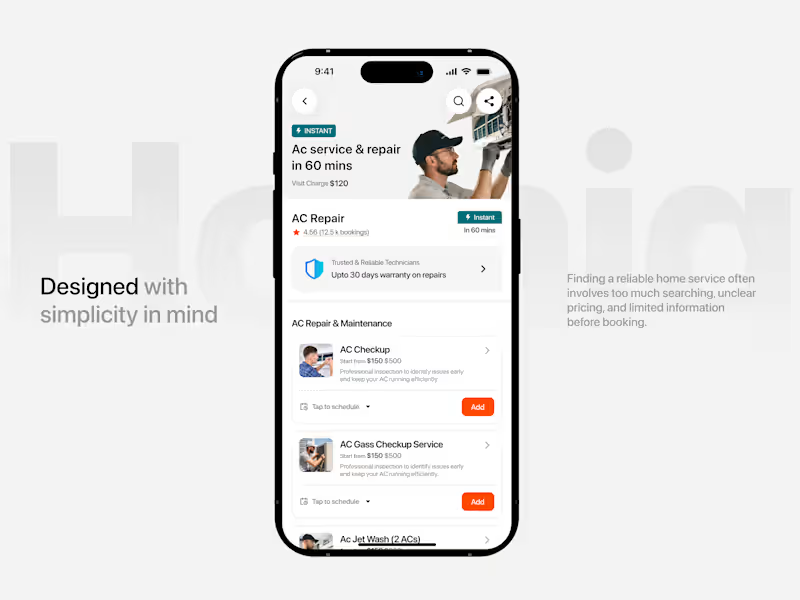
Homiq is a mobile home services platform that makes everyday home maintenance easier and more convenient. The experience helps users quickly discover nearby services, explore trusted professionals, understand pricing, and book services without going through complicated steps.
The homepage focuses on fast service discovery, while the service detail experience provides important information such as ratings, pricing, availability, warranty, and service options before booking.
The Challenge
Finding a reliable home service often means too much searching, unclear pricing, and limited information before you book.
The goal was to create a simple, trustworthy, and easy-to-navigate experience that helps users move from discovering a service to booking it with confidence.
Key Features
→ Location-based service discovery
→ Quick service search
→ Popular & categorized services
→ Ratings & booking information
→ Clear service pricing
→ Instant service availability
→ Warranty & trust information
→ Flexible service scheduling
→ Add multiple services before booking
4
189


Bilingual VA keeping inboxes, calendars, and client ops runn
- 10
- Followers
Bilingual VA keeping inboxes, calendars, and client ops runn
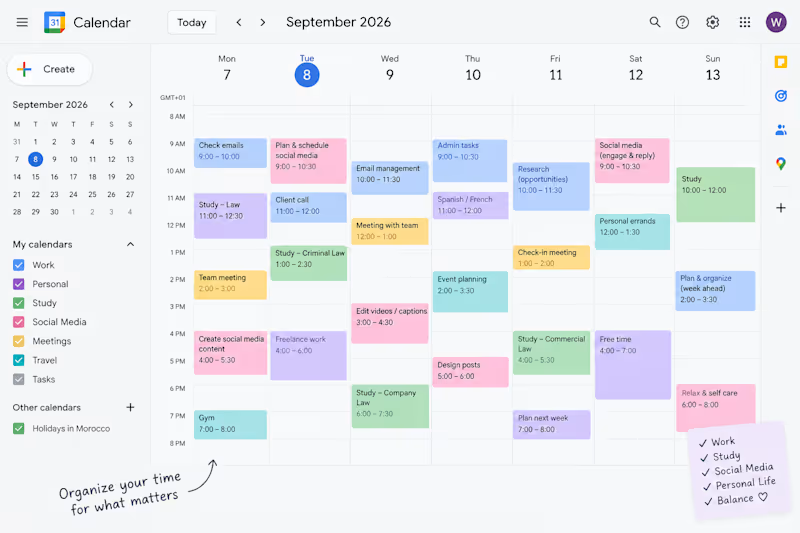
I used Google Calendar to organize schedules, set up recurring events, and manage deadlines and reminders — making sure appointments, meetings, and tasks stayed on track without overlap. I also color-coded events by category and shared calendars for easier coordination.
I like this kind of work because good scheduling is invisible when it's done right — it just means nothing gets missed and everyone knows where they need to be
1
54
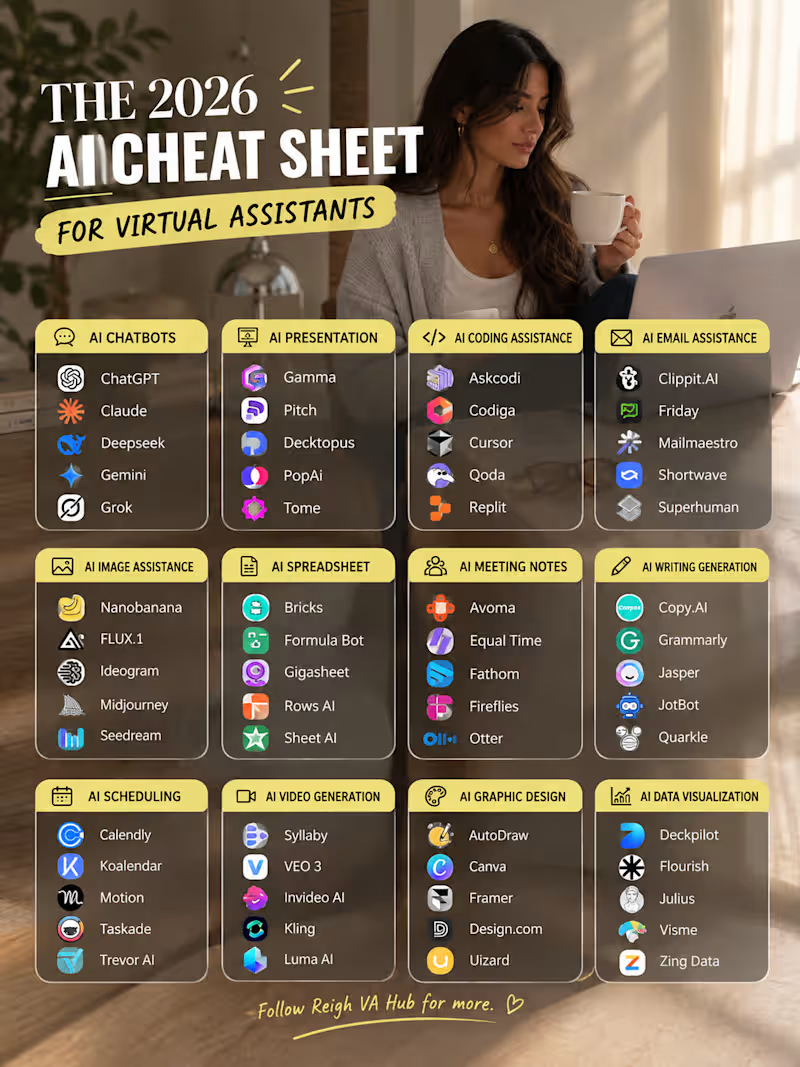
I used to think being a Virtual Assistant was mostly about staying organized, answering emails, and keeping a calendar under control.
Then I started discovering how much AI could actually change the way I work.
Not to replace the human part of the job — but to make the repetitive parts lighter.
To research faster.
To organize better.
To create without starting from zero every time.
So I made myself this little 2026 AI cheat sheet — a collection of tools for different parts of VA work: research, writing, meetings, scheduling, presentations, design, spreadsheets, and more.
And honestly… I’m still discovering new ones. 😂
The goal isn’t to use every AI tool out there.
It’s to find the few that actually make your workflow easier.
Because working smarter doesn’t always mean doing more.
Sometimes it simply means having the right tool when you need it. ✨
Which AI tool has actually made your work/life easier lately? 👇
#VirtualAssistant #AItools #AIToolsForVAs #VirtualAssistantTips #FutureOfWork #ProductivityTools #RemoteWork #AIforWork #VAlife #DigitalSkills
2
179
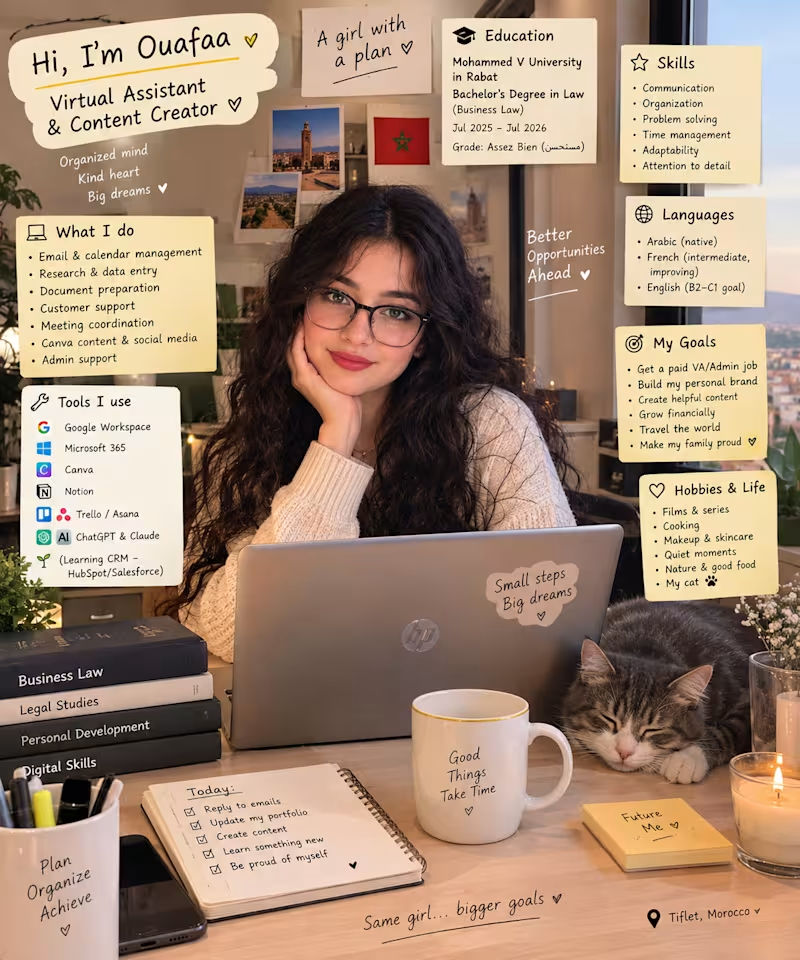
Hi! I’m Ouafaa, a Virtual Assistant ready to support businesses with their day-to-day tasks. 💻✨
I’m currently looking to connect with clients and business owners who need a reliable, organized, and detail-oriented VA.
I can help with:
• General Administrative Tasks
• Email & Calendar Management
• Meeting & Appointment Coordination
• Travel Planning & Organization
• Data Entry & CRM Management
• Online Research & Summaries
• Document & File Organization
• Social Media Support & Canva Content
• Client Communication & Follow-ups
I have a Business & Private Law background, which has strengthened my attention to detail, organization, confidentiality, and structured thinking.
I also use tools such as Google Workspace, Microsoft 365, Notion, Trello, Asana, HubSpot, Canva, ChatGPT, Claude, Gemini and DeepSeek to keep workflows efficient and organized.
If you're a client or business owner looking for someone dependable to help manage your tasks and stay organized, I’d be happy to connect! 🤎
🌐 Portfolio: ouafaaelassassi.my.canva.site/dahsuidqyre
🔗 LinkedIn: linkedin.com/in/ouafaa-elassassi
📧 ouafaaelassassi@gmail.com (mailto:ouafaaelassassi@gmail.com)
#VirtualAssistant #VirtualAssistantServices #AdministrativeSupport #RemoteWork #OnlineResearch #DataEntry #CalendarManagement #EmailManagement #BusinessSupport #FreelanceVA
0
65

Hi, I’m Ouafaa 👋
I’m a Virtual Assistant with a background in Private Law, and I’ve always enjoyed the kind of work that requires organization, attention to detail, research, and getting things done.
My journey into Virtual Assistance started because I realized that I genuinely enjoy helping people stay organized and making their day-to-day work a little easier.
From email and inbox management 📩
to calendar and appointment scheduling 📅
online research 🔎
data entry and document preparation 📊
and administrative & content support 💻
I’m constantly learning, improving my skills, discovering new digital tools, and building my experience in the remote work world.
Here, I’ll be sharing a little bit of my journey — my day-to-day life as a VA, productivity tips, digital tools, behind-the-scenes work, and things I’m learning along the way. 🤍
And if you’re a business owner, entrepreneur, founder, or busy professional who needs an extra pair of hands…
My DMs are open. 💌
Tell me what you need, and let’s see how I can help.
— Ouafaa
#VirtualAssistant #VirtualAssistantServices #AdministrativeSupport #RemoteWork #RemoteAssistant #FreelanceVirtualAssistant #EmailManagement #CalendarManagement #OnlineResearch #DataEntry #SmallBusinessSupport #BusinessSupport #RemoteWork #Freelancer
2
418

Graphic designer and video editor



Tech Sales & Virtual Support Expert
Tech Sales & Virtual Support Expert


View more →

Empathetic Customer Support Specialist
Empathetic Customer Support Specialist


View more →