
Python Developer building business software, APIs & web apps
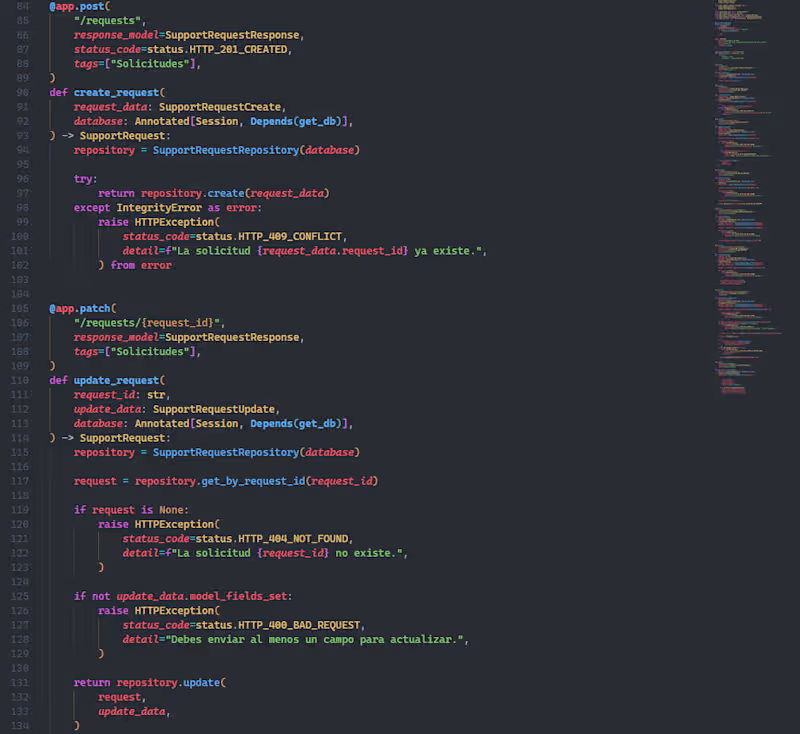
I built a REST API with Python and FastAPI for SupportFlow AI, a customer support management application.
The backend handles support requests, message conversations, updates, deletions and statistics through structured API endpoints, with database integration and HTTP error handling. main
I also implemented an AI-assisted response endpoint that processes customer conversations and generates reply suggestions through a local Ollama integration, while keeping application logic and error handling separated and maintainable.
1
195
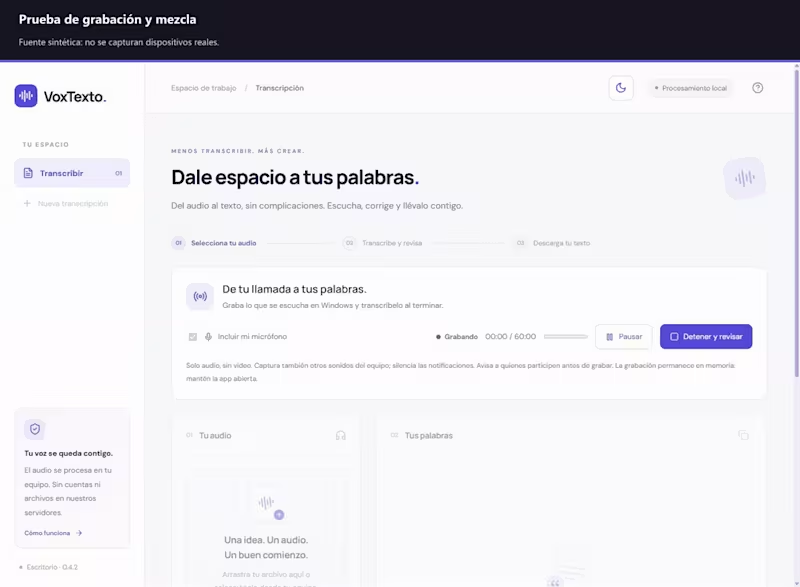
🚀 I built VoxTexto — turning audio into editable text, right in your browser.
One thing Ive learned while developing software is that a useful application doesnt have to solve a complicated problem.
Sometimes, its about making an everyday task easier.
Thats the idea behind VoxTexto, a personal project Ive been working on.
🎙️ VoxTexto is an audio transcription application designed to help people turn recordings into text, review their transcripts, and export them without uploading their audio to an application server.
What can it do?🎧 Transcribe audio using AI-powered speech recognition.
🌎 Support multiple languages with automatic language detection.
✏️ Edit transcripts with timestamps and audio playback.
📄 Export transcripts to Word, PDF, or TXT.
🔒 Process audio locally in the browser, with privacy in mind.
💻 Built with React, TypeScript, Transformers.js, and Whisper, with a responsive interface and automated testing.
One of the most interesting challenges was implementing multilingual speech recognition and making the transcription workflow practical and accessible.
VoxTexto is still evolving, and Im continuing to test and improve its performance across different devices and browsers.
For me, this project represents something important:
Turning real-world needs into practical digital solutions by combining software development, design, and technology.
Thats the kind of work I want to keep doing as I grow as a software developer.
🔗 GitHub: https://github.com/wasatnight/voxtexto
Id love to hear your feedback!
0
18
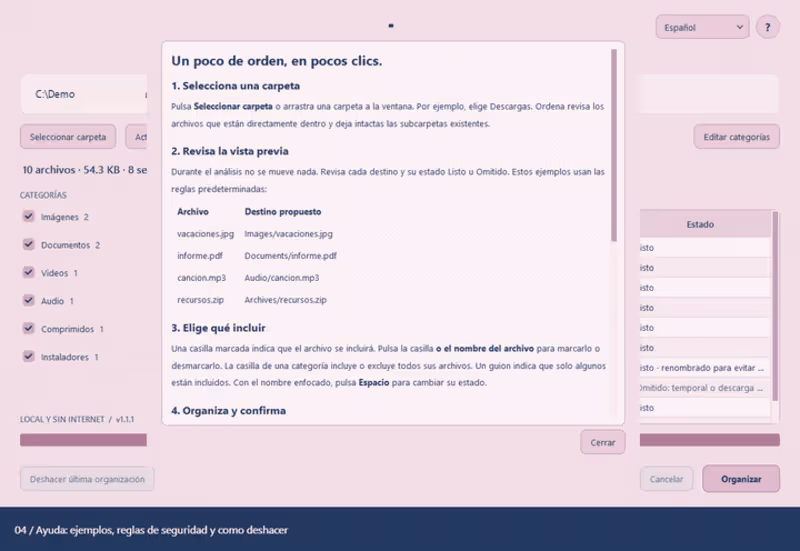
🚀 Meet Ordena — a Windows desktop app I built to make folder cleanup easier.
Downloads folders have a way of becoming a little bit of everything: documents, screenshots, videos, ZIP files, and installers. Sorting them manually is repetitive, but moving everything automatically can make it hard to know where your files went.
That’s the idea behind Ordena: see the plan, choose what moves, and stay in control.
📂 With Ordena, you can:
🔍 Preview each file’s destination before making changes.
☑️ Select individual files or entire categories.
✏️ Customize folder names and the file extensions assigned to them.
🛡️ Avoid overwriting existing files through automatic conflict renaming.
↩️ Undo the last organization and restore files to their previous locations.
🌐 Switch between English and Spanish.
🔒 Process files locally, without an account or internet connection.
💻 Built with Python and PySide6, Ordena is packaged for Windows so it runs without installing Python or opening a terminal.
One of the most interesting challenges was making file operations predictable: handling repeated names, preserving excluded files, and keeping a history that supports undo. Testing those details mattered just as much as refining the interface.
I also enjoyed giving Ordena its own visual identity: a soft pink interface, blue typography, and a simple message — “Tus carpetas ordenadas.”
This project gave me more practice taking an everyday problem through development, testing, and packaging into a usable desktop application.
🎬 The demo below shows an automated walkthrough of Ordena using sample files, including organization and undo.
🔗 GitHub: https://github.com/wasatnight/Ordena
Which folder on your computer could use an Ordena moment? 👀
#Python #PySide6 #DesktopApp #SoftwareDevelopment #BuildInPublic
0
26
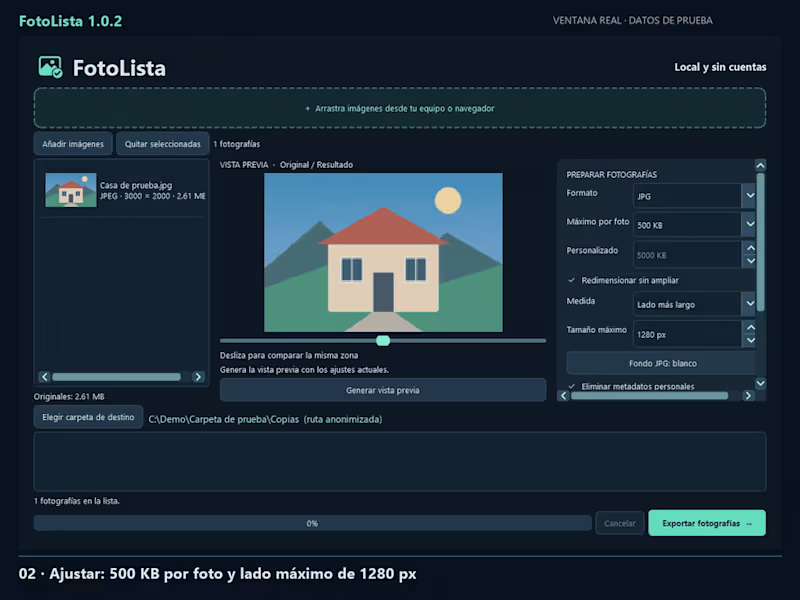
🚀 I built FotoLista — a desktop app that prepares your photos for sharing.
A photo can look ready to send until you discover it’s too large, in the wrong format, or carrying metadata you’d rather keep private.
That everyday friction inspired FotoLista, a personal project focused on making image preparation easier.
🖼️ FotoLista lets you:
📂 Add images individually or drag them into the app.
📏 Set a maximum file size for each photo and resize without enlarging smaller images.
🔄 Convert images to JPG, PNG, or WebP.
🔍 Compare the original with the processed result before exporting.
✏️ Rename exported copies with automatic numbering.
🔒 Remove personal metadata and process images locally, without an account.
Your original files stay intact, so you can try different settings while keeping the source images.
💻 Built with Python, PySide6, and Pillow, FotoLista is packaged for Windows so users can run it without installing Python or using a terminal.
One of the most interesting challenges was meeting a file size limit for each image while balancing quality and resolution. Refining drag and drop, progress feedback, and cancellation also reminded me how much the smaller interactions matter.
This project has helped me grow beyond implementing features: testing the results, improving the interface, and turning the application into something people can actually use.
🎬 The demo below shows FotoLista working with sample images.
🔗 GitHub: https://github.com/wasatnight/FotoLista
What takes you the most time when preparing images to share? I’d love to hear your feedback.
#Python #SoftwareDevelopment #DesktopApp #PySide6 #BuildInPublic
0
26
