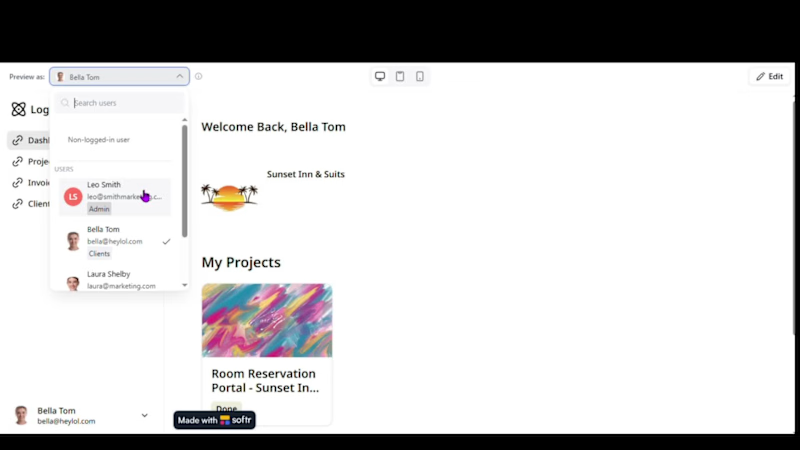
The brief: give clients one place to track their projects, invoices, and files without digging through email threads or asking “what’s the status?”
What it does:
✅ Role-based dashboards, each client sees only their own projects and data
✅ Live project tracking (In Progress, Todo, Done)
✅ Invoice status at a glance (Paid, Unpaid, Payment Sent)
✅ Centralized file sharing per project
Built entirely with Airtable + Softr, no custom code, fully automated data sync.
This is exactly the kind of system I love building: it replaces scattered spreadsheets and email chains with something clients actually enjoy using.
If your business is still managing client updates manually, I’d love to show you what this could look like for you.
#NoCode #Airtable #Softr #Automation #ClientPortal #SmallBusiness #WorkflowAutomation #FreelanceDeveloper #BusinessAutomation
1
182

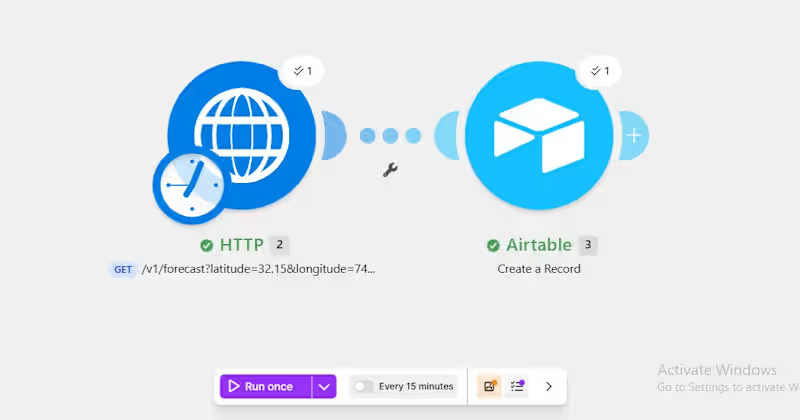
Today I learned how to connect Make.com (http://Make.com) to any API using the HTTP module, not just the pre-built app integrations but literally any system on the internet that exposes data.
The concept clicked when I stopped overthinking it: an API is just a messenger. You ask a question, it carries that question somewhere, and brings back an answer. Everything else: JSON, endpoints, headers is just detail on top of that simple idea.
Built a small test today: pulled live weather data through a public API and logged it straight into Airtable automatically. Small example, but it’s the same core pattern behind connecting to shipment tracking, payment systems, or literally any external tool to ask, receive, store, automate.
Excited to keep building on this.
1
162


E‑commerce Order Management System
Tools: Airtable | Softr | Make.com
(http://Make.com)Description:
End‑to‑end order management system for an online store. Tracks products, customers, orders, and inventory in real time. When a customer places an order, stock is automatically deducted, and confirmation emails are sent to both the customer and the admin. Includes a dashboard for order status tracking (Pending → Processing → Shipped → Delivered) and low‑stock alerts.
Key features:
· Airtable tables: Products, Customers, Orders, Order Items (linked records, rollups for totals)
· Softr admin dashboard: view all orders, update status, see low‑stock products
· Softr customer portal (optional): customers can view order history
· Make.com (http://Make.com) automation:
· On new order → deduct inventory, send order confirmation email to customer
· On status change → send shipping notification email
· Daily stock check → email alert if any product stock < 5
· Mobile‑responsive design
Built independently – full database schema, frontend dashboards, and multi‑step automation logic
0
98


Real Estate Property Management System
Tools: Airtable | Softr | Make.com
(http://Make.com)Description:
Property management platform for tracking listings, tenants, leases, and maintenance requests. Designed for landlords or agencies to manage rental properties, tenant communications, and maintenance workflows. Includes automated alerts for rent reminders and lease expiries.
Key features:
· Airtable tables: Properties (for sale/rent), Tenants, Leases, Maintenance Requests
· Softr landlord dashboard: property availability, tenant portal, payment tracking
· Softr tenant portal: online rent payment (placeholder), maintenance request submission
· Make.com (http://Make.com) automation: rent reminders via email, lease expiry alerts, maintenance request notifications
· Conditional routing: urgent vs standard maintenance requests sent to different channels
Built independently full database, frontend portals, and automation logic
0
94

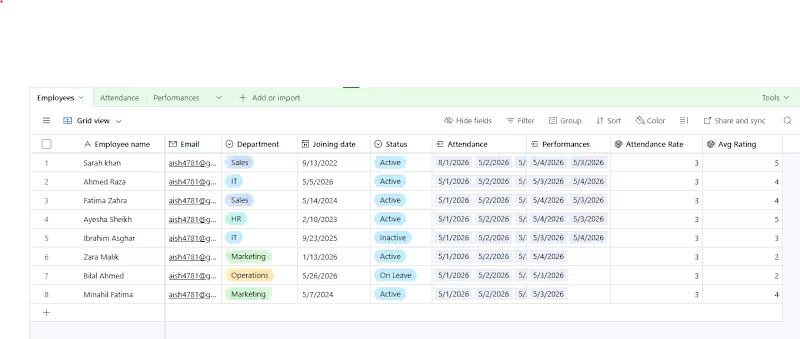
HR Employee Management System
Tools: Airtable | Softr | Make (http://Make.com)com
Description:
Complete HR platform to manage employee records, attendance, performance reviews, and leave requests. The system provides an employee dashboard for submitting time‑off requests and viewing attendance history, plus an admin approval portal for managers. Automated email notifications inform employees when their requests are approved or rejected.
Key features:
· Airtable tables: Employees, Attendance Logs, Performance Ratings, Leave Requests
· Softr employee portal: request leave, view attendance, see performance score
· Softr admin dashboard: colour‑coded status (Pending/Approved/Rejected) for leave approvals
· Make (http://Make.com)com automation: sends email to employee when request status changes
· Daily schedule check for upcoming leave (optional reminder)
Built independently – from database design to frontend and automation
0
106

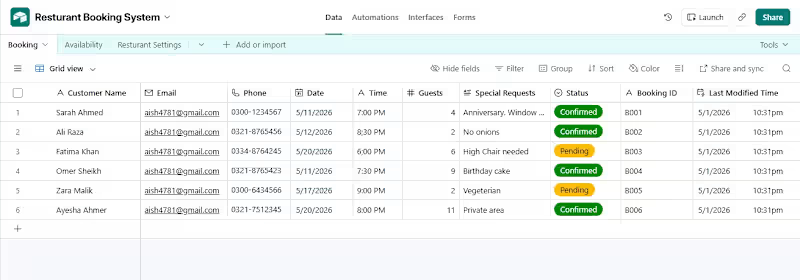
Restaurant Booking System
Airtable | Softr | Make (http://Make.com) com
Complete online reservation system for a mock restaurant. Customers book a table, receive instant email confirmation, and managers get a real‑time dashboard with colour‑coded status (Confirmed/Pending).
Key features:
Airtable tables: Bookings, Availability, Restaurant Settings
Softr dashboard for staff (filter by date, update status)
Make (http://Make.com) com automation: sends confirmation email to customer + manager alert
Mobile‑responsive design
Built the entire system independently
0
105